
The Truth About Houzz Pro for Interior Designers
Houzz Pro positions itself as an all-in-one platform built for interior designers and construction companies. It’s a robust tool that aims to cover everything—from built-in LiDAR technology for site measurements to client portals, 3D floor planner, team collaboration tools, product clipping, spec sheets, and more.
It’s a popular platform, widely used and well-regarded by many construction teams and designers. I’ve featured Houzz Pro on my blog before; comparing it to alternative interior design softwares. However, I wanted to take a closer look at Houzz Pro from a designer’s perspective—especially after spending time with the platform and ultimately choosing to go in a different direction.

In this post, I’ll share my honest take on my demo experience with Houzz Pro, the key details you need to know about the pricing, how the design tools stack up, and ultimately, my perspective on whether this software is worth the investment.
The Houzz Pro Demo Experience

Naturally, when considering new software, the first step is to book a demo—so that’s exactly what I did to see what Houzz Pro really had to offer.
I scheduled a demo, and when the time came, I met with a Houzz Pro sales representative. The meeting lasted about an hour, and throughout it, it felt very much like a sales pitch—which, to be fair, it was.
This didn’t come as a surprise. Houzz Pro is known for its persistent outreach to contractors and designers. That said, their sales approach feels quite aggressive, and personally, I find that a bit off-putting. Most people don’t enjoy feeling like they’re being sold to.
The demo itself felt somewhat chaotic, if I’m being honest. The representative walked me through the platform and all of the features, but when they opened the 3D floor planner and demonstrated the photo-to-3D feature, the software started to glitch.
After the demo, I never received a follow-up call or email. However, several months later, I did receive an unsolicited call from Houzz Pro asking if I had the capacity to take on more clients and whether I was interested in their marketing services, which I declined.
The Real Issue: Houzz Pro Subscription Fees
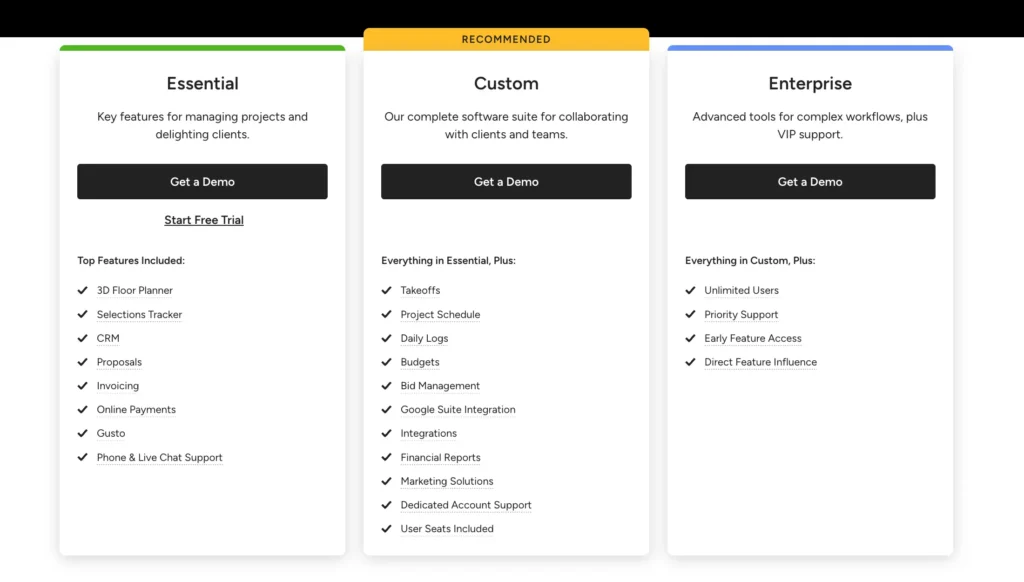
What I’ve discovered about Houzz Pro, through research, conversations with other designers, and my own network, is that pricing varies significantly depending on team size—and, more importantly, team location.
This means a team of five in Wisconsin will pay considerably less than a team of five in California. The range I’ve heard is fairly wide: the lowest reported monthly subscription fee is around $200, while the highest can exceed $600+.
That’s a substantial difference, and there doesn’t appear to be much transparency around it.
To get a subscription price from Houzz Pro, you need to book a demo, during which you’re required to share various details, including your business and projected revenue. Only then are you given a quote.
Compared to other design software platforms that clearly list their pricing online, Houzz feels a lot less transparent. Most tools charge a consistent, published rate, rather than tailoring pricing based on location or inferred revenue.
Another noteworthy point is that Houzz Pro requires an annual commitment, which limits flexibility if the platform doesn’t turn out to be the right fit.
Ultimately, it can become a significant investment, especially for larger teams or those based in major metropolitan areas, where pricing appears to trend higher.
Houzz Pro Design Tools
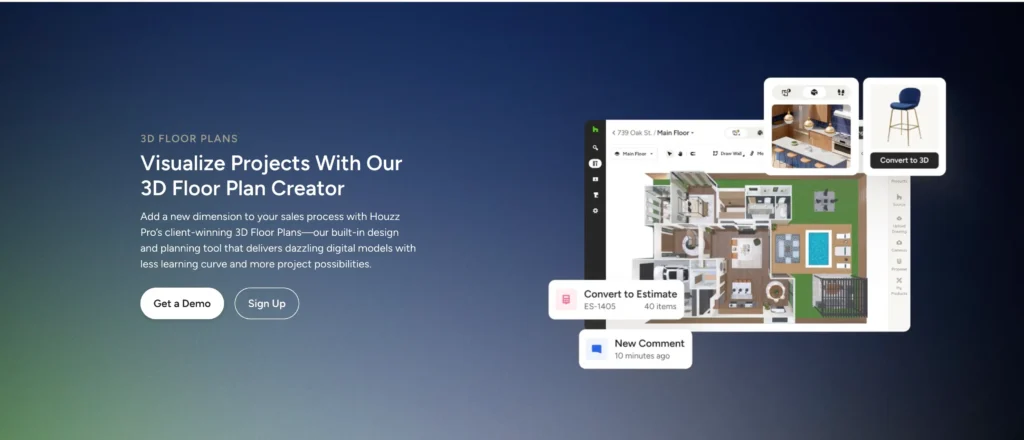
If we are discussing Houzz Pro in the context of its use for interior designers, well, we need to discuss the software’s design tools.
Houzz Pro has the following design tools:
3D Floor Planner
- Build or import 2D floor plans and convert them into 3D models
- Draw and adjust walls, rooms, doors, and windows
- Place furniture and fixtures from product libraries
- Switch between 2D and 3D views instantly
- Create multi-level floor plans for whole homes
- Photorealistic render generation
- Lighting, textures, and materials applied to 3D scenes
- Helps present polished client visuals without external software
Room Scanner + LiDAR
- Scan real spaces using your phone or iPad
- Automatically generates accurate room measurements
- Detects walls, openings, and layout elements
- Speeds up site measurement work significantly
Life-Sized Walkthrough / AR Tour
- Virtual “walkthrough” of the designed space
- Augmented reality view so clients can experience scale in real environments
- Helps clients visualize the finished project before construction
Mood Boards / Selection Boards
- Create visual boards for design concepts
- Combine materials, furniture, and inspiration images
- Useful for client approvals and design direction alignment
My Review Of Houzz Pro Design Tools

There are a few notable interior design platforms feature built-in design tool, including Houzz Pro. When it comes to their 3D floor planner, I’d give it a solid rating. While it’s not perfect 100% of the time, features like photo-to-3D model generation are genuinely impressive and add real value to the workflow.
When it comes to mood boards, however, the platform feels lacking. It’s not especially robust or customizable. It can get the job done in terms of communicating ideas to a client, but it doesn’t go much further than that.
What does set Houzz Pro apart—and why many designers and design-build firms gravitate toward it—is its integration of LiDAR technology. If you’re not familiar, LiDAR is quickly reshaping how designers approach site measurements.
This technology allows you to scan a space using a device like an iPad or iPhone and capture measurements with a high level of accuracy. From there, it generates a 3D floor plan that’s ready to be developed further with your design.
That said, LiDAR isn’t exclusive to Houzz Pro. There are other apps and tools that offer similar capabilities, so it’s worth exploring those options as well. Click here to learn more about Lidar technology and how interior designers are using it to change the way they work.
Is Houzz Pro Worth It For Interior Designers?
Coming from both a designer and a tech reviewer, I feel well-positioned to share my perspective on Houzz Pro for interior designers. And ultimately, it’s quite simple: I think it’s a great piece of software—but it’s not worth the hefty subscription cost.
There are other interior design tools out there that can achieve much of what Houzz Pro offers—such as DesignFiles—with a few workarounds, and at a significantly lower price point.
That said, I do think Houzz Pro is well-suited for larger design-build firms—especially those managing high-budget, multi-million dollar projects where an all-in-one platform can justify the cost.
For smaller interior design studios or solo designers, however, it’s likely not the most practical or cost-effective choice. Read more on software for interior designers here: The Best Mydoma Alternative, Designer Reviews
Click Here To Shop My Favourite Home Goods
Let’s design your space together, virtually.




