The Best Interior Design Mood Board Software Tools
The interior design process typically starts with creating a mood board. This is where designers and DIYers capture the overall look and feel of a space—and it’s often the stage that sparks excitement to continue with the project. Interior design mood boards showcase colour palettes, furniture inspiration, materials, and the overall design intent.
Creating a mood board helps ground your design decisions. It sets the direction for where the project is headed. Because of this, the mood board is not a step I skip. I either ask my clients to share their own mood board or I gather enough information to create one that reflects their design taste and guides us into the next phases of the interior design process.
However, with so many software programs and apps available for creating mood boards, the question becomes: which ones are best—and for what purpose? In this post, I’ll break down the best interior design mood board software options to consider for your next interior design endeavour.
AVOID COSTLY (AND UGLY) DESIGN MISTAKES
Interior Design Mood Board Software
Here are the mood board software tools and apps I’ll be breaking down in this post:
Click to jump.
DesignFiles

The first mood board software I want to mention is DesignFiles. This platform originally started as a mood board tool called Olioboard, which catered to homeowners. Over time, it evolved into what interior design professionals now know as DesignFiles.
This software is excellent for creating mood boards for several reasons. The platform includes a design board option that opens to a blank canvas, where you can pull in paint colors from brands like Benjamin Moore, Sherwin-Williams, Dulux, and Farrow & Ball. You can also search their extensive product library and import images from vendors such as West Elm, Pottery Barn, Crate & Barrel, and many more.
One standout feature is the product clipper extension, which allows you to populate your design boards with real, purchasable products—an absolute game changer for professionals who want to recommend specific items to clients. DesignFiles also includes photo-editing tools that let you manipulate images so your mood boards resemble actual spaces rather than flat collages, taking your presentations to the next level.
Overall, I love this platform for more than just mood boards—it’s a true all-in-one design business tool.
Read more on DesignFiles here.
Who it’s for
DesignFiles is ideal for professionals looking to elevate their mood boards and designers who want an all-in-one platform to manage their design business.
Pros
- Excellent unlimited background removal tool
- Powerful image distortion tools for creating 3D-looking mood boards
- Robust paint and color library
- Enhance with AI tool to create an even better output
Cons
- Mood board size cannot be customized
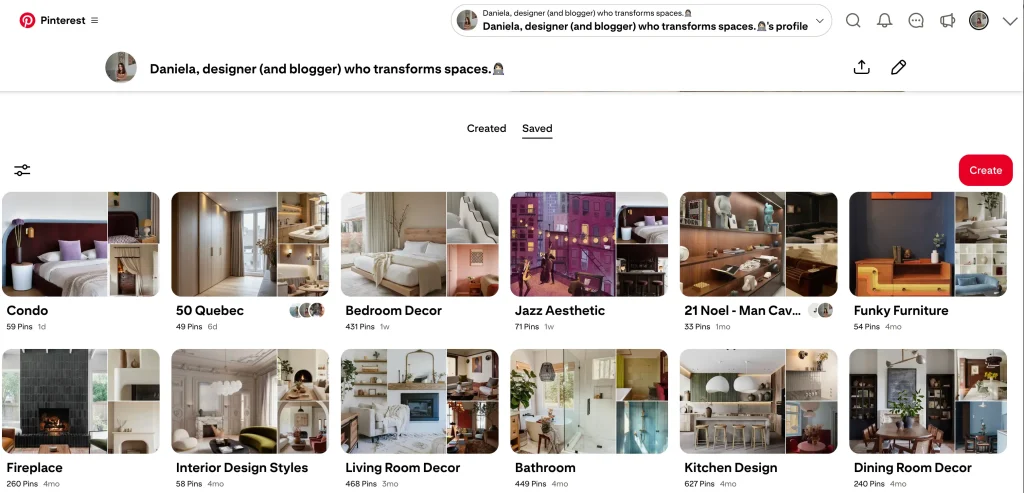
Now, we all know what Pinterest is, and it absolutely deserves a spot on this list. Pinterest is still one of the best platforms for early, conceptual interior design mood boards.
Pinterest is full of dreamy, It-girl interior photos. I’m currently planning to decorate my own condo, and I’m on Pinterest nonstop, drooling over accent chairs that cost far more than I’m willing to pay. While that’s dangerous, it’s also incredibly useful. Pinterest is amazing for gathering inspiration, saving reference images, and discovering furniture brands that align with your style.
Who it’s for
Pinterest is for the average homeowner and designer. It’s perfect for anyone looking to collect, share, and explore interior design inspiration.
Pros
- Endless interior design inspiration
- Easy to use and completely free
Cons
- Creates collections of images rather than one cohesive mood board
Canva

Canva is a template-based design platform, and many interior designers use it for presentations and mood boards. You can create just about any digital product on Canva, making it great for branding boards and working with pre-made templates in various styles.
While Canva isn’t specifically built for interior design mood boards, you can easily copy and paste images from the web and edit them within the platform. Because of this, it’s still worth mentioning if you’re looking for a user-friendly tool to quickly put together a mood board.
Who it’s for
Canva is used by both professionals and DIYers, but it’s more geared toward DIY users. It’s not as robust for professional interior design mood boards compared to other tools on this list.
Pros
- Easy to use
- Free on some account plans
- Includes basic image editing tools
Cons
- Not interior design–specific
- Lacks specialized features for mood board creation
- Interface can feel clunky at times (personal experience)
Rayon.design

Rayon is a software I’ve featured before on my blog, particularly as a replacement for AutoCAD. It’s a powerful drawing tool beloved by many designers—and I’m one of them.
Using Rayon, you can also create stunning mood boards thanks to its clean templates and simple drag-and-drop functionality. I recently used it to create a board for my upcoming condo project, and I love how sleek and professional the final result looks.
Who it’s for
Professional interior designers who want both a drawing tool and the ability to create polished, professional mood boards.
Pros
- Customizable board sizes
- Easy to use and simple to brand for your business
- Plenty of professional mood board templates
Cons
- No product clipper for importing real products
- The background removal tool is limited
Midjourney

Last on the list is Midjourney, an AI tool that has taken the interior design industry by storm. Its ability to generate impressive interior design mood boards in under a minute is hard to ignore.
Midjourney works differently from the other tools on this list—it relies on written prompts describing materials, colours, and design intent to generate mood boards that function more like material boards. While it has broader capabilities (and there are other AI tools I personally prefer), when it comes to AI-generated mood boards, Midjourney produces some of the most impressive results with the least effort.
To learn more on Midjourney, click here.
Who it’s for
Interior design professionals who want to quickly generate AI mood boards that showcase materials, textures, and overall design intent.
Pros
- Quick, easy, and affordable
- Highly impressive and professional-looking outputs
Cons
- Limited customization
- Best suited for initial conceptual mood boards
The Best Overall Mood Board Software for Interior Design
I’ve broken down some of the best mood board software tools currently used in the interior design world—but which ones do I personally use, and why?
I stick to DesignFiles and Rayon. I love that DesignFiles is industry-specific and allows designers to quickly create high-quality mood boards. With their recent AI enhancements, the outputs are even more polished.
I also use Rayon because it gives me full control over board size and layout, which I really like, plus I love to use Rayon for my interior drawings.
For the average DIYer, I’d recommend good ol’ Pinterest. Creating a board filled with images of your dream home helps ground your design decisions and makes it easier to discover your personal interior design style.
Let me know in the comments which mood board software you use—and why.
Click Here To Shop My Favourite Home Goods
Let’s design your space together, virtually.