
AutoCAD vs. Rayon: Which Software Is Better For Architectural Drawings?
So, we’re back with another design software review, this time comparing two tools used for creating architectural drawings: the OG AutoCAD, and the new kid on the block, Rayon.design. I’m giving you my two cents on which software you should consider using, from the perspective of a designer who’s been working with AutoCAD for nearly a decade… but who also loves testing new design tools. Recently, I’ve been experimenting with Rayon, and I have some real thoughts to share.

I was classically trained in AutoCAD during my college years. Back then, the main software options were AutoCAD, SketchUp, and Revit—all considered industry standards. I remember how challenging it was at first. In fact, I had to get an AutoCAD tutor. Like with many robust design tools, the learning curve was steep. But with time and continued use, I became a pro. I could fly through floor plans and construction drawings.
Years into running my interior design business, I began questioning whether AutoCAD was still the best tool for every scenario, especially with so many new, lighter, and more intuitive options emerging. That curiosity led me to Rayon, an AutoCAD alternative. After starting to use Rayon recently, I knew I had to share my honest opinion. Whether you’re a design student or an interior designer exploring these tools, this breakdown will give you a genuine recommendation based on real-world experience.
Read: Five Things You Need To Know Before Starting An Interior Design Company
Read: The Best and Worst Interior Design Software
Software For Architectural Drawings – The Breakdown
Pros and Cons of AutoCAD

Pros of AutoCAD
1. Industry Standard
AutoCAD is widely used across architecture, engineering, and design industries. It’s a safe bet for collaboration and client compatibility.
2. Precision and Detail
This software is built for detailed 2D documentation—floor plans, sections, elevations, and technical drawings.
3. Extensive Tool Set
With advanced layering, annotation, and dimension tools, AutoCAD gives you full control.
4. Customizability
You can create palettes, scripts, and even automate tasks using AutoLISP.
5. File Compatibility
AutoCAD supports DWG and DXF formats, which are essential for industry-wide sharing.
Cons of AutoCAD
1. Steep Learning Curve
It takes time to learn. The interface can feel overwhelming at first.
2. 2D-Focused
Though it has 3D features, AutoCAD isn’t great for rendering or visualization.
3. Expensive Licensing
The software can be pricey, especially for freelancers or students.
4. No Built-In Real-Time Collaboration
You’ll need to rely on Autodesk Cloud or external file-sharing for teamwork.
5. Not Cloud-Native
AutoCAD works best on powerful local machines—not ideal for mobility.
Overall Thoughts on AutoCAD

AutoCAD is powerful, but not exactly plug-and-play. The learning curve is worth it for the level of precision you get, and there are tons of resources online to support you. But it’s not ideal for visual presentations, and the lack of cloud functionality can be frustrating in today’s remote-working world. Plus, it’s expensive. So, for a freelance designer, I can’t see it worth justifying the cost in most circumstances. However, the investment may be worth it, depending on your career goals. Keep reading for my full summary.
Pros and Cons of Rayon

Pros of Rayon
1. Cloud-Based and Lightweight
It runs in your browser, making it perfect for remote teams and flexible workspaces.
2. Designed for Designers
Rayon is tailor-made for architects and interior designers. It focuses on 2D layouts and space planning.
3. Real-Time Collaboration
Work on the same file simultaneously—just like Google Docs.
4. Smart Objects and Snapping
Drawing feels intuitive, thanks to smart components and alignment tools.
5. Easy to Learn
It’s user-friendly and great for students or those new to design software.
Cons of Rayon
1. Limited 3D and Rendering
No photorealistic visuals—you’ll need to export to other platforms.
2. Still in Development
Some tools are still evolving. It’s not as feature-rich as AutoCAD (yet).
3. Needs Internet Access
No offline functionality—yet.
4. Not Meant for Complex Construction Docs
Ideal for layouts, but not full-scale construction sets.
Overall Thoughts on Rayon
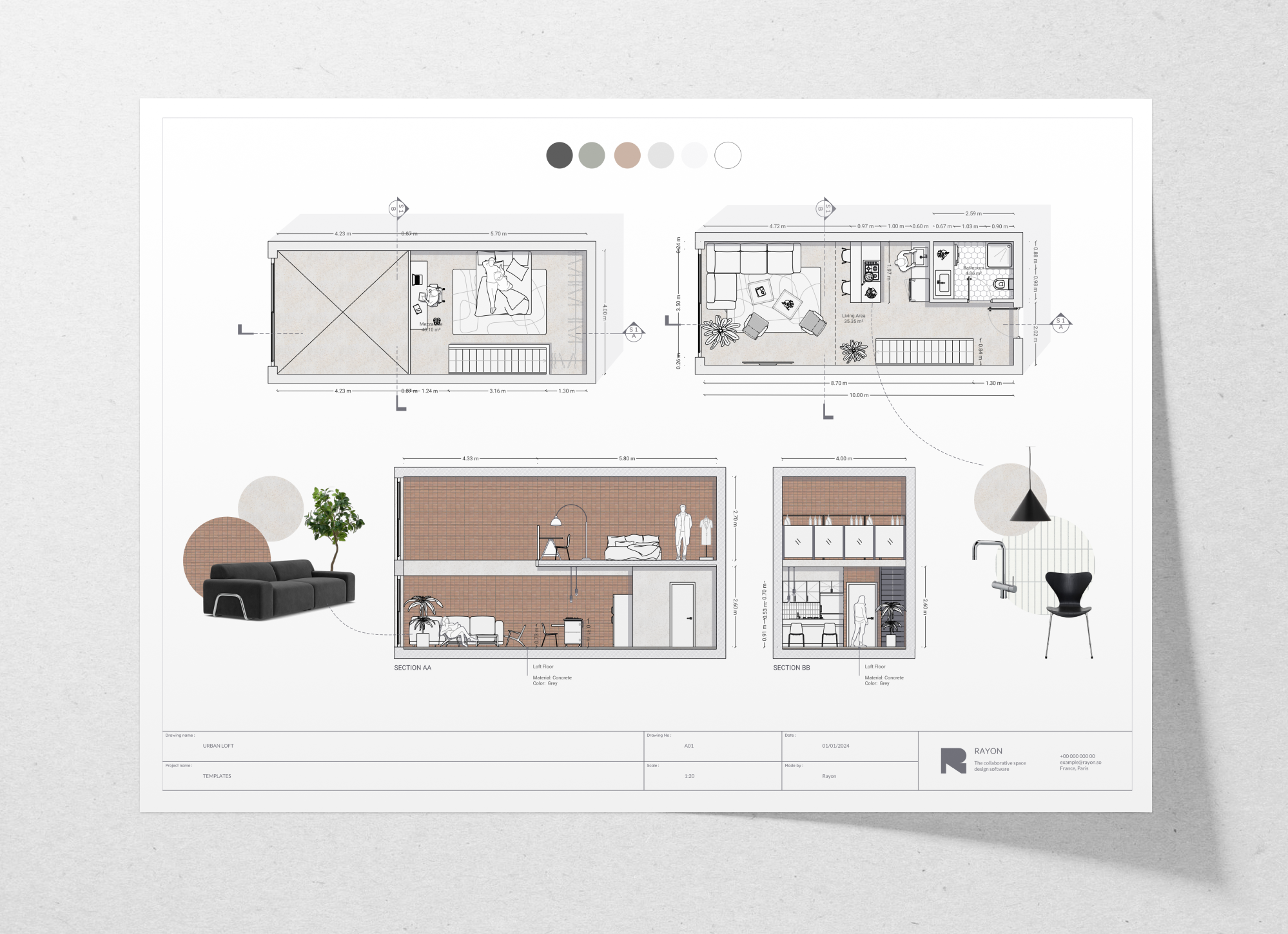
Rayon is super easy to pick up. For me, as someone experienced with many design tools, there was virtually no learning curve. It shines when it comes to presentations—you’re drafting and building out your visuals in the same platform. The cloud-based, collaborative nature of Rayon is a huge win. Plus, it has a fantastic block library.
I’d especially recommend Rayon for students or early-career designers. It’s far easier to use than AutoCAD when it comes to architectural drawings, especially for those without a ton of CAD experience.
Which is Easier to Learn: AutoCAD or Rayon?
Hands down, Rayon wins for ease of use. Its intuitive interface is miles ahead for beginners.
However, I will say, once you learn CAD, it’s easy. However, for people with little experience with tools for architectural drawings-Rayon is far easier.
Best CAD Software for Architecture Students
If you’re starting out and want something easier to master, Rayon is the clear winner. That said, I still believe learning AutoCAD is essential. It’s the industry standard, and not knowing how to use it might limit your career opportunities down the line.
Which Software For Architectural Drawings Is Fastest?
Let’s be realistic—whichever software you become skilled at will naturally become the fastest for you to use. For me, that’s AutoCAD. But for you, it really depends on which tool you commit to learning. The truth is, there’s value in sticking with one platform and mastering it over time.
That said, when it comes to overall speed and efficiency, especially for both drafting and presenting architectural drawings in one place, I have to give the edge to Rayon. Its all-in-one, cloud-based setup makes the workflow feel seamless.
The Best Software For Architectural Drawings
So—what’s my verdict on the best software for architectural drawings?
It depends on your needs. If you want a one-stop tool for both drawing and presenting, Rayon is my top recommendation. If you’re aiming to work behind the scenes at an architecture firm or need detailed construction documents, AutoCAD is still the gold standard.
The good news? You can use both. You can start a drawing in AutoCAD and bring it into Rayon, which will convert it to an editable file. In today’s tech-driven design world, the more software you master, the better prepared you are.
If you’re a student or creative professional looking to enhance your design workflow—give Rayon a try. But don’t ditch AutoCAD just yet!
Read: The Best and Worst Free Interior Design Layout Software
Click Here To Shop My Favourite Home Goods
Let’s design your space together, virtually.



