
The Best SketchUp Alternatives For Interior Designers
SketchUp is a software I was trained to use in college. At the time, AutoCAD, SketchUp, and V-Ray were the go-to combination for designers to create drawings, 3D models, and photorealistic renderings for clients.
Fast forward to 2026, and with the rapid advancements in technology and the growing number of tools on the market, many designers (and aspiring designers) are asking themselves: Is SketchUp still worth learning?
SketchUp is an incredible tool, but it definitely comes with a learning curve. It’s not the easiest software to master—and that’s coming from someone who grew up with technology.
During college, I actually needed tutoring in SketchUp because I found it so challenging. Over time, I improved, completed my studies, and eventually became highly proficient—so much so that I began tutoring others.
While tutoring, I was reminded of just how difficult SketchUp can be for beginners. It’s one of the main reasons many designers are now skipping it in favour of alternative programs that feel more intuitive and accessible.
With that in mind, I’ve put together a list of the best SketchUp alternatives for interior designers and compared them side by side, so you’ll know exactly what to expect if you’re considering making a switch.

SketchUp Features
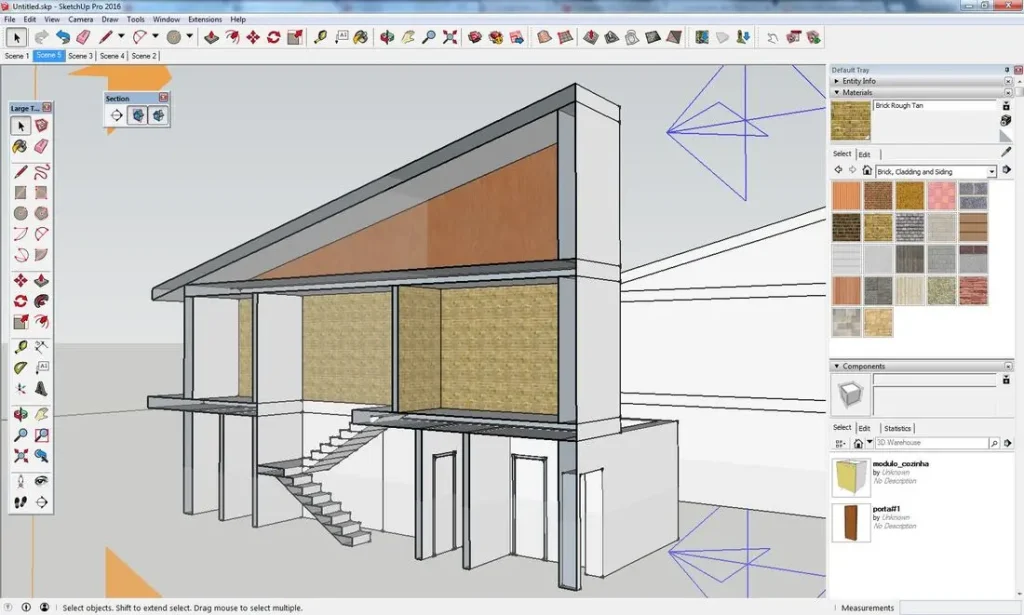
First, let’s review what SketchUp can be used for in the context of interior design:
With SketchUp, you can:
- Create precise 3D models of interiors, exteriors, and more
- Import and edit 3D models from the SketchUp 3D Warehouse library
- Build custom objects from scratch
- Import and apply custom materials
- Render using external plugins like V-Ray for photorealistic outputs
Drawbacks:
- Not very beginner-friendly
- Not cloud-based, so collaboration can be tricky
- Requires external plugins to achieve photorealistic renders
- Time consuming
SketchUp Alternatives For Interior Design
Click to jump.
Coohom

Coohom is a 2D and 3D floor planner that’s popular with both DIYers and professionals in the interior design space. I’m quite familiar with the software, having written about it before and tested features such as its AI capabilities, 2D-to-3D floor plan conversion, and rendering tools. It’s very beginner-friendly and specifically designed for creating interior models.
How does coohom compare to SketchUp?
Pros of Coohom:
- Beginner-friendly and intuitive to use
- Built-in furniture blocks that can be customized with textures and materials
- Cloud-based and accessible online
- More affordable than SketchUp
Limitations:
- Not as customizable as SketchUp; creating fully custom objects is more limited
- Cannot import external 3D furniture models
- Less technical control over dimensions and precision
Summary:
Coohom is a fantastic tool for interior designers who don’t require extensive custom modeling. It’s ideal for professionals who want quick, impressive renders and floor plans without a steep learning curve. For designers who don’t use the full customizability of SketchUp, Coohom can be a very effective alternative.
Foyr Neo
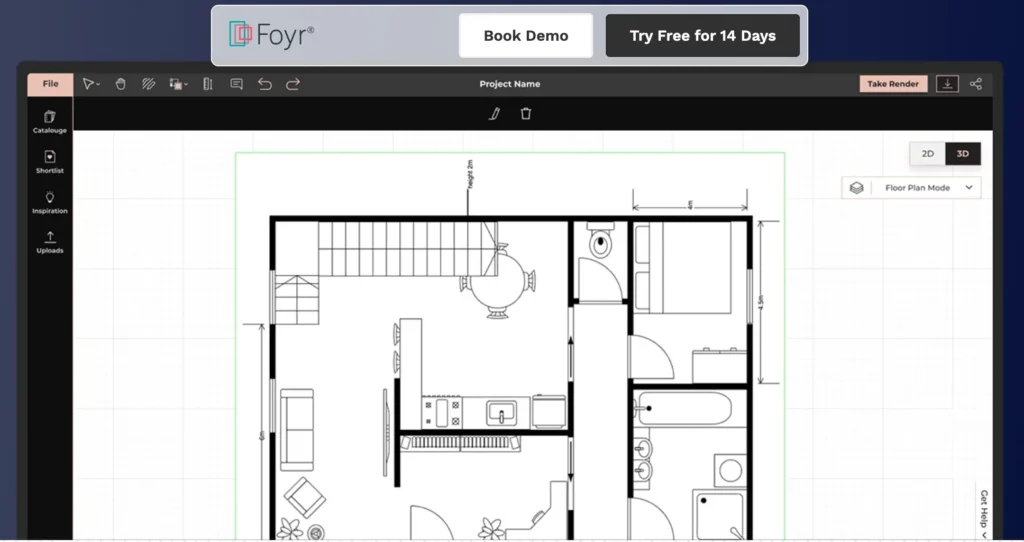
Foyr Neo is another very popular software for interior designers for 2D and 3D floor planning, and it’s easy to see why. In short, Foyr Neo is designed for professionals in the design industry who want to quickly create 2D and 3D models and produce realistic 3D visuals for their clients.
What sets Foyr Neo apart is its 3D furniture capabilities. You can upload a photo of a furniture piece, and the software will convert it into a 3D model ready to use in your designs. Additionally, they offer services such as floor plan tracing, which can save time when working from existing layouts.
How does Foyr Neo compare to SketchUp?
Pros of Foyr Neo:
- Less of a learning curve compared to SketchUp
- Optimized for faster 2D and 3D drawings
- Completely customizable 3D furniture blocks
- Cloud-based and accessible online
- Drag-and-drop materials and finishes
- Extensive library of kitchen cabinets, furniture, and accessories
Limitations:
- Adding your own materials is not as precise as in SketchUp
- Not as fully customizable as SketchUp for complex modeling
Summary:
Foyr Neo is designed for interior design professionals who want to quickly create 2D and 3D layouts without spending as much time as they would in SketchUp. The key difference is that SketchUp allows for full customization of virtually anything, which can make drawing slower and more tedious. Foyr Neo, however, is customizable enough for most interior designers, making it a robust and efficient tool for professional design work.
Planner 5D

Planner 5D is very similar to Coohom but offers even more AI capabilities and features that I find valuable. It’s a software tool used by both professionals and amateurs. For interior design professionals looking for an easy-to-use, adaptable tool or app, Planner5D could be the SketchUp replacement you’ve been looking for.
How does Planner 5D compare to SketchUp?
Pros of Planner 5D:
- Has a mobile app that’s easy to use and includes AI features
- Can upload a floor plan, scale one wall, and have the AI trace the space into 3D
- Low learning curve — beginner-friendly
- Very affordable plans
- Large built-in library of products that can be edited
Limitations:
- Not as customizable, especially for kitchen and bath design
- Cannot create fully custom objects
- Less technical control over dimensions and precision
Summary:
Planner5D is a great tool for designers who want to create impressive visuals quickly for their clients. It excels at generating layouts and includes features that make the design process easier and more efficient. However, like many SketchUp alternatives, it does not offer the same level of customization and precision that SketchUp provides, making it better suited for concept work rather than highly technical or fully custom modeling.
Blender
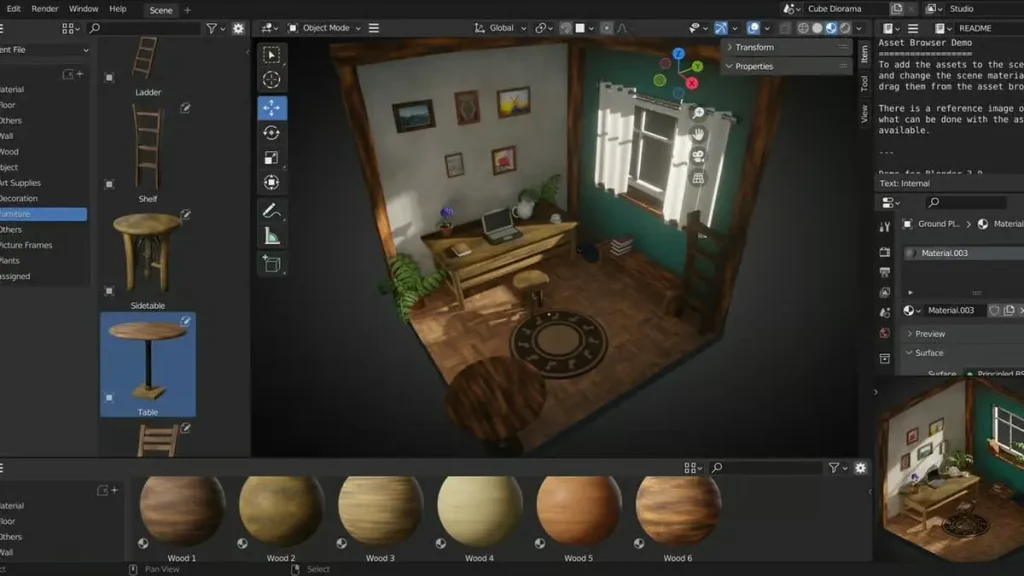
Blender is a powerful free 3D creation suite used for modeling, rendering, animation, and visualization. Interior designers often use Blender for high-end photorealistic renders and custom models, even if the initial layout comes from another program.
How does Blender compare to SketchUp?
Pros of Blender:
Pros of Blender:
- Built-in photorealistic rendering
- Advanced modelling tools
- Animation and visual effects — Create walkthroughs, camera animations, and cinematic presentations.
- No cost
- Highly customizable
- Custom “blocks” are possible — You can create reusable linked objects or collections (similar to components in SketchUp).
Cons of Blender:
- Steep learning curve — More complex and less beginner-friendly than SketchUp.
- Not interior-design specific — You’ll need to manually model architectural elements or install add-ons for walls, windows, etc.
- No built-in furniture or asset library — Unlike SketchUp’s 3D Warehouse, Blender does not include a ready-made model library.
What Is The Best SketchUp Alternatives For Designers?
So, should you ditch Google’s SketchUp for one of these alternatives?
Well, the answer comes down to one key question: How customizable do you need your interior models to be?
If you’re a designer who works on highly custom projects — including custom millwork, bespoke kitchens, built-in cabinetry, custom furniture, wallpapers, and detailed architectural elements — SketchUp may be worth holding onto. Its flexibility and modeling control make it well-suited for detailed, fully customized work.
On the other hand, many SketchUp alternatives are excellent for designers who don’t need deep customization for every component of a model. I know several design professionals who use alternatives like Planner 5D or Coohom for projects such as short-term rentals, decorating-focused work, Airbnb projects, and similar spaces. In those cases, the built-in libraries and customization options are often more than sufficient.
Ultimately, ask yourself how custom your projects typically are. Then try a SketchUp alternative and see whether it can realistically replace your subscription.
Read: The Best 3D Floor Planner Software For Pros
Click Here To Shop My Favourite Home Goods
Let’s design your space together, virtually.




