
The Best Ivy Alternative For Interior Designers
Back when I was working under other interior designers around 2021, Ivy was thee interior design software everyone used. It was one of the first platforms I became familiar with, and for many designers, it felt like the industry standard for managing projects, proposals, purchasing, and client communication.
Fast forward to today, and a lot has changed. After Houzz acquired Ivy, the platform gradually became part of the broader Houzz ecosystem, eventually evolving into what is now known as Houzz Pro. As a result, Ivy, as a standalone software has slowly faded away, with Ivy now redirecting designers directly to Houzz Pro.
For many longtime Ivy users, this transition hasn’t been ideal. Houzz Pro is more expensive and more cumbersome than the simpler, streamlined experience Ivy originally offered. That shift has left many interior designers searching for a true Ivy alternative — something that captures the ease and functionality of the original platform without the hefty Houzz Pro subscription costs.
Which leads to the big question: what interior design platform today is actually closest to Ivy?

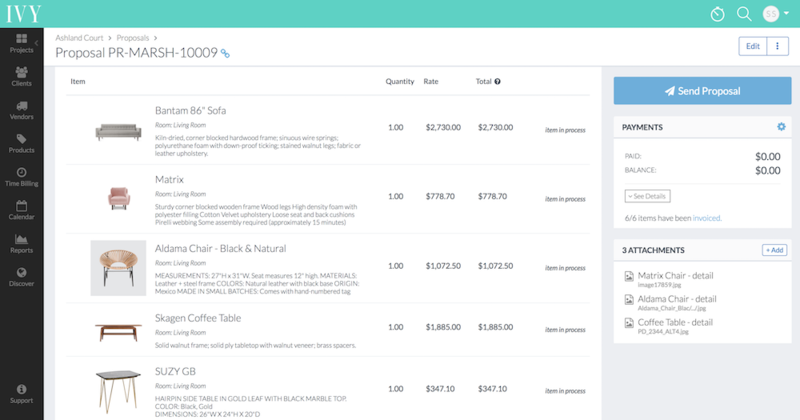
Why Designers Loved Ivy
Designers loved Ivy because it was straightforward to use. Personally, I loved the platform for sourcing — I’m a big fan of a good product clipper — and I always found the software intuitive to navigate. There wasn’t much of a learning curve, which made onboarding simple for both solo designers and larger teams. Putting together estimates, creating visuals, and keeping track of billable hours all felt easy and streamlined within the platform.
Ivy’s Key Features
Proposals & Estimates
Create branded proposals, quotes, and specification packages for clients.
Invoicing & Payments
Send invoices, collect retainers, track payments, and manage billing in one place.
Purchase Orders (POs)
One of Ivy’s biggest strengths. Designers could generate and track purchase orders with vendors, including freight, markups, and order statuses.
Product Sourcing & Clipping
Save furniture, lighting, materials, and decor items into project boards and proposals.
Client Approvals
Clients could approve products, proposals, and selections digitally.
Project Management
Track project timelines, tasks, installs, deliveries, and ongoing project progress.
Accounting Integrations
Especially known for its integration with QuickBooks, which helped firms sync invoices and bookkeeping.
Vendor Management
Store vendor contacts, pricing, lead times, and purchasing information.
Time Tracking
Log billable hours for consultations, design work, and revisions.
Team Collaboration
Multiple team members could work on projects and purchasing workflows.
Client Portal
A polished client-facing dashboard where clients could view proposals, invoices, approvals, and updates.
Interior Design Platforms Similar To Ivy
DesignFiles

DesignFiles is one of the closest alternatives to Ivy available today. It offers all of the same core business management tools that designers loved about Ivy, while also adding modern design-focused features like a built-in 3D floor planner, AI-enhanced renders, and a more advanced mood board experience.
DesignFiles Features & How It Compares to Ivy
Quotes
Create branded quotes and proposals with the ability for clients to approve or decline individual line items.
Invoicing & Payments
Send invoices, collect retainers, and manage billing all in one place. DesignFiles also integrates with Stripe for both credit card and ACH payments.
Purchase Orders (POs)
Generate purchase orders directly from quotes, invoices, or products in your library, then send them directly to vendors or reps.
Product Sourcing & Clipping
Save furniture, lighting, materials, and decor items into your project library and easily add them to design boards and presentations.
Project Management
Track timelines, tasks, installations, deliveries, and overall project progress from the tasks and calendar features.
Accounting Integrations
DesignFiles integrates with QuickBooks to help firms manage invoicing and bookkeeping more efficiently.
Time Tracking
Log billable and nonbillable hours for consultations, revisions, sourcing, and design work.
Team Collaboration
Allow multiple team members to collaborate on projects, purchasing workflows, and client communication.
Client Portal
Provide clients with a professional dashboard where they can view contracts, questionnaires, quotes, invoices, design boards, product lists and renders.
2D & 3D Floor Planner
This is one of the biggest features that sets DesignFiles apart from Ivy. The platform includes a built-in 2D and 3D floor planner that allows designers to create space plans and polished visual presentations directly inside the software. Combined with its AI-enhanced rendering tools, designers can create more immersive client presentations without needing separate visualization software.
👉If you’re looking for the closest alternative to Ivy — but also want the added benefit of modern design tools — DesignFiles is one of the strongest options available today.
Programa

Programa is a software I’ve written an extensive review on, and honestly, it feels impossible to keep up with all the updates and new features the platform continues to release. What makes this software stand out is its modern, sleek design, incredibly polished client portal, and the thoughtful small features that genuinely make life easier for interior designers.
Programa Features & How It Compares to Ivy
An elevated client portal
Programa’s clean and sleek design truly shines through its cloud-based sharing system. You can easily share schedules, sheets, and pinboards via live links with a custom domain. Essentially, giving each client their own mini website where they can access all their project deliverables is a truly elevated and high-end experience.
Pinterest integration
Programa simplifies that process beautifully with its Pinterest integration feature. You can simply paste your Pinterest URL to pull in images, reorganize them, resize them, and create beautiful conceptual presentations for your clients.
Quotes
Create branded quotes and proposals with the ability for clients to approve or decline individual line items.
Invoicing & Payments
Send invoices, collect retainers, and manage billing all in one place.
Purchase Orders (POs)
Generate purchase orders directly from quotes, invoices, or products in your library, then send them directly to vendors or reps.
Product Sourcing & Clipping
Save furniture, lighting, materials, and decor items into your project library and easily add them to design boards and presentations. They also have an AI URL feature, which allows you to take the URL of a product and add it to your product library.
Project Management
Track timelines, tasks, installations, deliveries, and overall project progress with a Kanban-style system.
Accounting Integrations
Programa integrates with QuickBooks and Xero to help firms manage invoicing and bookkeeping more efficiently.
Time Tracking
Log billable hours for consultations, revisions, sourcing, and design work.
Team Collaboration
Allow multiple team members to collaborate on projects, purchasing workflows, and client communication.
👉If you’re looking for an alternative to Ivy and don’t necessarily care about extra bells and whistles — like the additional design tools DesignFiles offers — I would recommend going with Programa.
MyDoma
MyDoma Studio is another popular interior design platform with notable features that compare to Ivy. This software includes many of the same core tools as Ivy, with the added option of a 2D and 3D floor planner (available at an additional cost).
MyDoma Features & How It Compares to Ivy
Quotes
Create branded quotes and proposals with the ability for clients to approve or decline individual line items.
Invoicing & Payments
Send invoices, collect retainers, and manage billing all in one place.
Purchase Orders (POs)
Generate purchase orders directly from quotes, invoices, or products in your library, then send them directly to vendors or reps.
Product Sourcing & Clipping
Save furniture, lighting, materials, and decor items into your project library and easily add them to project documents.
Project Management
Track timelines, tasks, installations and deliveries within the platform.
Accounting Integrations
MyDoma integrates with StudioDesigner (parent company) to help firms manage invoicing and bookkeeping more efficiently. Noting that using StudioDesigner for the accounting feature comes at an additional cost.
Time Tracking
Log billable hours for consultations, revisions, sourcing, and design work.
Team Collaboration
Allow multiple team members to collaborate on projects, purchasing workflows, and client communication.
Client Portal
Provide clients with a professional dashboard where they can view contracts, questionnaires, quotes and invoices.
2D & 3D Floor Planner
MyDoma has a 2D and 3D floor planner, which is identical to Coohom, however, noting that this feature comes at an additional subscription fee.
👉If you’re looking for an alternative to Ivy and don’t necessarily need a robust moodboard feature, MyDoma might be a good option.
A Designer’s Top Alternatives to Ivy
I’ve broken down the top three most comparable software options to the once-beloved interior design platform Ivy. Ultimately, the right choice depends on your specific needs as a designer. However, my top pick for the closest and most well-rounded alternative to Ivy would be DesignFiles. Read more on DesignFiles, here.
Click Here To Shop My Favourite Home Goods
Let’s design your space together, virtually.





