
The Best Project Management Software For Interior Designers
As a designer, I’m always on the hunt for the latest and greatest software tools that help interior designers project-manage like a pro, create beautiful client presentations, and simplify the admin side of design business. That’s how I stumbled upon Programa — a software designed specifically for interior designers and architects to do all that, and more.
Interior Design Isn’t all Creative…
We, as designers and interior design professionals, need software that makes our lives easier. When people think of interior design, they often imagine how creatively fun it must be. But if you’ve worked in the industry for more than a minute, you know the truth — interior design involves a lot of admin, endless tinkering with software tools, and serious project management and organizational skills. These skills and tasks are essential to actually bring a design to life.
Like many designers, I dreamed of becoming one from a young age. I watched all the interior design shows on TV, redecorated my room a million times, and couldn’t get enough of it. What I didn’t dream about was the admin work, the FF&E specification sheets, the project management (which is really just endless people management), or all the behind-the-scenes tasks that make design projects actually happen. This post isn’t to say my design dreams were naïve or that working in this field isn’t everything it’s chalked up to be. Rather, it’s to say that interior designers need the right tools for the less fun parts of interior design. That’s where Programa comes in — it takes the not-so-fun parts of interior design and actually makes them enjoyable.
Programa Features I Love

The first thing that caught my eye about Programa was its sleek, clean interface. This may sound minor, but as designers — looks matter. Aesthetics are half the job, and Programa nails it by making design presentations look effortlessly polished. This software makes branding effortless with an interface that gives your business a polished, professional feel.
Let’s get into the specific features and tools I love about this ever-so-sleek project management software.
SHARE WITH LINK
Programa’s clean and sleek design truly shines through its cloud-based sharing system. You can easily share schedules, sheets, and pinboards via live links with a custom domain. Essentially, giving each client their own mini website where they can access all their project deliverables (And yes, you can control what they have access to!). One major benefit of the shareable link is the client approvals system. You can mark any item in your schedule for client review, allowing clients to access the dashboard and easily approve, reject, or leave comments directly—streamlining communication and reducing back-and-forth.
I think the way Programa shares files is brilliant—it speaks to a higher-end clientele and is sure to impress. As a designer, I know that the experience of interior design is just as important as the final result, and great software like this forms the backbone of that experience.
Also, note the QR code integration. You can generate QR codes for drawings, allowing contractors or trades to instantly access the most recent versions right from their phones. It’s such a simple yet powerful feature that keeps everyone aligned and up-to-date. Once again, because it’s cloud-based, project management becomes so much easier—contractors can access the latest drawings instantly. No messy back-and-forth, just a simple “refer to the latest drawings using the QR code,” and done.
team collaboration
Programa is a software platform that designers with teams can fully utilize to collaborate seamlessly. No more back-and-forth emails or confusion over which drawing package was shared where. It allows all aspects of project management—including team coordination—to be managed in one centralized place.
Also, note the QR code integration. You can generate QR codes for drawings, allowing contractors or trades to instantly access the most recent versions right from their phones. It’s such a simple yet powerful feature that keeps everyone aligned and up-to-date. Once again, because it’s cloud-based, project management becomes so much easier—contractors can access the latest drawings instantly. No messy back-and-forth, just a simple “refer to the latest drawings using the QR code,” and done.
PINTEREST INTEGRATION
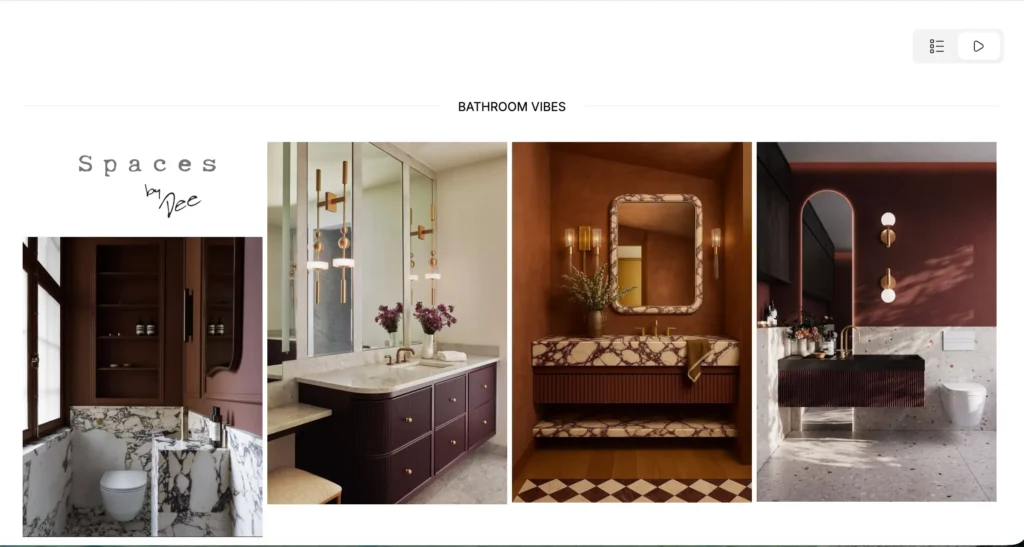
Creating mood boards, client presentations, or concept boards was never my favourite part of the job. It’s not difficult, but it is tedious — juggling between Pinterest, various mood board tools, and trying to make everything look cohesive. Programa simplifies that process beautifully with its Pinterest integration feature. You can simply paste your Pinterest URL to pull in images, reorganize them, resize them, and create beautiful conceptual presentations for your clients—all extremely efficiently. I don’t know about you, but I think this is a total game-changer. No more saving a million Pinterest photos and uploading them elsewhere—it’s the simple tools like this that make all the difference.
Project Management and Planning with Programa
Managing an interior design project means constantly overseeing a lot of moving parts. A standout feature of Programa is the way its project management system is structured — as an interactive Kanban board. And as a PMP, I love this.
If you’re not familiar with Kanban boards, think of them as highly visual tools for managing projects — which is perfect for us designers who naturally think in visuals. The board is divided into categories (such as “To Do,” “In Progress,” and “Completed”), allowing you to create tasks, assign them to the appropriate stage, and visually track progress.
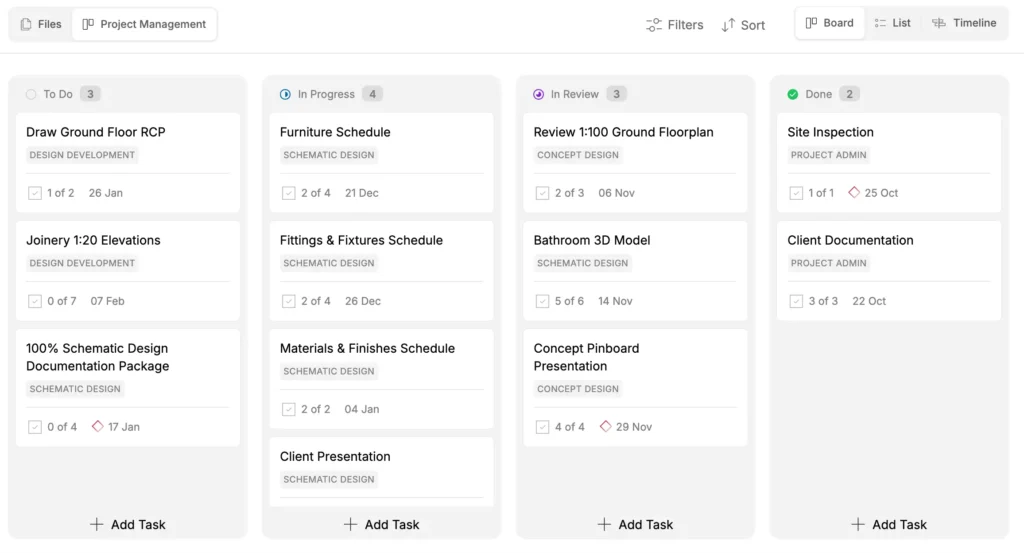
Now, if you are not crazy about the Kanban board layout, you can also view the tasks as lists or a timeline view.
Within these tasks, you can assign responsibilities to team members, set deadlines, and maintain organization. Programa streamlines this process by linking live schedule items directly to project management cards, allowing you to tag team members, track progress, and ensure every detail stays in one centralized place.
Organization is a key component of successfully managing interior design projects, and Programa makes it virtually foolproof.
FF&E Specification Sheets and Schedules
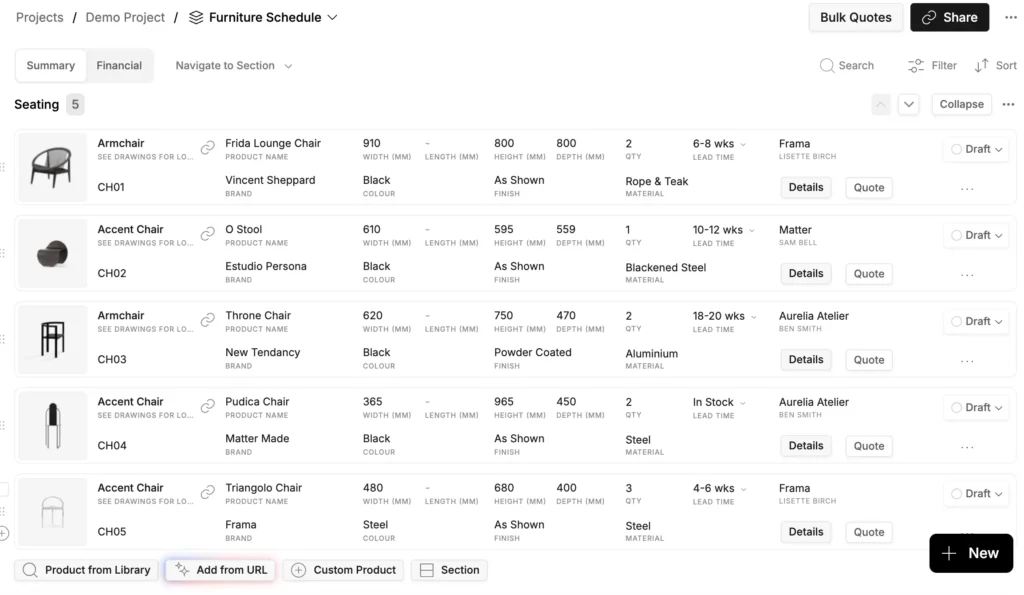
Another feature I really love is how easy Programa makes it to create FF&E specification sheets and other schedules. I’ll be honest — this was a task I used to dread.
So how does Programa simplify the process? The software also developed a Google Chrome web clipper browser extension that lets you quickly scrape product information from the web. Those items are then saved directly into your personal product library, ready to be added to a project or specification sheet with just a click. Programa also has a tool that allows you to remove the background from an image, creating a sleek and professional presentation.
Essentially, by sourcing and saving products, you’re automatically building beautiful, professional spec sheets. That ability alone completely sold me.
AI Integration MakES Creating Schedules even faster
And now, with Programa’s new AI add from URL feature, it gets even better. You can add products to your sourcing library even faster — simply paste in a product URL, and the AI will automatically pull all the details for you. Within seconds, the product is ready to be added to any spec sheet you want.
Absolutely brilliant.
How User Friendly Is Programa?
When it comes to technology, there’s always the question of learning curve and ease of use. I can confidently say that with Programa, there’s little to no learning curve. It’s really easy to get familiar with all the tools, and if you ever get stuck, there are plenty of video tutorials to guide you. You can even book a one-on-one session with their excellent support team, who are available 24 hours a day! Wow.
Designer Rates Programa: Project Management Software For Interior Designers
If you’ve made it this far, you probably know I have a very favourable opinion of Programa. I’m naming it the best project management software for interior designers. Simply put, it offers an exceptionally clean interface that impresses clients, streamlines the planning process, provides easy access to project information via shareable links, and gives you all the tools you need to efficiently run your interior design business.
I’d say Programa is ideal for teams of 1–10. Considering, it includes a collaboration feature that keeps communication and documents organized in one place. So, whether you’re a solo designer or have a small team, this software could be exactly what you need to stay organized, manage projects smoothly, and leave a lasting impression on your clients.
Overall, I rate Programa a solid 9/10 and consider it the best project management software for interior designers. While it covers nearly every task a designer could need. However, it’s not a complete all-in-one platform—mainly because it lacks built-in floor plan drawing features. You’ll still need a separate program for that functionality, unless Programa plans to integrate it in the future.
This post is sponsored by Programa, but as always, all opinions are entirely my own.
Click Here To Shop My Favourite Home Goods
Let’s design your space together, virtually.




