
I Fired My Bookkeeper and Simplified My Books With Claude
As a designer and entrepreneur, I never dreamed about bookkeeping or admin work. However, my rude awakening was when I realized that being a business owner means dealing with tedious bookkeeping, paperwork, and administrative work. It just comes with the territory.
My creative brain could never fully wrap itself around the process and language of bookkeeping. I even took an accounting course, and somehow, things still went over my head.
Still, I found myself doing my own books because, let’s be real, when you first start a business, overhead costs matter. Since 2017 — the year I started my design business — I relied heavily on Excel spreadsheets and manually creating invoices. And honestly, for the genesis of my business, it worked well enough.
Fast forward to 2025, and thankfully, Spaces by Dee had grown significantly. I now work with clients all over the world, which means accepting multiple currencies, managing many different projects, and handling far more financial complexity than before. Suddenly, my system no longer felt robust enough.
I knew that I needed a new system.
Hiring and Firing My Bookkeeper and QuickBooks

In January of 2026, I spent time searching for a bookkeeping company that would understand my business and know how to properly categorize everything so I could finally feel some relief and take something off my plate that I truly disliked.
I hired a bookkeeping company and began using QuickBooks.
And honestly? Right off the bat, I found QuickBooks extremely cumbersome. It felt overloaded with features my business simply didn’t need. However, QuickBooks is an industry-standard accounting system, so it almost felt like a default.
While my bookkeeper handled transaction recording and reconciliations, I still found myself feeling the same way I always had during the bookkeeping process: overwhelmed and uncertain whether things were even being recorded correctly.
When My Bookkeeping System Became Too Complicated
Soon enough, I found myself back in Excel spreadsheets again — except this time, they were coming directly from my bookkeeping company. I was constantly being asked questions about expenses, transactions, and categorization. At the same time, I became increasingly frustrated with QuickBooks’ lack of seamless integration with various payment processors and even my bank.
I couldn’t log into QuickBooks without immediately feeling overwhelmed and confused. On top of that, I felt drained trying to answer countless bookkeeping questions while simultaneously running and growing my business.
What I had created was what we call in the tech world: a clunky system.
I sat there and thought about it: why was I paying $400 a month to still feel like my books were neither understandable nor simple?
In 2026, I thought, there has got to be a better way. At the end of the day, it’s just numbers. Yes, I hate organizing them. I hate recording transactions. But I didn’t need a team of five bookkeepers just to keep my finances straight. What I really needed was a simple, foolproof system — one that could organize my numbers, generate reports when needed, and actually feel intuitive.
Enter Claude.
How I Set Up Claude To Do My Bookkeeping

I’ve written about Claude’s capabilities on my blog before, particularly how powerful it can be as an AI business assistant, and how not-so-powerful it is as a replacement for an interior designer.
How Interior Designers Can Reclaim Their Time with Claude Cowork
Claude Design: A New Era for Interior Design Workflows
Is Claude The Best New AI Tool For Interior Designers?
Notably, many interior designers have already been using Claude to assist with procurement and other administrative tasks. So naturally, I began to wonder: could Claude also be set up in a way where it could do my bookkeeping?
I thought it was worth exploring.
How I Prompted Claude Chat
So, I opened Claude and explained my business to it. I described the types of transactions I deal with, including multi-currency payments, the kinds of taxes I need to track from clients, and the various business expenses I incur. I also explained the key financial numbers I need to keep organized to provide to my accountant during tax season.
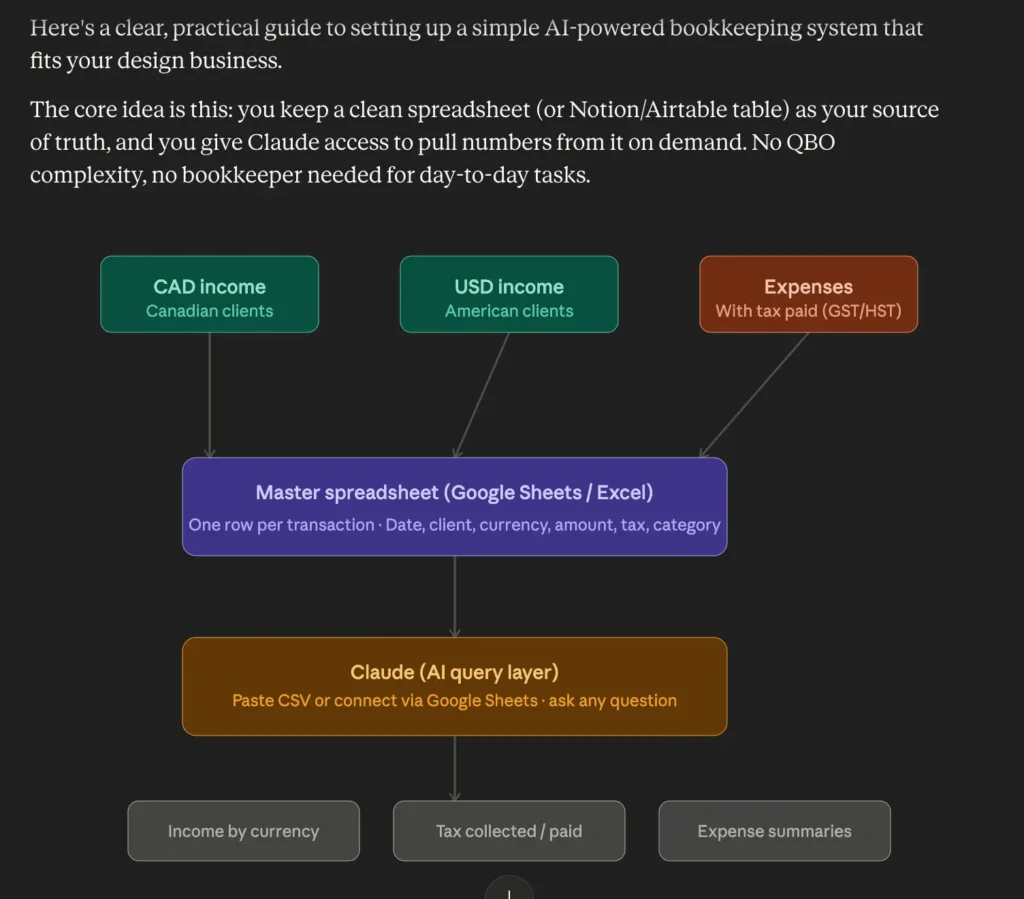
Claude then generated a game plan and visualized a simplified bookkeeping system tailored specifically to my business.
Extracting data from QuickBooks
From there, I told Claude that I wanted to transition away from QuickBooks and extract all of the data already entered there so I wouldn’t have to manually re-record five months’ worth of transactions, which would have been a nightmare.
Claude walked me through the process of exporting the necessary information from QuickBooks in order to build what it called a “master spreadsheet.” Yes, this would mean another Excel/XLSX file (however, keep reading to find out how Claude can handle the entries).
I followed the instructions, and once I uploaded the exported documents from QuickBooks, Claude immediately began building out my bookkeeping system.

On the right side of the chat, I could preview the spreadsheet in real time. From there, I started asking Claude questions and requesting adjustments to the document. I asked it to:
- create a separate tab for recurring expenses
- flag unclear expense categories
- generate quarterly summary tables
- track taxes collected
- organize transactions by currency
I was collaborating back and forth with Claude to build a master financial document that centralized all of my business transactions into one organized system.
During the process, I even realized my previous bookkeeper had missed recording certain expenses. I prompted Claude to add them, and it continuously updated the master spreadsheet while flagging questionable transactions and asking me clarifying questions about specific line items.
I started to feel a sense of relief.
Setting Up Claude Code to Handle Excel Entries
Even though I’ve relied on Excel for years, I’ve always disliked it. I never felt confident enough with formulas or advanced spreadsheet organization to truly build a foolproof system. I constantly worried about accidentally breaking formulas or losing track of information.
I mean, seriously, one wrong move in Excel and you mess up the whole formula.
So I decided to take things a step further.
I installed Claude Code directly onto my computer and connected it to my bookkeeping folder in my documents, as instructed by Claude.
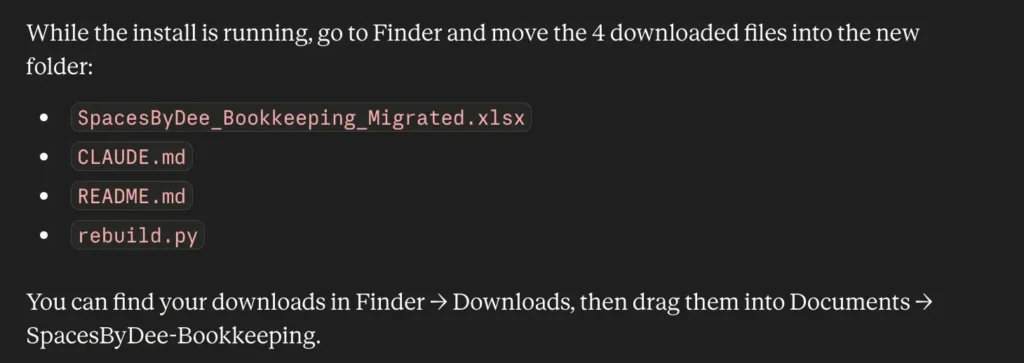
Once everything was set up — with Claude walking me through the process every step of the way — I was able to open Claude Code through Terminal or the desktop app and simply prompt the AI to continuously update my bookkeeping system for me. For example, I could say:
- “Mark this invoice as paid.”
- “Enter this expense under software on this date.”
- “Update the tax summary.”
- “Generate a quarterly profit and loss report.”
- “Generate this month’s profit and loss statements.”
I could also upload PDFs, receipts, spreadsheets, and transaction exports directly into the workflow, allowing Claude to continuously update my master bookkeeping file, which lives locally on my computer and remains fully editable by me at any time.
Bingo, I thought.
Claude Code For Easy Bookkeeping
This AI bookkeeping system was exactly what I needed: clever, simple, and straight to the point.
With Claude Code, I was able to build a financial system that actually made sense for an entrepreneur like me. Instead of paying $400 a month for a bookkeeping service and software stack that felt clunky and overwhelming, I was able to build a system with a Claude Pro subscription and now pay a fraction of the cost.
Most importantly, my books finally make sense to me.
I can have Claude Code update my master ledger using prompts or uploaded documentation, which means no more manual entries in an Excel file. And, I can pull financial data quickly without confusion, frustration, or unnecessary complexity.
Click Here To Shop My Favourite Home Goods
Let’s design your space together, virtually.



