
The Easiest Design Software for Interior Designers—No Tech Savviness Needed
In 2026, the interior design world is undeniably tech-driven. From drafting tools and 3D modelling software to site measurement apps and AI-powered platforms, today’s designers are expected to be fluent in a wide range of digital tools.
But it wasn’t always this way. There was a time when hand drafting, sketching, and printed spec books were the standard. Many experienced designers may find themselves nodding along, remembering those “good old days.”
Today, those same designers can feel the pressure to adapt—sometimes even feeling as though they’re falling behind. With so many new tools emerging, learning new technology can feel overwhelming, if not nearly impossible.
In this post, I’ll break down some of the easiest technologies to adopt, explain why they work so well, and show how you can confidently move toward a more tech-forward workflow—without feeling left behind.

Easy-to-Adopt Interior Design Softwares
Click to jump.
DesignFiles

DesignFiles is an all-in-one software built for interior designers who want a single platform to both run their business and adopt digital design tools. It combines a robust mood board creator, client portal, project management system, 2D and 3D floor planning, AI rendering, and more.
The platform is widely used and well-loved by designers—including those without a strong tech background—because it’s intuitive and doesn’t require extensive training to get started.
The User Experience
One of DesignFiles’ biggest strengths is how easy it is to learn. The platform offers a large library of YouTube tutorials that guide users step-by-step, making it especially helpful for designers transitioning into digital tools. There’s also a responsive customer support team that provides free support calls to help with onboarding and getting comfortable with the software.
Why I Recommend DesignFiles
I recommend DesignFiles because it simplifies your workflow by consolidating multiple tools into one platform. Instead of learning and managing several different programs, you can rely on a single system to handle most of your needs.
Its design boards function similarly to presentation tools like Canva, while its 3D capabilities are comparable to platforms like Coohom. Beyond design, you can also manage projects, communicate with clients, send invoices, and collaborate with your team—all in one place.
Overall, DesignFiles is an excellent option for designers at any level of technical experience, especially those looking for a more approachable way to integrate technology into their workflow.
Coohom
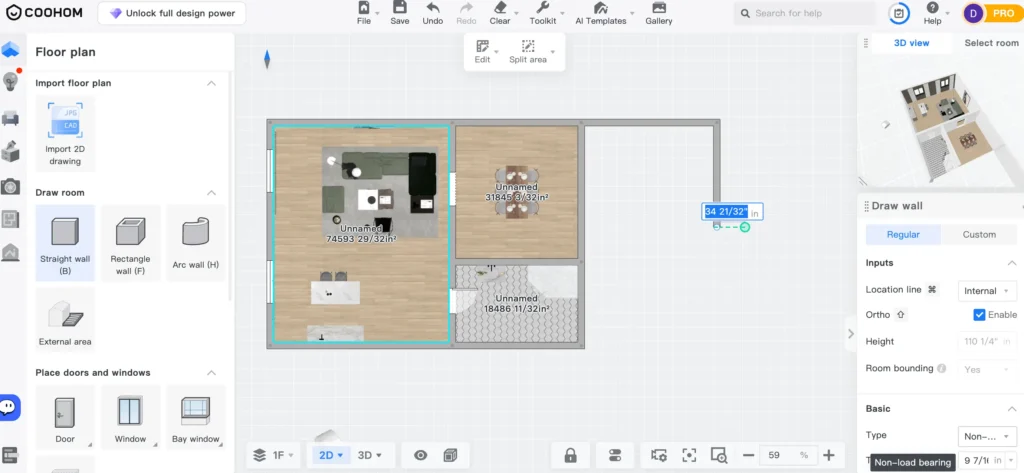
Coohom is a 2D and 3D floor planning tool used by both homeowners planning their own spaces and design professionals looking for an accessible, easy-to-use platform. It’s particularly strong for 3D modeling and creating impressive renders—without the need to install or learn more complex software like SketchUp.
The platform offers a solid balance of simplicity and customization, giving designers enough flexibility to bring their ideas to life without feeling overwhelmed.
The User Experience
I find Coohom to be one of the easiest 3D modeling tools to use. It’s not overly complicated, yet still includes the key features needed to create high-quality visualizations. The software is also relatively affordable and web-based, meaning there’s nothing to download and it works across multiple devices.
Why I Recommend Coohom
I recommend Coohom for its simplicity and user-friendly interface. Having tried a range of design tools, 3D modelers, and AI platforms, this one consistently stands out as an adaptable solution for professional use—especially for designers who may not consider themselves tech-savvy.
Overall, it’s a strong option for anyone looking to ease into 3D design without a steep learning curve.
Twindo
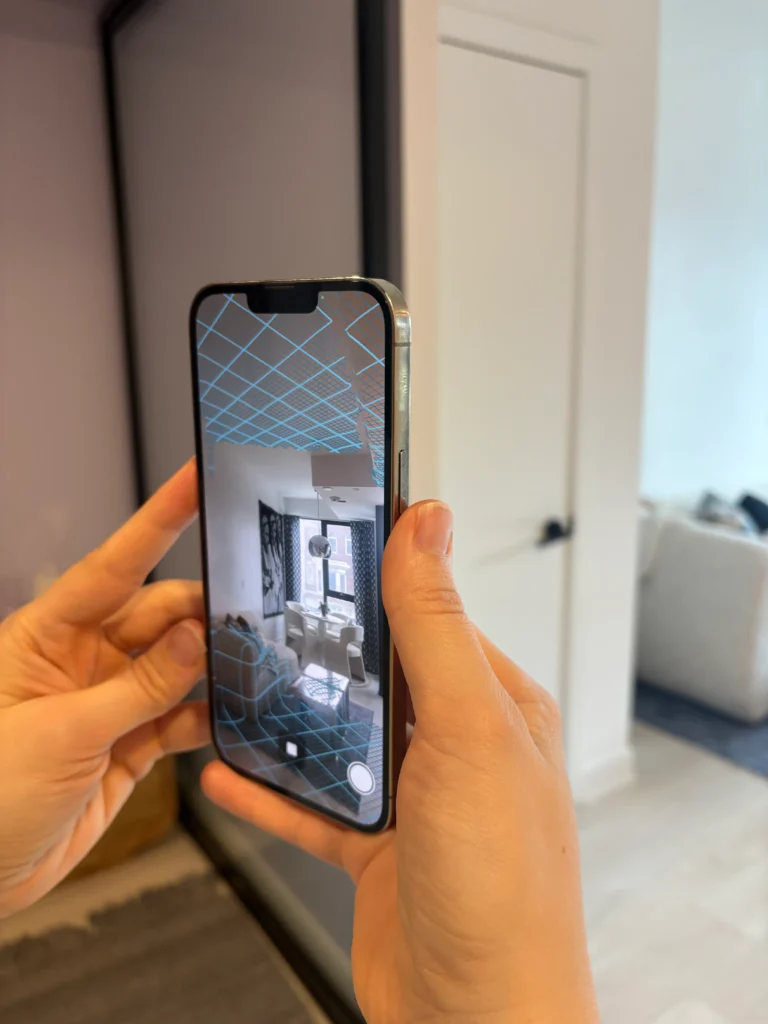
Twindo is a software that uses LiDAR technology to allow you to take site measurements directly from your phone. That’s right—no more manual measuring. It’s a powerful tool for designers looking to elevate their workflow and take a more tech-forward approach.
While Twindo isn’t the only platform using LiDAR, it stands out as a strong option thanks to its ease of use, reasonable pricing, and growing popularity among designers.
This technology allows designers to export the model to a variety of formats, including CAD, SketchUp, and others. So, you will need to be a designer who is already acquainted with one of these softwares.
The User Experience
Twindo is incredibly easy to use—if you can use a smartphone, you can use this software. The main consideration is that not all devices support LiDAR. You’ll need a compatible iPhone or iPad Pro to take full advantage of the technology.
That said, the investment can be well worth it. Tools like this can save hours on-site by eliminating the need for manual measurements and reducing the risk of error.
Why I Recommend Twindo
I recommend Twindo because it represents a meaningful step toward a more efficient, tech-forward design process. Using LiDAR technology not only streamlines your workflow but also helps you deliver a more polished, professional experience—leaving a strong impression on your clients.
Use the promo code DEE100 to get $100 off your first order with Twindo. Click here to redeem.
Planner5D

Planner5D is another notable 2D and 3D floor planning software that appeals to both homeowners and interior designers. In terms of capabilities and functionality, it is most comparable to Coohom. The platform also includes a mobile app and AI-powered features (primarily geared toward DIY users), which I have previously reviewed on the blog.
The User Experience
Planner 5D is very easy to use across both the app and the website. In fact, I find the app to be especially intuitive and user-friendly. For designers looking to create floor plans and 3D models with ease, this tool is certainly worth exploring.
Why I Recommend Planner 5D
I recommend Planner5D for its ease of use, powerful AI features, strong rendering capabilities, and overall flexibility. It works well for both homeowners and designers, making it a versatile option depending on your level of experience and workflow needs.
Interior Designers Adapting to the AI and Technology Revolution
The bottom line is that technology keeps moving forward—whether you like it or not. Designers who resist adopting modern methods for design presentations, spec sheets, 3D modeling, and site measurements may find themselves competing against those who do, while also struggling to keep up with demand and spending unnecessary time on repetitive tasks.
If you’re not particularly tech-savvy, adapting to these new methods can feel overwhelming. However, taking small, manageable steps in the right direction is often all it takes to begin transitioning into a more efficient, tech-forward design practice.
Click Here To Shop My Favourite Home Goods
Let’s design your space together, virtually.





