
I Tested The Best AI Interior Design Phone App
Last updated: February 8th 2026
I’ve tried over 25 AI interior design apps, so I’d say I can call myself a bit of an expert — or at least a trusted voice — in the AI interior design space. In this post, I’m breaking down the features of what is undoubtedly one of the best AI interior design apps available today. This app (and its website) truly blew me away with its capabilities, and I’m here to show you exactly what you can achieve with it — and why it stands out among the crowded field of AI interior design tools.
AVOID COSTLY (AND UGLY) DESIGN MISTAKES
Trying and Testing Planner5D Pro – AI Interior Design Phone App
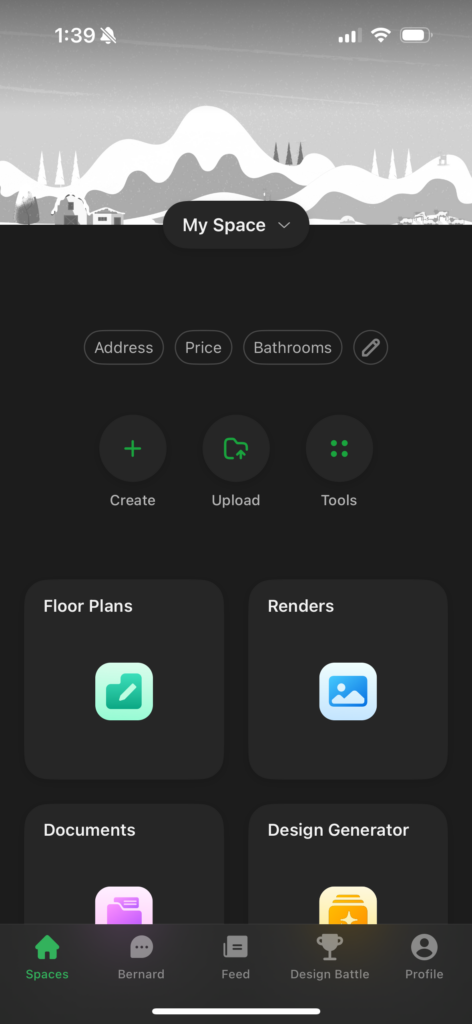
What Makes Planner5D Stand Out?
Planner5D stands out from other AI interior design tools due to its combination of AI-powered automation and user-friendly customization. Unlike many AI design platforms that generate a single layout, Planner 5D’s Design Generator offers multiple renderings, allowing users to explore different options more quickly. Additionally, its drag-and-drop interface and high-quality 3D visualizations make it accessible to both beginners and professionals, offering a balance between AI automation and hands-on creativity. It also provides a seamless experience across both mobile app and desktop, though the mobile app allows for greater style customization – hence why in this post I will be focusing on the AI phone app.
Features of Planner5D
Here are the AI phone app features that Planner5D offers.
Click to jump.
- Build From Scratch: You can build a new floor plan from scratch.
- Smart Wizard: Quickly furnish a floor plan with your selected style.
- Scan Room: You can use your smartphone to scan a room and create a floor plan.
- Upload a Floor Plan: Digitize your floor plan instantly.
- 3D Interior Modelling: Build out your interior and visualize changes and furniture placement before you commit.
- Design Generator: Generate a stylized render from a photo of your space.
- AR Try On: Virtually see how decor items will look in your space before you buy.
Build From Scratch + Smart Wizard
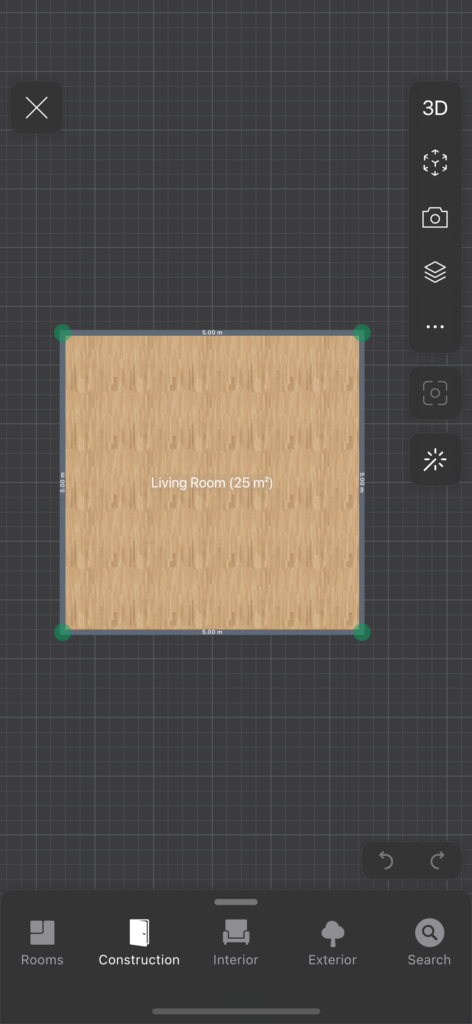
When you select “Build From Scratch” on this AI interior design phone app, this is what comes up.
At a glance, this is what this function can do:
- Create Custom Floor Plans – Draw walls, adjust dimensions, and design unique layouts.
- Add Architectural Elements – Place doors, windows, stairs, and structural details with ease.
- Drag-and-Drop Furniture & Decor – Choose from a vast library of furniture and decor items to style your space.
- Switch Between 2D & 3D Views – Design in 2D for precision, then switch to 3D for a realistic visualization.
- Customize Materials & Textures – Change flooring, wall colours, and furniture finishes to match your vision.
- Use AI Assistance (Optional) – While you can build manually, AI tools can help optimize and refine your design.
- Seamless Mobile & Desktop Experience – Work on your design across devices with an intuitive interface.
- Export to CAD – If you’re a designer reading this, you might be happy to know that you can export your floor plan into CAD. Now this made me excited.
When experimenting with this feature, I was very impressed. It reminds me of SketchUp, but without the finicky controls. I was honestly surprised by how much you can do with an AI interior design app on a phone. That said, manoeuvring can be a bit tricky on a smaller screen; it’s probably better suited for a larger phone or tablet.
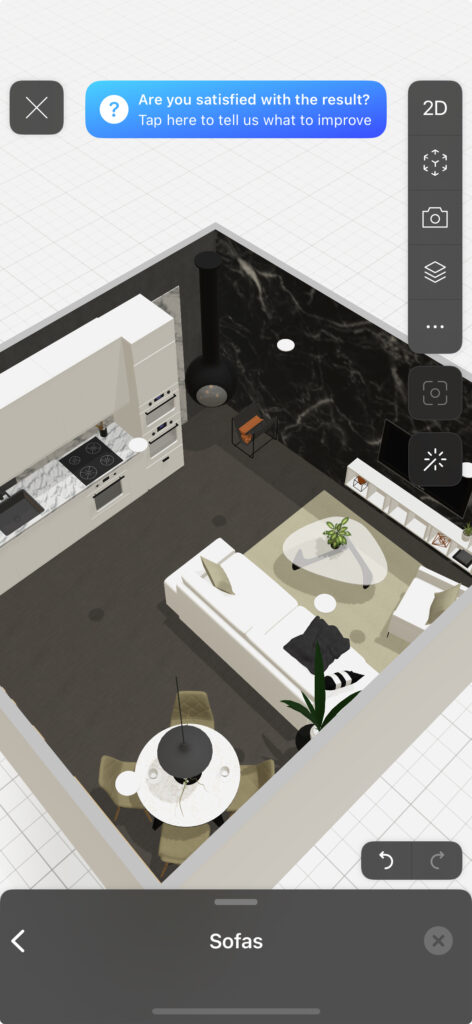
Here’s what I was able to create with a few clicks. I think this is really useful for folks who have no idea how to furnish their space – you can quickly see how things can come together. However, I will say that sometimes the floor plan does not generate the most practical layout. However, overall, I am very impressed.
Scan Room
I tried the Scan Room feature to create a floor plan, but was unsuccessful. This feature seems to work best for simple, empty spaces. However, if your space has many nooks and crannies, you may run into difficulties. Honestly, is my policy here.
Upload a Floor Plan
Okay, for this test, I uploaded this floor plan to the AI interior design phone app.
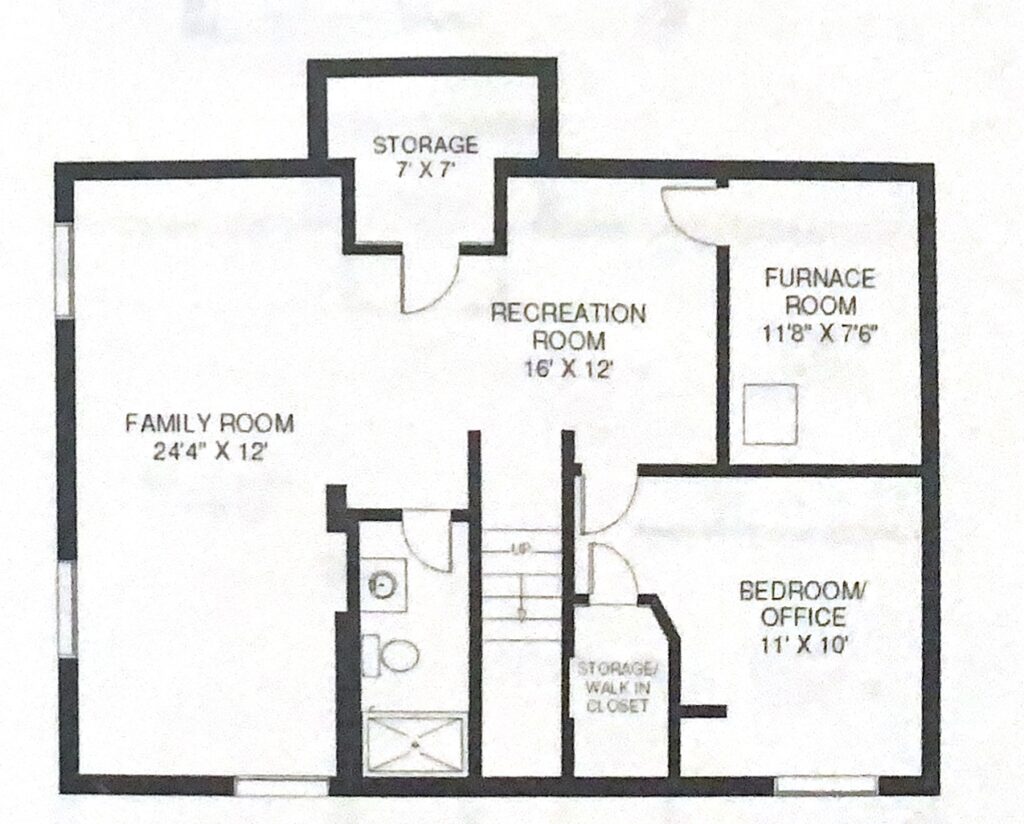
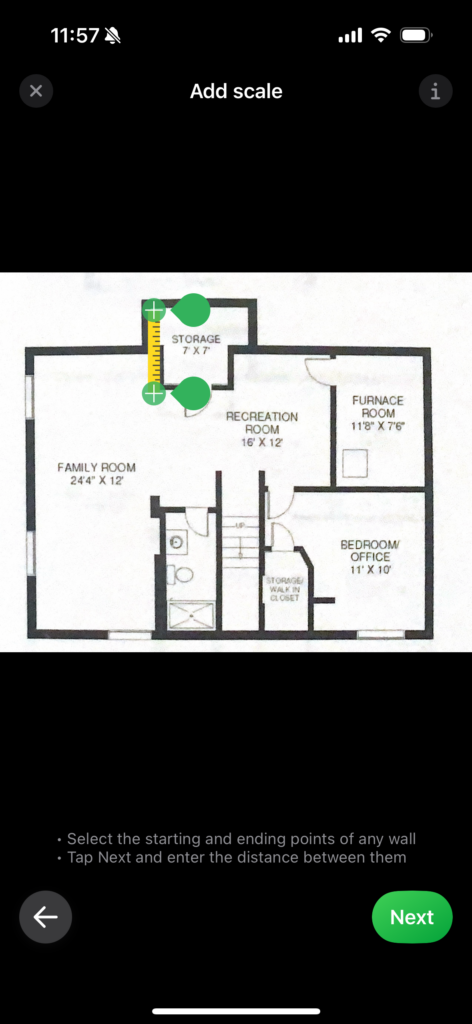
I was asked to scale the drawing; it was pretty easy to move the ruler into place. I then input the distance when clicking next, and it notified me that I would receive an email when the floor plan was complete. So, not instant, but it only took about 5 minutes. And here is the result (I opened it on desktop). Amazing!

3D Modelling Made Easy

3D modelling an interior space isn’t easy for those with no prior experience using 3D software. However, I can honestly say that Planner 5D is surprisingly easy to use — even for first-time users. This 3D planning software allows you to import floor plans, scale and trace them, and then build out the space by adding elements such as doors and windows. You can even customize these components to achieve a very realistic result.
The platform also features an extensive library of furniture, décor, and kitchen cabinetry, all of which are customizable and easy to drag and drop into your design. If you’re looking for an AI-powered tool that lets you create detailed 3D interior models without a steep learning curve, I highly recommend giving Planner 5D a try. It’s one of the easiest platforms to pick up and start using right away.
Is Planner 5D The Best 3D Interior Design Software?
Design Generator
I uploaded the photo and selected a Minimalistic design style. It took around 20 minutes to generate 3 images. Two of which I was impressed with. Take a look to see a before and after here:
Before:
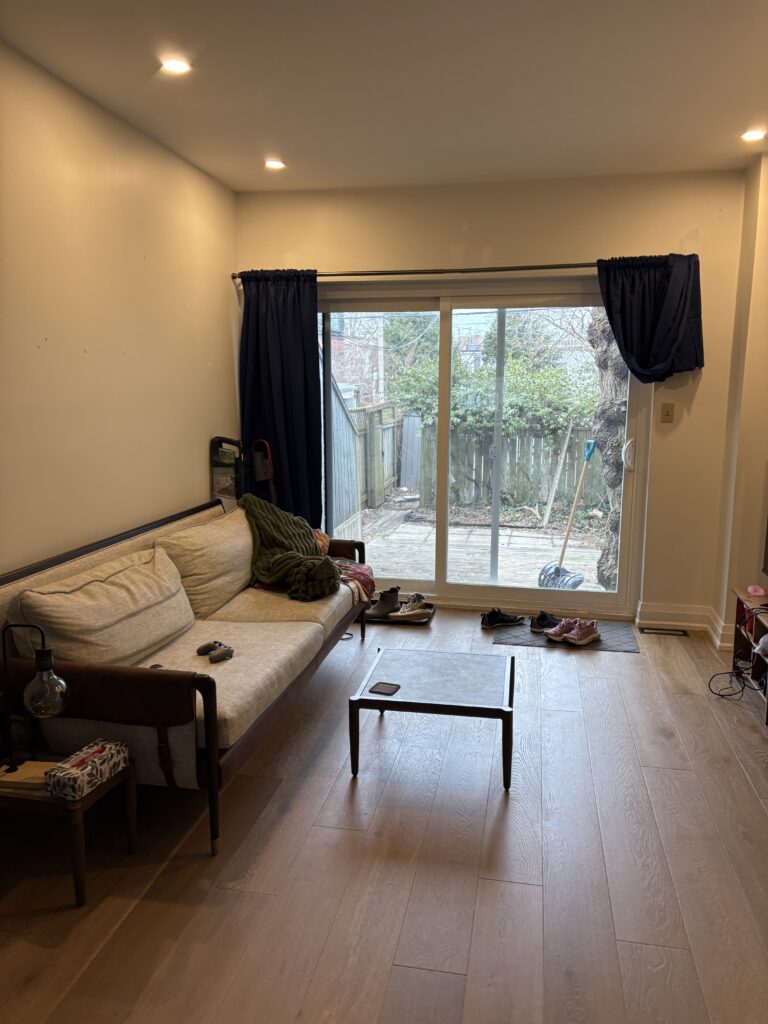
Now, I have already tested out this feature in my post The Best and Worst Interior Design AI,A Designer’s Review, however, I wanted to put it to the test again. In this case, I used this photo. A photo of a typical messy living space that isn’t fully furnished. I figured this was realistic for what many people would be working with.
After:
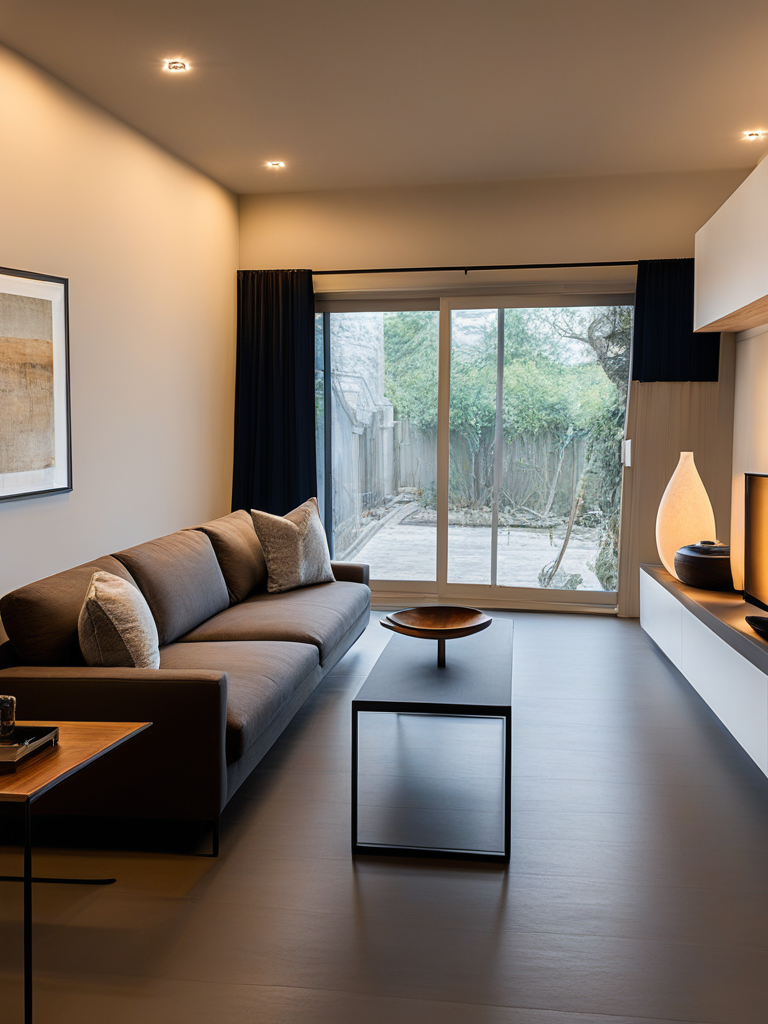
I am honestly very impressed. The renders are of great quality.
AR Try On
Planner5D also has an AR Try On feature, which I will be covering in a separate post, and will link it here when complete. However, to complete this review, I will add that their AR function is great for most items.
Is Planner 5D for Pros or Hobbyists?
Planner 5D is used by both hobbyists and professionals within the design–build industry. They even offer a Planner5D Pro Plan, which includes unlimited 4K renders, 360° panoramas and walkthroughs, mood boards & project organization tools, advanced AI & floor-plan recognition tools and more features specifically tailored to design professionals. At the same time, the AI tools are simple enough for the everyday hobbyist to use. Overall, it’s a software that sits comfortably in the middle—accessible for beginners but still functional for more advanced users.
My Conclusion on The Best AI Interior Design Phone App
Overall, I give Planner5D a solid 8.5/10. This AI interior design app impressed me more than I expected.
The standout features, in my opinion, are:
–Design Generator – Great for visualizing new possibilities for a space.
-Upload a Floor Plan – A useful tool for homeowners and designers alike.
-3D Modelling – Easy to use and gives people the most realistic visuals.
These features work well and have practical applications. Homeowners who want to decorate themselves but struggle with selecting finishes will find this app helpful. Designers frustrated with their current floor plan creation methods may benefit from the Upload a Floor Plan tool. And professionals looking to improve client visualizations will appreciate the Design Generator.
I love that Planner5D is available as both a mobile app and a desktop application. In today’s fast-paced world, people value the convenience of being able to pull out their phone and create on the spot.
The app is well-designed, intuitive, and delivers a smooth user experience. While the desktop version provides more precision and flexibility for detailed planning, the mobile app is perfect for quick edits, brainstorming, and generating ideas on the fly. It’s an impressive balance between accessibility and functionality, making it a great tool for both beginners and professionals. If I sold you on this app, I’d appreciate it if you’d use my link to sign up: Planner5D.
Read More On AI Interior Design
More AI Design Tool Reviews
I Tested the Most Popular Home Design App in Korea
Designer Reviews VisualizeAI: The Complete AI Tool For Decorating
The Ultimate AI Tool for Interior Designers and Architectural Rendering
The Complete Review of AI Interior Design Tools
Interior Designer Vs. ChatGPT: Who Can Space Plan Better
I Tried the Best 3D Room Visualizer AI, Here is my Review
Remodel AI: My Review + Secret to Free Pro Upgrade
More on the AI topic…
The Best and Worst Free Interior Design Layout Software
I Tried The Newest and Hottest Interior Design AR Tech
Generative AI in the Design-Build Industry
The Best and Worst Interior Design Software
A Better Alternative to Interior Design Artificial Intelligence
Will Interior Designers be Replaced by AI? A Designer’s Perspective
Click Here To Shop My Favourite Home Goods
Let’s design your space together, virtually.



