
Is Design Files The Best Houzz Pro Alternative? A Comparison
Running an interior design business — like any other business — means that designers incur overhead costs. In 2026, a lot of those costs are associated with software. When we think of interior design, we don’t necessarily equate it with being a software-heavy career; however, as an interior design professional who works with clients online, my job relies on tech — a lot. This means potentially many different subscriptions and a tech bill that increases with every new phase of design.
Now enter Design Files and Houz Pro. These software solutions both claim to be the one tool interior designers need to effectively run their business. I have reviewed many different interior design software options in the past (I will link those below), but in this post, I am going to focus on comparing Design Files to Houz Pro to see if these two platforms are truly comparable.

Design Files Features
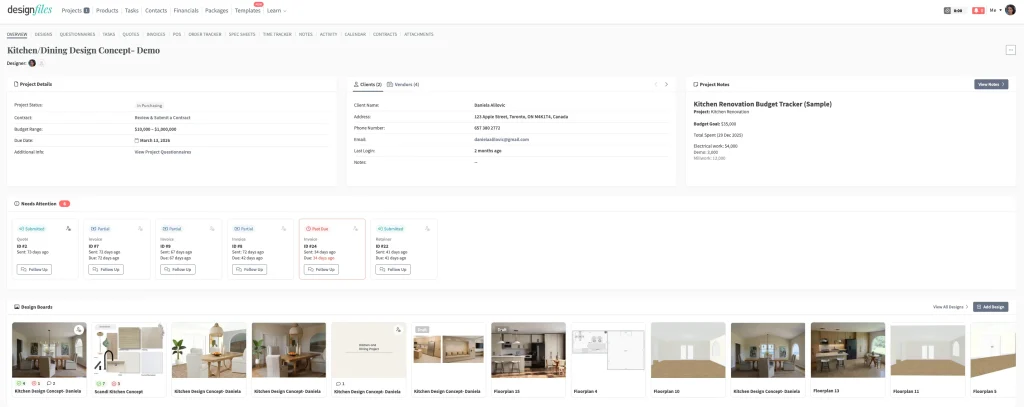
Design Files has a robust set of features, and the software continues to expand year after year. What began as a simple mood board tool has quickly evolved into a comprehensive platform where designers can create 3D models, generate photorealistic AI-powered renders, and easily source products using the product clipper. The software also allows users to generate spec sheets, quotes, and invoices, and can be used for team and client communication as well as overall project management.
Design Files Features
Design & Visualization Tools
- Web-based product clipper
- Product library
- Mood boards & interior design presentations
- 3D modeling
- Photorealistic rendering
- Enhance with AI rendering tool
Business, Sales & Financial Tools
- Quotes
- Invoicing
- QuickBooks integration
- Financial tracking dashboard (markups, service income, reporting)
- Time tracking
Project & Team Management
- Project-based task management
- Task creation and assignment for team members
- Notes per project
- Project attachments
- Activity page showing client logins and actions
Client & Vendor Management
- Client portal
- Client questionnaires
- Client and team chat
- E-design packages
- E-design contracts
- Contracts for both clients and vendors
Product & Order Management
- Purchase orders (POs)
- Product tracker
Templates & Workflow Tools
- Templates for:
- Interior design presentations
- Contracts
- Questionnaires
- E-design workflows
Read here for the Best Interior Design Template tools.
There isn’t much this software doesn’t offer designers. It’s a toolkit that can be utilized by both large teams and solo designers. What really makes Design Files stand out is the level of customer service and support. I speak with a lot of designers, and this is something that is consistently praised about Design Files. They also have a very active Facebook community, which gives designers a place to connect, collaborate, and share industry insights.
Design Files Pricing
Design Files keeps pricing refreshingly simple, with only two plans to choose from. The only add-on is the Enhance with AI tool, which operates on a credit-based system rather than unlimited usage. Credits cost $0.01 each, with photorealistic renders typically requiring between 8–20 credits — not too shabby.
Design Files did introduce a price increase in February 2026 (the first in three years). Current pricing is:
$30/month for each additional team member
$55/month for the E-Design package
$75/month for the Full Service package
Houzz Pro Features

Core Design & Visualization Tools
- Product Clipper & Product Library — save products from across the web for proposals & boards
- Mood boards for visual presentations
- 3D Floor Planner + 3D modeling & VR-style walkthrough views
- Mobile room scanning with LiDAR (on supported devices)
- Selection Boards (centralized product options and client approvals)
Business, Sales & Financial Tools
- CRM for leads, contacts, and sales tracking
- Estimates and proposals (branded & professional)
- Invoicing & online payments
- Financial reporting and dashboards
- QuickBooks Online integration
Project & Team Management
- Project scheduling tools (calendar and Gantt views)
- Task management & assignments
- Time & expense tracking
- Daily logs and activity tracking
- Client dashboard for approvals, chats, and updates
Project & Order Tools
- Change orders & budget management
- Purchase orders & assemblies
Marketing & Growth Features
- Email marketing tools (campaigns, newsletters)
- Premium Houzz profile & lead generation tools
- Custom website builder & hosted site options
Mobile & Collaboration
- Mobile app access for on-the-go management
- Centralized messaging, comments, and client communications
- Unlimited cloud file storage
Additional Features
- Integrations (Google Suite, accounting tools, etc.)
- Activity tracking showing client engagement and actions
Houzz Pro offers all the features interior designers and construction teams need to run their business. It’s a well-known and widely used platform, but it does feel more geared toward larger teams, particularly when you consider the pricing structure.
Houzz Pro Pricing
Now, this is where things get tricky. Houzz Pro does not have a consistent pricing structure. As I like to say, the pricing is a bit sneaky — it’s based on both team size and location. This means a team in California may pay a very different amount than a team in New Jersey.
What’s the price difference? From conversations with numerous designers — and from speaking directly with Houzz Pro — pricing appears to start around $299 per month and can climb to $600+ per month. And that doesn’t necessarily include all features, which adds another layer of ambiguity around what is and isn’t included at each price point.
Comparing Design Files and Houzz Pro Features
Features Unique to Design Files
These are capabilities Design Files offers that Houzz Pro doesn’t (or doesn’t do in the same way):
Design & Creative‑Focused
- AI‑enhanced photorealistic rendering tools (Enhance with AI workflow)
- Product tracker tied directly to design sourcing
- Templates specifically for design presentations, questionnaires, and contracts
- E‑design workflow packages tailored to remote design services
- Highly visual presentation tools geared toward interior designers (vs construction emphasis)
- Notes + attachments tied directly to design assets
Workflow & Collaboration
- Activity tracking focused on client viewing behaviour (what they looked at / actions taken)
- Strong community support and design‑specific Facebook groups
Pricing Simplicity
- Clear, flat pricing tiers that don’t vary by location or team size
- Add‑ons priced transparently (e.g., AI credits)
Read more on Design Files here.
Features Unique to Houzz Pro
These are capabilities Houzz Pro offers that Design Files doesn’t (or does differently):
Business Operations & Marketing
- CRM & lead management
- Marketing and lead generation tools
- Premium Houzz profile & directory leads
- Custom website builder + hosted site options
Project & Construction‑Focused Tools
- Project scheduling & Gantt‑style timelines
- Change orders & budget tracking
- Daily job logs (for job sites and contractors)
- Purchase orders with construction workflows
- Ability to generate elevations
- 3D room scanner tool for measurements and quick 3D models
Client & Team Communication
- Branded client portals with approvals + shared views
- Built‑in messaging for communication history that ties to project workflows
Interior Design Software Tools Compared
Now that we’ve compared the giant in the interior design software world, Houzz Pro, to a smaller, more niche software, Design Files, what’s the takeaway?
In my view, Houzz Pro is much more geared toward larger construction-focused teams, particularly because of tools like the 3D room scanner, which is really what makes Houzz Pro stand out. For many of the other features, I feel they aren’t interior design–specific enough to justify the price for the average design firm.
That said, if you’re a design firm heavily involved in construction, Houzz Pro may be worth the steep price tag. However, Design Files covers most of what Houzz Pro offers, with the added benefit of being industry-specific to interior designers — and at a much more affordable price point. Unless you absolutely need every tool Houzz Pro provides, a platform like Design Files will likely serve you better while keeping more money in your pocket.
To compare the top 10 interior design software tools, read: The Best All-In-One Software For Interior Designers
Also, read: The Best and Worst Interior Design Software
Click Here To Shop My Favourite Home Goods
Let’s design your space together, virtually.




