
How To Use AI To Design a Room, Designer Best Practices
I’m no stranger to AI. As a designer working at the intersection of technology and the interior design industry, I’ve tested nearly every AI room design tool currently available. With my combined experience in design and AI, it seemed natural to create a guide that demonstrates how AI can be effectively utilized in room design.
This guide shares my approach to prompting AI, along with designer-specific tips and techniques to help you achieve the best possible results—using AI as a creative support tool. For this tutorial, I will be using RoomStudioAI.
Now, you may be thinking: why would an interior designer encourage people to use AI instead of hiring her? Why teach others how to use AI at all?
The answer is simple. While I am an interior designer, I’ve also built my platform around connecting people with the best design resources available—whether that’s an AI tool, my professional services, or other trusted solutions. My goal is to help people choose the tools that work best for them and to understand how to use those tools thoughtfully, responsibly, and ethically.
So, let’s get into it.
Can You Ethically Use AI in Interior Design?

Before we get into the tutorial, I want to address a question some of you may be wondering about: Is it ethical to use AI to design a room?
We’re all becoming increasingly aware that AI has an environmental impact. Every time AI is used, it relies on large data centers that consume significant amounts of electricity and water for cooling. As demand for AI services continues to grow, the resources required to support that demand will increase as well—and that is a valid concern.
So what does this mean? Am I suggesting that you shouldn’t use AI for interior design?
No.
The reality is that we are in the midst of an AI revolution. AI has already impacted the interior design industry, and there’s no turning back. This shift is no different from when AutoCAD changed hand drafting or when SketchUp transformed hand-drawn perspectives. Technology has always reshaped how designers work—and how DIYers approach designing their homes.
So if AI is here to stay, the real question becomes: How can we use it ethically and responsibly in interior design?
The first step is understanding how to use AI effectively—choosing the right tools, avoiding excessive or unnecessary prompting, and knowing when AI adds value versus when it doesn’t. Using the wrong tool or overusing AI not only leads to poor results but also contributes to unnecessary resource consumption.
This guide is about using AI intentionally, efficiently, and thoughtfully—so it supports good design rather than replacing it.
Prompt Guide – How To Use AI To Design a Room
Using RoomStudioAI, I’ll walk you through best practices for achieving the strongest results when designing a room with AI. I like this tool because it includes furniture recognition, allowing it to generate a design concept while also suggesting specific items you can consider purchasing to bring the design to life.
1. Take a High-Quality Photo of Your Space
For the best AI-generated results, start with a clear, well-composed “before” photo of your space. This means removing clutter where possible and taking the photo from approximately chest height. Be sure to capture all relevant elements in the room that you want the AI to redesign.

Let’s use this photo as an example. As you can see, it’s a plain, unexciting room where I’m currently staying in Florida—making it a great candidate for an AI-driven design transformation.
2. Refine Your Prompt
Before you start generating endless design variations, take a few minutes to refine your prompts using the following best practices:
- Steer clear of vague descriptions unless you intentionally want the AI to improvise.
- Keep prompts simple — simpler prompts often lead to better results.
- Be specific, but concise — clarity matters more than length.
- Describe what to enhance, rather than what to remove or diminish.
- Focus on the goal of the redesign — define the overall outcome you want to achieve.
- Avoid conflicting instructions that can confuse the AI.
Let’s test this out using RoomStudioAI. I uploaded a photo of the room, and this tool is smart enough to offer selectable options for colour scheme, room style, resolution, and even aspect ratio. It also includes a field where you can add a custom prompt.
For this example, I prompted the AI to redesign the space using a terracotta colour scheme and a tropical design style, and added a custom prompt instructing it to “redesign the space, taking inspiration from the Florida tropics.” It felt like a fitting choice.
Here are the results:

Because I gave the AI a clear design direction, it was able to deliver exactly what I asked for. I think it did a terrific job—and I only wish my vacation rental actually looked like this.
Prompts to Change The Lighting and Vibe
All lights on (evening)
Enhance the scene with all interior lights on, warm ambient lighting, soft
shadows, and a cozy evening atmosphere.
Morning light
Show the room in early morning daylight with soft natural light coming
through the windows and gentle shadows.
Midday light
Render the space in bright midday daylight with neutral, balanced lighting
and natural shadows.
Nighttime mood
Create a nighttime version with low, warm lighting, accent lamps turned on,
and a calm, intimate mood.
Defining the View Outside the Windows
Show a landscaped backyard with greenery visible through the windows
and natural daylight filtering into the room.
Urban/condo
Add a city skyline view outside the windows with soft daylight and subtle
reflections on the glass.
Nature-focused
Include mature trees and greenery outside the windows to create a
peaceful, natural backdrop.
I prompted RoomStudioAI to “enhance the scene with all interior lights on, warm ambient lighting, soft
shadows, and a cozy evening atmosphere.” And, here are the results:

I am obsessed with this result! This room looks dreamy.
3. Use AI To Furniture Shop
Using AI to design a room isn’t very useful if you can’t move beyond the “pretty picture.” In my opinion, AI tools that can’t help source real furniture fall short of what’s needed to execute a design.
Fortunately, the AI used in this demo—RoomStudioAI—addresses this gap. It allows you to select individual furniture pieces directly from the generated design, then searches the web through retailers like Amazon and Wayfair to help you find comparable products. This makes it much easier to translate an AI concept into a real, livable space.

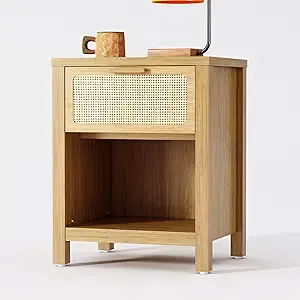
You can see here that this AI allowed me to select the bedside stand and found me pieces from Amazon that matched the vibe. I will insert one of the options here so you can see for yourself. The AI got it pretty close to what it suggested in the AI-designed image.
Use the Right AI Tool — and the Right Prompts
The results you get from using AI to design a room largely depend on two things: the tool you choose and how you prompt it. Selecting the right AI platform is just as important as knowing how to communicate your design intent clearly.
What to Look for in an AI Design Tool
When choosing an AI tool for room design, I recommend the following:
- Ease of use — Choose a tool that’s intuitive and not overly complex.
- Design control — The tool should allow you to input a design style, colour scheme, and a custom prompt so you can guide the design in the right direction.
- Furniture sourcing capabilities — A beautiful image alone isn’t enough. If the tool can’t help you translate that image into real, purchasable pieces, it falls short of being truly useful.
Why Choose RoomStudioAI
For my AI room design testing, I chose RoomStudioAI, and for good reason. This tool checks every box above and also offers several standout features:
1. Transparent Pricing
RoomStudioAI uses one image model at a single price point—no confusing credit systems or higher fees for “better” models. Users receive consistent quality without a bait-and-switch pricing structure.
2. True Collaboration
One subscription covers everyone you invite—family members, clients, or fellow designers. There are no per-seat fees, unlike many platforms that charge extra as soon as collaboration is introduced.
3. Flexible Sharing
You can share individual rooms via private or public links without giving access to your entire workspace. This is especially useful for designers sharing concepts with clients or for property managers coordinating with hosts.
Overall, RoomStudioAI is a strong option if you’re serious about using AI to design rooms effectively. Just remember, following best-practice prompting techniques is key to achieving the best results.
Click Here To Shop My Favourite Home Goods
Let’s design your space together, virtually.

This post was sponsored by RoomStudioAI; however, all thoughts and opinions remain my own.



