Claude Skills for Interior Designers: How to Build Them
Claude has quickly become one of the most useful AI tools for interior designers. With Claude, designers can offload some of the many administrative and repetitive tasks that come with running an interior design firm.
However, most interior designers are still using Claude as a simple chatbot. They may be spending time re-teaching Claude the same tasks, providing the same instructions over and over again, and ultimately not taking advantage of the software’s full potential.
The key to using Claude more efficiently is building Skills within Claude. In simple terms, Skills allow you to teach Claude how to complete a specific task or follow a specific process, so that you can reuse that workflow on future projects.
Instead of writing the same detailed prompt every time, you can build the process once and reuse it.
This means less time spent explaining what you want Claude to do and more time actually getting the work done.
So, what can you teach Claude to do?

What Can Interior Designers Use Claude For?

Interior designers can use Claude as an AI assistant, and the possibilities are pretty extensive when you take the time to properly set it up and train it.
You can use Claude to help with tasks such as:
- Creating FF&E schedules — FF&E schedules that would otherwise eat up an entire afternoon in a spreadsheet.
- Product sourcing and shortlists — narrowing down options based on a client’s style, budget, and requirements, and sourcing from your preferred vendors.
- Creating client-ready tear sheets — polished, presentable, and on-brand without having to spend hours formatting everything yourself.
- Creating concept imagery — developing early visual direction to get a client’s reaction before committing hours to a full render.
- Creating alternative design options — quickly developing variations so clients can compare different directions.
- Creating photorealistic renders — when paired with the appropriate AI image-generation capabilities.
- Conducting product, project, and client research — helping you gather and organize information that would otherwise take considerably more time.
The important thing to understand is that Claude isn’t automatically going to do all of this perfectly from day one.
Disclaimer: You Need to Train Claude and Build Skills

Think of Claude like a brand-new assistant.
You wouldn’t hire a new assistant on Monday and expect them to immediately understand your firm’s processes, your preferred vendors, your design philosophy, your client communication style, or how you organize your projects.
The same applies to AI.
Claude can make mistakes (that means you need to check its work), especially when you’re first establishing how you want it to work. You need to give it context, test its outputs, correct it when it gets something wrong, and refine the process over time.
The better you train it, the more useful it becomes.
The Framework Claude Needs for Better Outputs
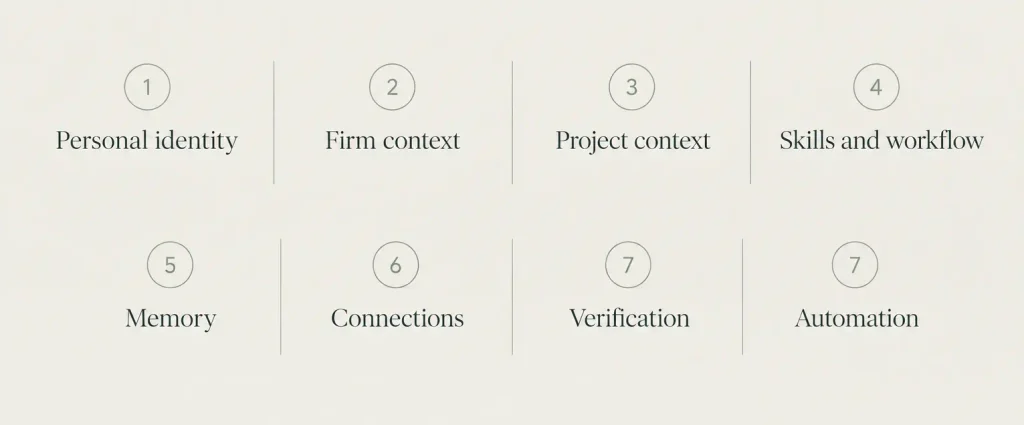
One reason designers can become frustrated with AI is that they expect it to understand their business without first giving it enough context.
To get the most out of Claude, you need to build the right framework so it understands your brand and therefore gives you better outputs.
I like to think about this in eight areas:
- Personal identity — Who you are as a designer, including your voice, values, and point of view. Also, who are you outside of being a designer?
- Firm context — Your business, brand, positioning, services, and how you present yourself to clients. Think about: what style(s) you design in? Who are your clientele, and what type of projects do you take on?
- Project context — The specific project you’re working on, including the client, space, budget, goals, and constraints. This will vary from project to project.
- Skills and workflow — The tasks you perform often enough that they’re worth teaching Claude once and reusing.
- Memory — Information Claude can retain about you and your processes so you don’t have to start from scratch every time.
- Connections — The information and tools Claude can access, such as files, email, websites, or other connected applications.
- Verification — Your process for checking Claude’s work and catching mistakes before relying on its output.
- Automation — Tasks that can be handled with less hands-on involvement once all the framework is established.
The more of this framework you establish, the more useful Claude becomes.
How To Use Claude Effectively
To use Claude effectively, you want to do more than simply chat with it.
Chatting with AI is great for asking questions, bouncing ideas around, brainstorming, and editing an email, and great to talk to if you are ever feeling lonely. But if you’re only using Claude’s chat function, you’re barely scratching the surface of what it can do.
The real opportunity is to start building repeatable workflows with building Claude Tasks.
Every time you have a new project, Claude can then reuse the process that was already built.
Building Skills in Claude: The Setup
To get more out of Claude, you’ll first want to make sure the Skills functionality is available in your Claude account.
The setup is relatively simple, and here’s how I did it.
1. Open your menu
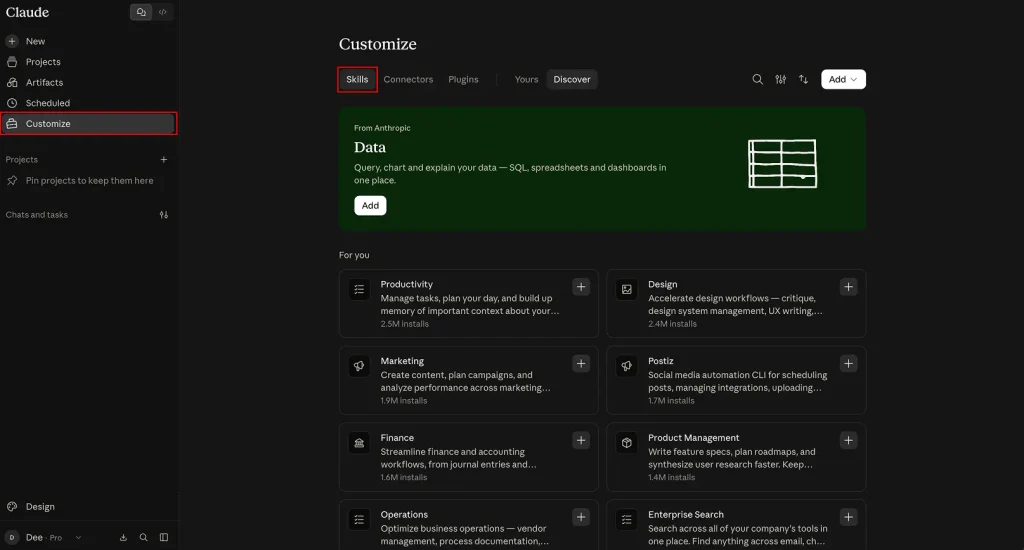
Open Claude in your web browser and navigate to your profile.
From there, select Customize → Skills.
This is where you’ll be able to see the Skills available for installation.
Install the Skill-Creator
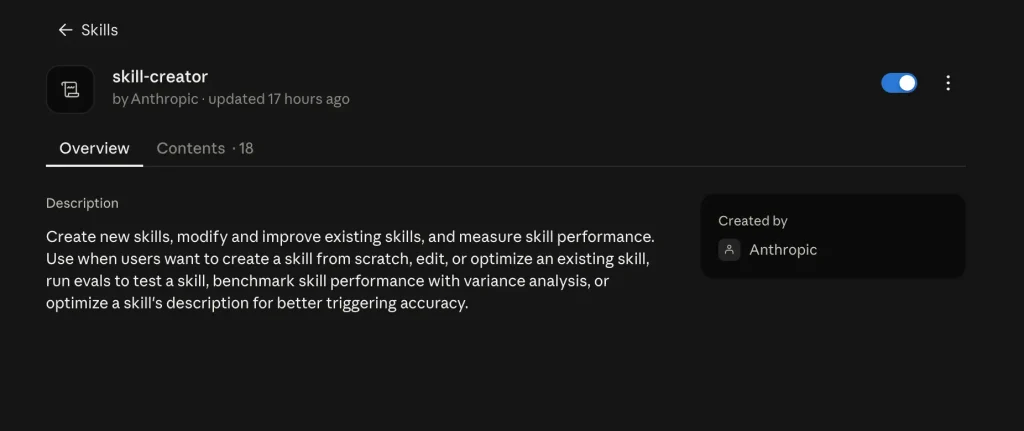
Within the Skills area, look for Skill-Creator.
If you haven’t installed it yet, you’ll see a + icon.
The Skill Creator is essentially what allows Claude to help you build your own reusable Skills.
2. Create a Skill
Once you’ve installed Skill Creator, you can go back into Claude’s chat and ask Claude to help you create a Skill.
You don’t need to know how to code.
Simply explain, in plain language, what you want the Skill to accomplish.
For example, you could say:
“Help me build a Skill that will take my client intake form and turn it into a thoughtful questionnaire that I can use during my discovery call.”
From there, Claude can help you build out the Skill and will ask you additional questions about how you want the process to work.
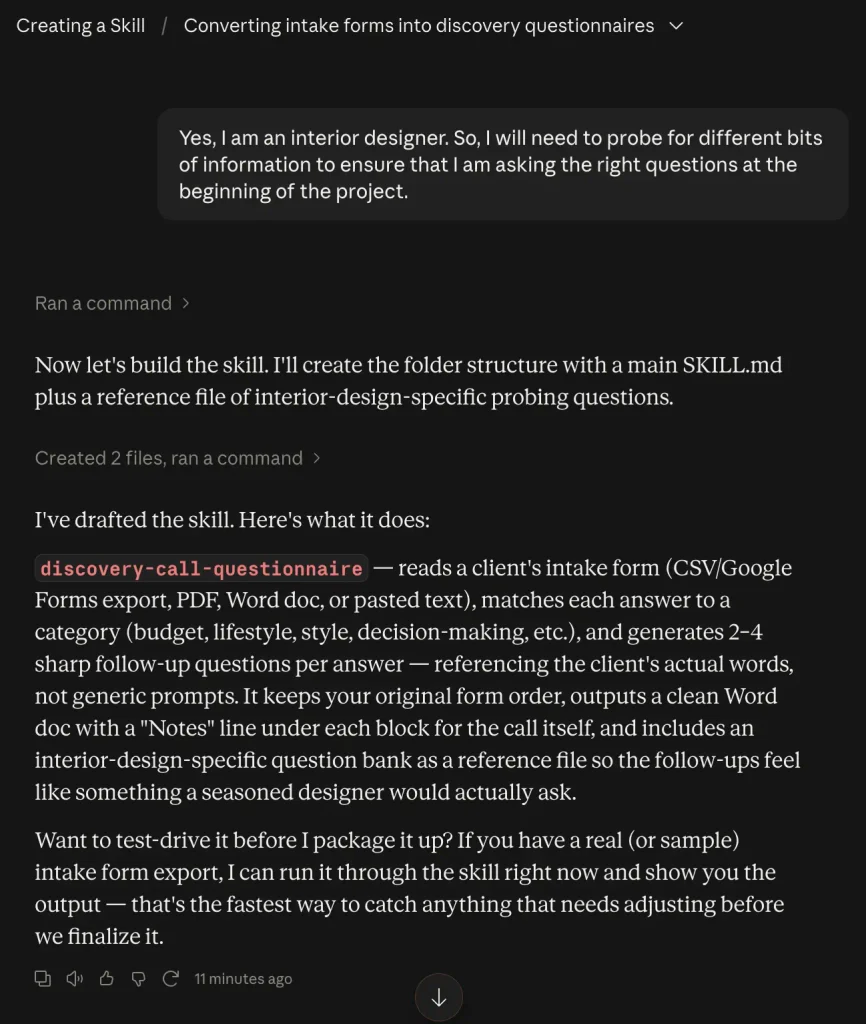
This is where you want to provide as much useful information as possible.
Think of it as onboarding a new assistant.
Tell Claude:
- What the task is
- What information it will receive
- What the final output should look like
- What your preferred format is
- What your firm’s standards are
- What it should avoid
- What questions it should ask when information is missing
The more context you provide, the better chance you have of getting a useful and repeatable result.
You may also see options for selecting the type of output you want. Claude will then work through the process of creating the Skill.
3. Test Your Skill
Before saving your Skill, Claude may give you the opportunity to test it.
Don’t skip this step.
If you’re creating a Skill that turns a client intake form into a discovery-call questionnaire, give Claude a fictional client scenario and see what it produces.
I told Claude that I have a virtual client who is flipping four properties across Pennsylvania and Colorado, that the projects are full gut renovations, and that your role is to establish the design direction and create conceptual designs.
I tested this exact type of workflow and asked Claude to create a checklist of questions that were not totally obvious, that I could use to make sure I was gathering all of the information necessary to properly direct the projects.
And, it gave me a genuinely impressive document with questions that I did not initially think of.
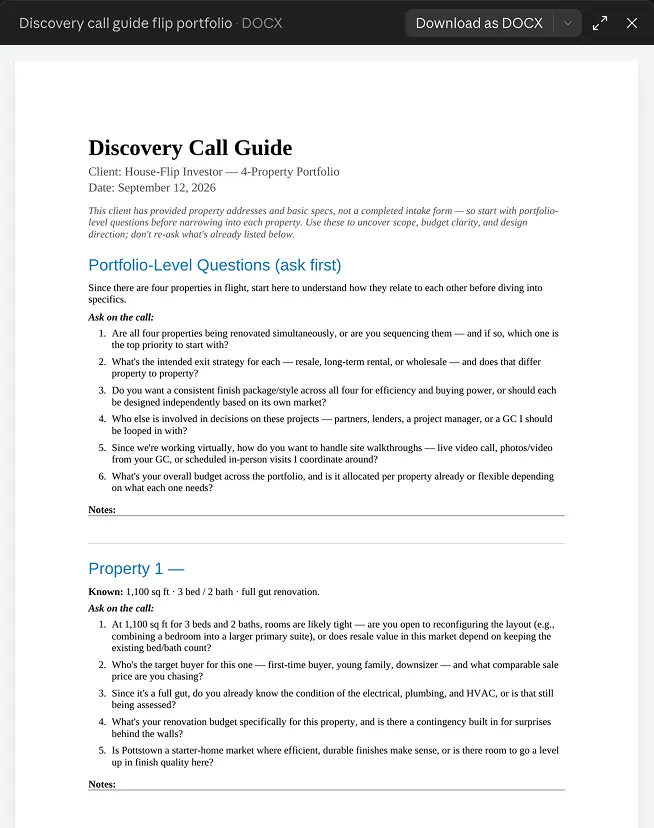
This is where you can start seeing the real value of building a rapport with Claude.
Instead of repeatedly explaining your process, you’ve started creating a repeatable system.
And remember: the more information you give Claude, the better you can refine the output.
4. Save the Skill in Claude and Reuse

Once you’ve finished building and testing your Skill, Claude will give you the option to package and save it.
Once saved, it becomes a reusable Skill within your Skills area.
Depending on the workflow and options available to you, you may also be able to download the Skill and use it elsewhere or share it with another Claude user.
Edit the skill
Skills can also be edited.
As you use one, you’ll probably realize that your own process changes. Maybe you want Claude to ask different questions, format something differently, add another step, or remove something that isn’t useful.
You can go back into the Skill and make those changes.
This is actually one of my favourite parts of the process because you’re not just teaching Claude — you’re also refining your own workflow.
You can go back and forth with Claude, tell it what you want changed, test the Skill again, and continue refining it until the process works the way you want.
Once your Skill is ready, you can call it from Claude Chat by asking it to run the specific Skill.
And just like that, you’ve created your first reusable AI workflow — without coding and without having to write the same lengthy prompt every time.
And the amazing thing is, as you continue on to build more Skills in Claude, your rapport and framework with Claude will strengthen, meaning it will give you better and better outputs.
The Bigger Opportunity for Interior Designers
This is where I think AI becomes particularly interesting for interior designers.
The goal isn’t necessarily to have AI design your projects for you.
Instead, think of Claude as an assistant that can take some of the repetitive, administrative, and time-consuming work off your plate.
The more you teach it about you, your firm, and your processes, the more useful that assistant becomes.
And Claude Skills is one of the tools that can help you get there.
Also, see here for the new Claude Google Chrome extension: Claude Chrome Extension: The New Must-Have Tool for Interior Designers
Click Here To Shop My Favourite Home Goods
Let’s design your space together, virtually.