The Best Beginner Friendly Interior Design Software
When it comes to software, no one enjoys a steep learning curve. Let’s face it—we all want to learn quickly and avoid the frustration of struggling to achieve what we want with a new tool. When it comes to interior design software, things are no different.
Whether you’re a seasoned designer who never fully adapted to technology because of the era you grew up in, or an aspiring designer looking to learn a new program, finding user-friendly software can make all the difference.
In this post, I’m breaking down the best beginner-friendly interior design software for creating floor plans, designing spaces, and even producing impressive 3D renders. These tools are easy to learn, intuitive to use, and ideal for anyone looking to bring their design ideas to life—without spending weeks figuring out how the software works.

Easiest Floor Planning Softwares
Planner5D

Why It Makes the List
Planner5D makes the list of the best beginner-friendly interior design software because it’s an incredibly intuitive platform that can be used by both interior design professionals and DIYers.
The 2D and 3D floor planner is pretty easy to use. You can even upload a photo of your existing floor plan, scale it, and use AI to automatically trace the layout for you (keep in mind that you’ll need to use the Planner5D mobile app to access this feature). Read more about this feature here.
The 3D planner offers a wide selection of kitchen cabinetry, customizable furniture, and custom materials, giving you plenty of flexibility when designing your space. With these tools, you can create detailed, impressive, and photorealistic 3D renders without needing extensive experience with design software.
Planner5D also allows users to convert images into 3D objects, making it possible to incorporate custom items into their designs. It can also recognize uploaded floor-plan images and turn them into editable 3D projects.
Read more about Planner5D, here.
Coohom
Why It Makes the List
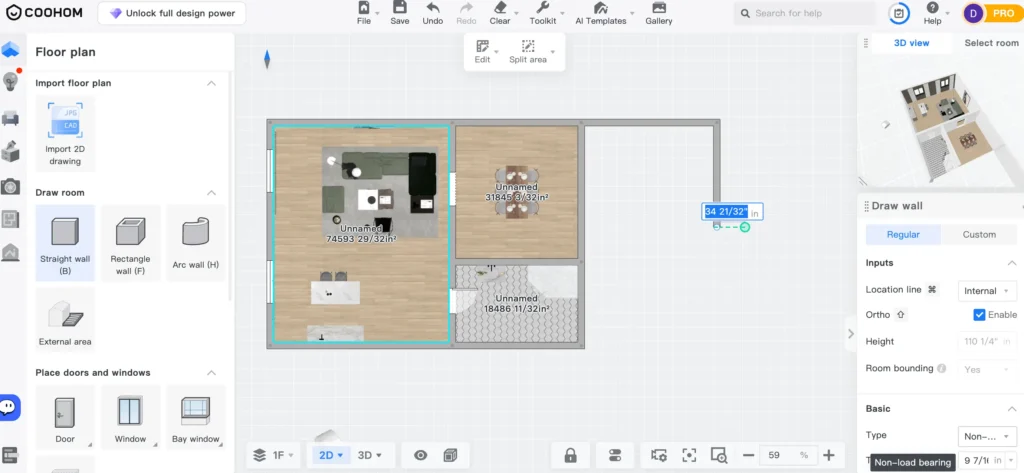
Coohom makes my list of the best beginner-friendly interior design software because of its ease of use and its ability to create realistic photorealistic renders at a great price point.
Coohom’s 2D and 3D floor planning tools continue to impress me. As the platform evolves, each update makes it easier for designers to bring their ideas to life and design with greater ease and efficiency.
The latest update allows users to convert images into 3D models, enabling designers to create more accurate representations of their designs without compromising on the quality of their visualizations.
Beyond this, Coohom’s floor planner also features an extensive library filled with materials, furniture, artwork, and other design elements that can easily be placed within your model.
My favourite part of Coohom, however, is its impressive ability to generate photorealistic renders using its integrated AI technology. This makes it an especially valuable tool for designers looking to visualize their concepts and present their ideas in a highly realistic way.
Read more about Coohom, here.
DesignFiles
Why It Makes the List
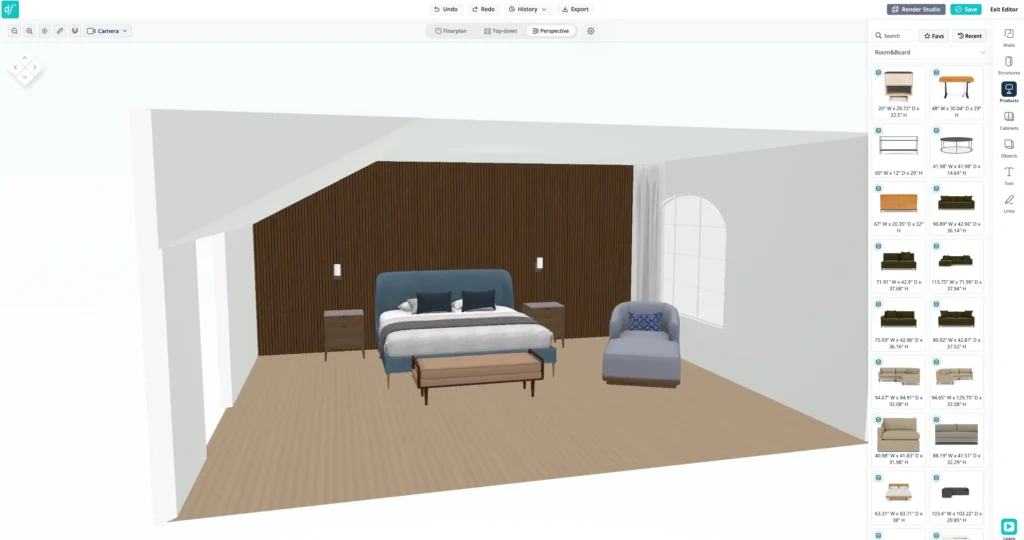
DesignFiles is an all-in-one software platform created specifically for interior designers, with a built-in 2D and 3D floor planner. It makes the list of the best beginner-friendly interior design software because the floor planner is easy to use, and the platform also offers helpful resources to guide you through the drawing and design process.
The 2D floor planner allows you to upload an image of an existing floor plan, scale it, and then trace over it to create your digital layout. Adding architectural elements is also straightforward, and many of these elements can be easily customized to suit your project.
The 3D floor planner does have some limitations. For example, it currently doesn’t allow you to generate 3D models directly from 2D images or upload your own custom materials. However, it does offer an extensive 3D model library with nearly one million items, including furniture, decor, appliances, and more. The platform also includes a materials library, giving you plenty of options when designing and visualizing your space.
One feature I particularly like about the DesignFiles floor planner is the selection of popular furniture brands available within the 3D model gallery. This makes it easier for designers to incorporate recognizable, real-world products into their designs.
Floorplanning + Mood Boards
DesignFiles also has an impressive mood board feature that allows designers to edit and customize their 3D models and images in a way that feels similar to working in Photoshop. This gives you more creative control over the final presentation of your design concepts.
To top it all off, DesignFiles has built-in AI rendering capabilities and offers one-on-one training sessions to help users get the most out of the platform. There is also a free trial available, making it easy to test the software before committing.
All things considered, DesignFiles certainly deserves a spot on the list of beginner-friendly interior design software worth considering, especially for designers looking for an all-in-one platform that combines floor planning, 3D visualization, mood boards, sourcing, and other essential design tools.
Read more about DesignFiles, here.
Rayon.Design
Why It Makes the List
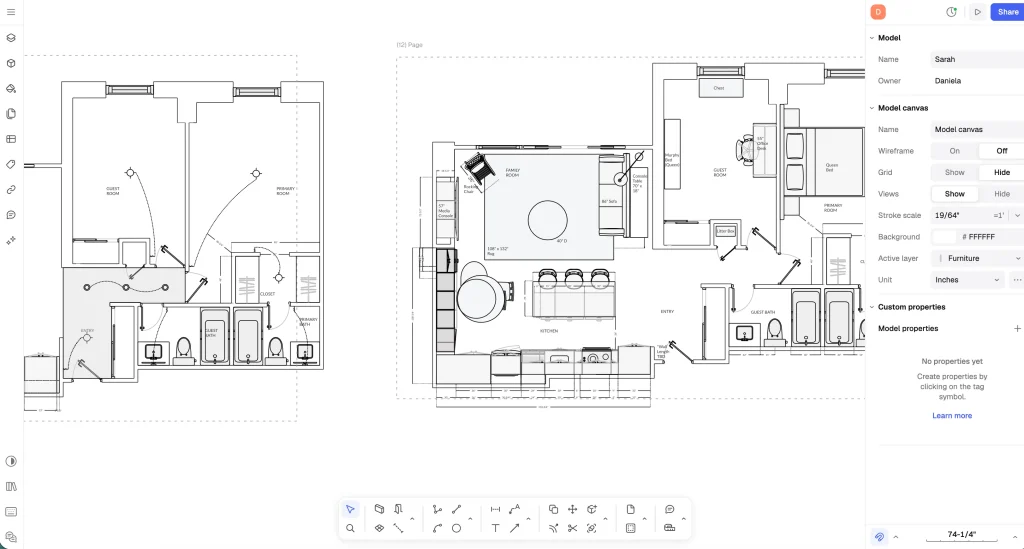
Rayon is a little different from the other software on this list because it isn’t a traditional 2D/3D floor planner. Instead, it’s a drawing and drafting software that’s comparable to AutoCAD. In my opinion, however, Rayon is much easier to draw in than AutoCAD (and for the record, I love AutoCAD!).
Since I was introduced to Rayon, it has actually replaced AutoCAD in much of my workflow. I find it easier to create polished and impressive interior design presentations for my clients, while still having the flexibility and precision I need as a designer.
What I love about this software—and why it makes my list of the best beginner-friendly interior design software—is its extensive template library. It includes a wide range of interior design templates that can make a designer’s life much easier, especially when you’re just getting started.
Rayon also has an extensive video library on YouTube that walks designers through how to use the software step by step. For beginners, having access to this kind of educational content is incredibly valuable and can make the learning curve much less intimidating.
Read more about Rayon, here.
Click Here To Shop My Favourite Home Goods
Let’s design your space together, virtually.