In today’s post, I’m reviewing an AI tool for decorating called VisualizeAI. This platform stands out to me for a few key reasons. First off, it’s a Canadian company (yay, Canadians in tech!). Second, it offers some unique features that aren’t commonly found across other AI decorating tools—and trust me, I’ve tried nearly all of them.
So, let’s dive into this case study, explore what VisualizeAI can do, and critique the results.

AVOID COSTLY (AND UGLY) DESIGN MISTAKES

Note: This post is sponsored by VisualizeAI, but as always, all thoughts and opinions are my own.
What Can VisualizeAI Do?

VisualizeAI is designed with interior decorators, designers and architects in mind. Unlike many tools that only focus on interiors, VisualizeAI can also redesign and render exteriors—a capability that’s less common in the AI interior design tool market. I will be testing out this tool’s interior and exterior redesign capabilities.
Here are some of its standout features:
- Sketch to Render: Turn hand-drawn sketches into realistic renderings.
- Inspiration Uploads: Upload reference images to guide the AI.
- Custom Prompts: Provide detailed instructions for style and design preferences.
Now, this AI feature really caught my attention…
- “Ask AI” Feature: Upload a photo of a space and ask the AI to critique it. This is an innovative feature I haven’t seen elsewhere, and it demonstrates the tool’s intuitive nature.
In this review, I’ll be testing all of these, including the “Ask AI” feature, to see just how far this tool can push the limits of AI in decorating (and whether it could ever put a designer like me out of business!).
Redecorating a Living Room with AI
For my first test, I asked VisualizeAI to redecorate a dated living room.
If you know me, you know I travel a lot. Right now, I’m staying in a cottage in rural Lithuania—a charming space…however, it could definitely use a makeover. See below for the before photo.
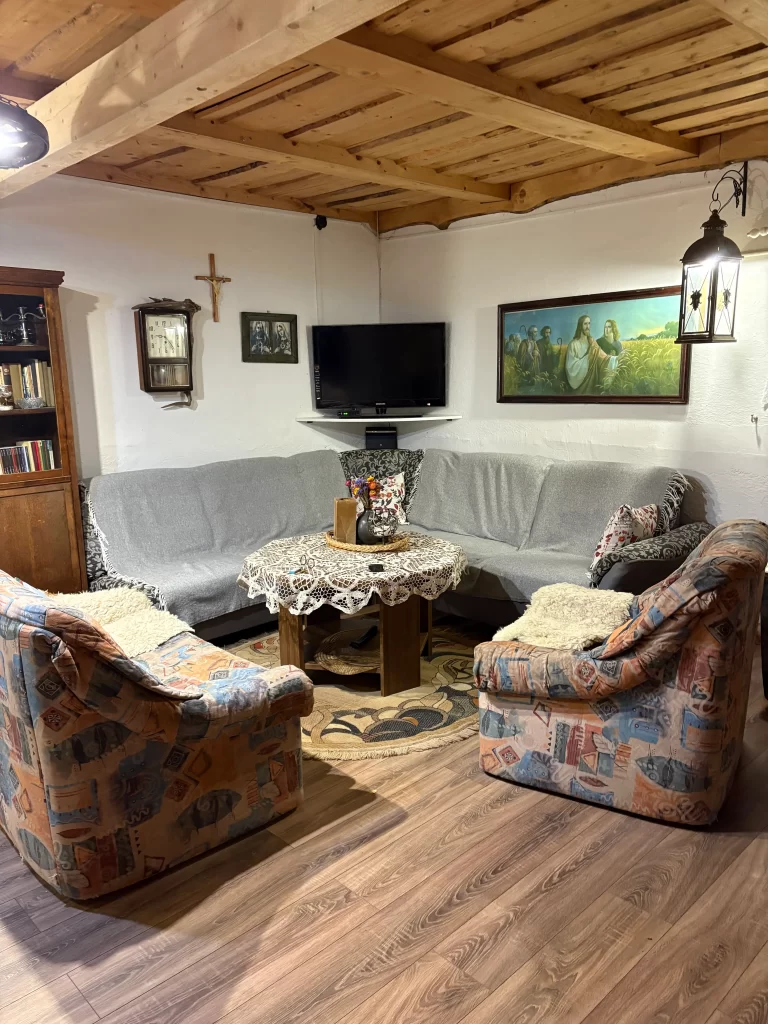
The furniture is outdated and falling apart, so I used VisualizeAI to explore fresh styles. I first prompted the AI to redesign the space in a cottagecore style. I thought this style was the most fitting. See below for the result:

A Designer’s Critique On AI For Decorating:
- The cottagecore aesthetic came through beautifully.
- I loved that the AI preserved the ceiling details, maintaining character while refreshing the look.
- The furniture choices felt realistic—pieces you could actually source and recreate.
- The light and airy feel worked perfectly for the space.
- The only hiccup? The AI added windows where none existed—a common mistake I’ve noticed across most AI decorating tools.
That said, the purpose of AI decorating tools is to inspire and provide a design direction—not deliver flawless blueprints. With that perspective, VisualizeAI did an excellent job.
I also tried a farmhouse style redesign, and again, the AI captured the essence of the style while retaining the space’s original charm. See below for the output.

This AI decorating tool offers a wide range of style options—from Art Deco to Maximalist—covering popular interior design trends that can help you explore and narrow down the style you’d like to redecorate in.
Testing VisualizeAI for Exterior Rendering
Next, I wanted to test VisualizeAI’s exterior rendering capabilities, using the same Lithuanian cottage as a case study.
Here’s the before: charming, but definitely in need of some love.

I asked the AI to redesign the exterior in a Craftsman style, and the results were seriously impressive. The AI maintained the original charm but elevated the design into something truly eye-catching. For anyone considering renovations, this feature could be a game-changer.

I was especially impressed that this AI was able to work with a photo taken at night. When testing AI tools, I like to use realistic photos and settings—since we can’t always capture the perfect shot at the perfect angle—and it’s great to see that the AI can still deliver strong results in those conditions.
The Unique “Ask AI” Feature
Finally, I tested VisualizeAI’s most intriguing and unique feature: Ask AI.
For this, I uploaded a kitchen I designed in the past—not my masterpiece, but cozy and functional (the client loves it, which is what really counts!). I asked the AI: “How can I make the design better?” Here is the photo and design in question (before staging and such):

Here’s what it suggested:
- Add under-cabinet lighting or pendants for brightness and atmosphere.
- Incorporate a colourful or patterned backsplash for interest.
- Introduce open shelving with stylish brackets or unique materials.
- Upgrade cabinet handles for a modern touch.
- Add plants or colourful accessories for warmth and texture.
- Place a rug underfoot for comfort and visual appeal.
- Include art or wall decor to personalize the space.
- Experiment with two-tone cabinetry for added contrast.
AI Tool For Decorating “Ask AI” Critique:
The recommendations were thoughtful, practical, and stylistically on point. Of course, you always need to adapt AI suggestions to your own budget, space, and limitations—but as a creative starting point, this tool delivers great value.
This is a feature I haven’t seen in other AI interior design tools, and it truly intrigued me the most—and for good reason. I think this tool is especially valuable for anyone looking for practical advice. Maybe you’re not planning to redecorate your entire space, but instead want guidance on how to improve it through slow decorating practices or simply need a little push in the right direction.
A Designer’s Final Review of VisualizeAI
I’ve mentioned VisualizeAI before in a previous post [The Best and Worst Interior Design AI,A Designer’s Review], but after testing it more extensively, I can confidently share my holistic thoughts:
- This AI decorating tool is versatile and intuitive.
- It produces realistic outputs for both interiors and exteriors.
- It offers unique features, like “Ask AI,” that set it apart from competitors.
- It’s a strong option for homeowners, architects, designers, and decorators looking to brainstorm, explore, or visualize design concepts.
In short, VisualizeAI can take your sketches, elevations, and photos and transform them into realistic, buildable designs across a wide range of styles. I think it’s a great option if you are looking to invest in an AI interior design tool!
Exclusive Promo Code for VisualizeAI
The team at VisualizeAI has generously given my readers an exclusive offer!
Use code Dee10 to save 10% on your subscription.
If you’re curious to try an AI tool for decorating, interior design, or even exterior upgrades, I’d love to hear your thoughts in the comments below.
Click Here To Shop My Favourite Home Goods
Let’s design your space together, virtually.