Remodel AI: My Review + Secret to Free Pro Upgrade
Okay, here we go, yet another in-depth AI interior design review! In this post, I’ll be reviewing Remodel AI Pro, and yes, there’s a way to get a full year of the Pro version for free (keep reading for the details).
If you’ve read some of my previous posts, you’ll know I’ve already tested this AI tool a bit, but this time, I’m really putting it through testing. What sets Remodel AI apart is its advertised “Shop” feature, which promises to help you find real products that closely match the ones pictured in your AI-generated designs. I’ll be digging into how well it actually works. So, let’s dive in.
Read: The Best and Worst Interior Design AI,A Designer’s Review
Read: Latest Bedroom Designs For Airbnb Created With AI Design
AVOID COSTLY (AND UGLY) DESIGN MISTAKES

Case Study: Remodel AI Living Room Redesign
Remodel AI is developed by ReImage AI, and is an AI-powered interior design phone app that allows users to transform their spaces using virtual renderings, mood boards, and realistic design simulations. It leverages artificial intelligence to help homeowners, renters, and even design professionals (like me) visualize room makeovers, try out new styles, and generate decor suggestions with just a few clicks, all from a photo of their existing space.
For my first test, I want to see how well Remodel AI redecorates this living room.

As you can see, this living room is a bit drab. I am not feeling the pineapple-plant theme. Let’s see what this app can do.
Options in Remodel AI
When you upload a photo into Remodel AI, you’re immediately presented with a range of powerful transformation options designed to help you visualize and edit your space. These features make it easy to tailor your redesign based on your goals, whether you’re looking for a small refresh or a total overhaul. Here’s some of what you can do:
- Full Remodel: This option generates a complete redesign of your space, altering floors, walls, furniture, and decor to showcase an entirely new look.
- New Floors: Experiment with different flooring options (from hardwood to tile to carpet).
- New Walls: Explore updated wall finishes including materials like brick, panelling, or wallpaper to add texture and style to your space.
- Paint: Quickly test out new wall colours without lifting a paintbrush.
- Shop: This links the AI-generated items to real-life products you can purchase, helping you bring the digital design into reality.
- Remove: Use this to digitally erase furniture or elements you no longer want.
- Replace: Swap out specific items like a sofa, table, or light fixture with AI-suggested alternatives that fit your style.
- Reskin: This subtle but powerful tool lets you change surface finishes-like turning a leather chair into a velvet one, or a wood table into marble, without changing the item’s shape or scale.
Full Remodel
Ok, so let’s give this living room a full remodel, shall we? First, I selected MCM style. Here is what I got:

For another test, I regenerated to a Cottage style and got this:

Now, looking at these two outputs, which one do I think is better? Well, style is subjective. That said, in terms of realism and how well the design aligns with the intended style, I’d say the cottage version has a slight edge. Still, both outputs look great and offer strong design direction.
New Floor Feature
I decided to try the same living room and see how just changing the floors would look, since this AI is specifically trained to understand light and dark shading. I selected the light flooring option and got this:

Fantastic job, AI! (Hopefully, your boss isn’t saying the same)
Replace Object Feature
For this test, I asked the AI to replace the coffee table with a burgundy ottoman (a bit of a random choice, I know). It took a few tries to get it right, but eventually, I landed on this result:

I am pretty impressed with this tool.
Reskin Feature
For this prompt, I asked the AI to redesign this sofa. I prompted it to reskin in camel leather.

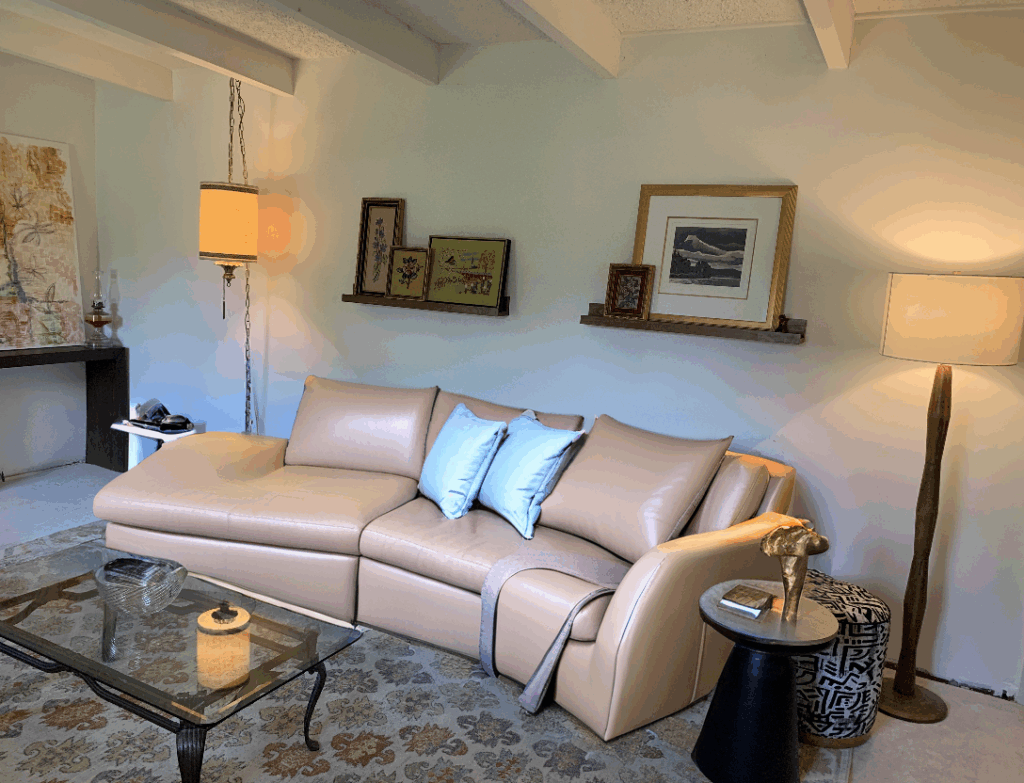
The AI did a good job.
Shop Feature
This is the feature I’m most curious about. If you’ve read my previous blog posts on AI interior design, you’ll know my overall take: AI is a great tool, but often lacks real research behind its product selections. However, with a tool like “Shop,” I just might be proven wrong.
Let’s go back to the MCM remodel. You can hover over any area, and the AI will recommend similar products displayed below.
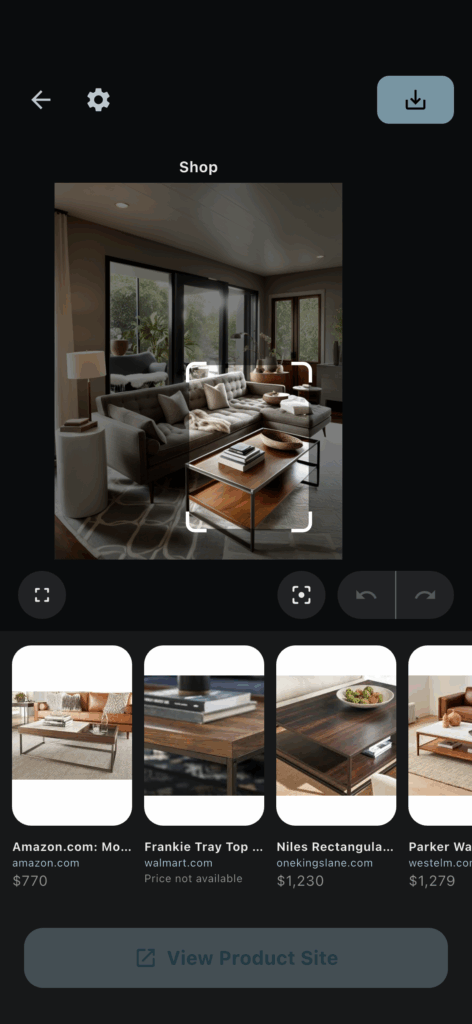
I have to admit, the AI is pretty good at finding similar products. Now, I wouldn’t say this coffee table is the most challenging item to source. Something more unique would put the AI to the test. So, I decided to look for the burgundy ottoman from the “replace” feature test.
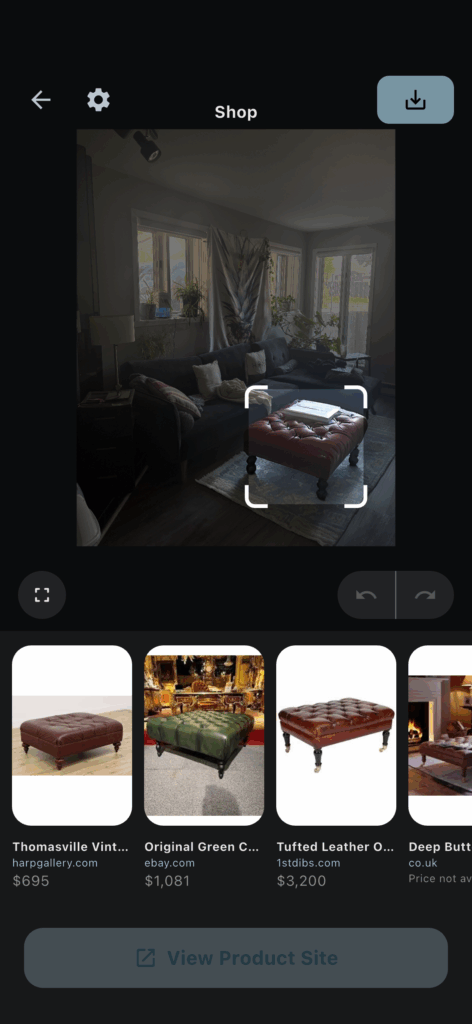
Once again, impressive, the matches they found did look promising.
Sourcing With AI…Yay or Nay?
The shop feature in this AI is pretty solid at finding items that closely resemble what’s shown. I tested it with different products like sofas, lamps, and end tables. While there are times the AI doesn’t quite recognize an item correctly, overall, it works very well.
That said, sourcing isn’t just about finding things that look good. There’s a lot to consider. Starting with scale, you need to measure and plan your space to know what size furniture will fit. Beyond that, material quality, function, price, and availability all matter. There’s a lot that goes into sourcing and pulling a room together (I’m a designer, so I know firsthand).
So, how would I use this tool? It’s a good jumping-off point to find pieces that are stylistically similar. From there, you’ll need to use your own judgment to consider all the other important factors before making a purchase.
Remodel AI Final Thoughts and Free Pro Upgrade
If you’ve read all the way down here, you’re probably wondering about my final thoughts, and how to get a free Pro upgrade. Well, I’m happy to say that Remodel AI gets the Spaces by Dee stamp of approval! As you’ve seen, it delivers on what it promises. It’s a solid option if you’re looking for an AI interior design tool to help with your space redesign. The AI works well; it’s fast, very easy to use and has all the features you’d need to redecorate your space.
How To Get a Monthly AI Interior Design PRO Subscription for Free
My friends at The Remodel AI App are giving away a free monthly PRO subscription to three of my readers. All you have to do is book a 30-minute virtual consultation with me. We’ll use the session to help guide the direction of your project. You’ll get expert interior design advice plus a free month subscription to one of the best AI interior design tools out there.
👉 Use this special link to book. The first three readers to complete their consultation will have their free PRO subscription activated!
Click Here To Shop My Favourite Home Goods
Let’s design your space together, virtually.