Is Claude The Best New AI Tool For Interior Designers?
There’s a new AI that interior designers seem to be buzzing about—Claude—and as a self-proclaimed AI-for-interior-design expert, you know I had to give it a try.
Now, Claude isn’t specifically built for interior design or for designers. However, like ChatGPT, Gemini, and other AI tools, you can certainly experiment with using it for design-related tasks.
So, I’ll be putting it to the test—creating 3D visuals, generating photorealistic concepts, sourcing furniture, and more—to see whether Claude can truly be considered a viable AI tool for interior design.

Claude Features For Interior Designers
According to Claude AI, here is what it can do to assist with the interior design process:
Mood Boards + Planning
- Review and give feedback on your 3D renders or mood boards
- Suggest furniture arrangements, colour palettes, and material combinations
- Help develop a design concept from scratch
Client-Facing Documents
- Write professional design proposals and presentations
- Create detailed project briefs and scope of work documents
- Draft client questionnaires to capture preferences
Spreadsheets & Budgets
- Build furniture/material specification sheets in Excel (FF&E schedules)
- Create project budget trackers and cost breakdowns
- Procurement and vendor comparison tables
Presentations & Reports
- Design PowerPoint decks for client presentations
- Write design narratives and concept statements
- Create mood board write-ups and style guides
Business & Communication
- Draft client emails, follow-ups, and proposals
- Write website copy, bio, and social media captions
- Create contracts and terms of service templates
Research
- Research trending styles, materials, or suppliers
- Compare product specs and pricing
- Summarize building codes or accessibility standards
Designer Tests Claude For Interior Design
Interior Design Mood Boards
Every project starts with a mood board, and Claude AI actually has a built-in feature specifically for creating one. When you request a mood board, it even provides category options—including “Interior / Home Design.” So, even though this isn’t an AI tool designed exclusively for interior designers, it clearly has some design-focused features built in.
Once you select “Interior / Home Design,” Claude asks, “Do you have a vibe in mind?” It then suggests a few preset “vibes,” as it calls them—such as Warm & Cozy, Cool & Minimal, and Bold & Dramatic. There’s also an “Other” option where you can input your own description. I chose to enter “feminine and contemporary.”
Claude immediately generated a series of Pinterest-style inspiration images based on what it interpreted as “feminine and contemporary.”
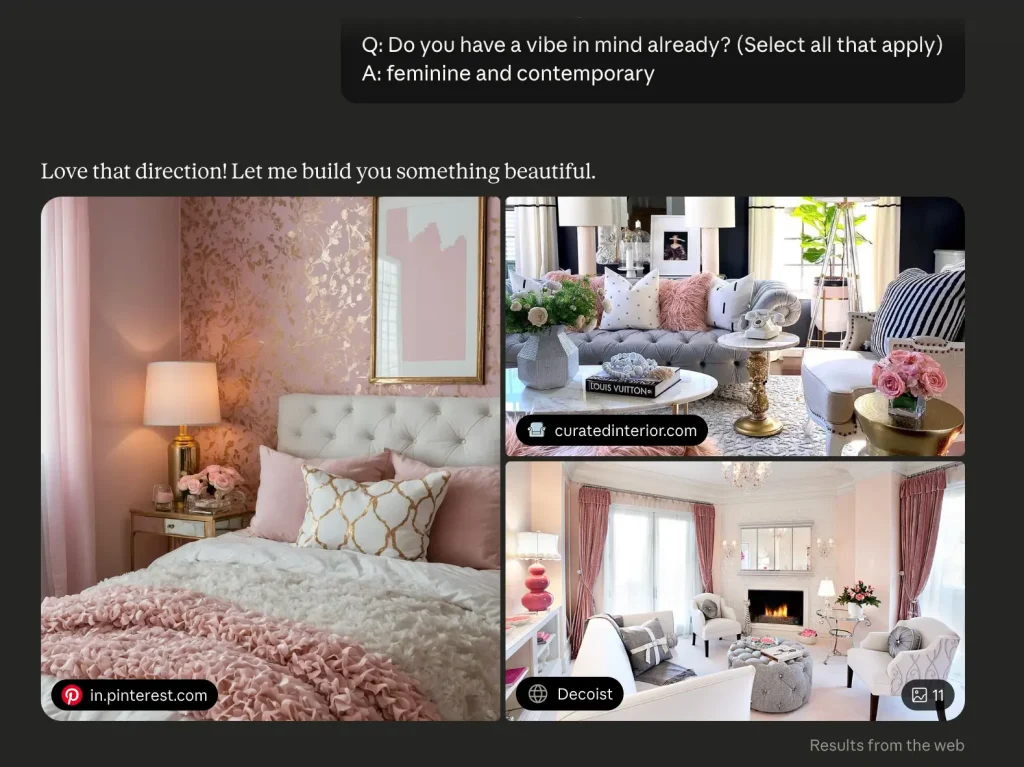
I could definitely see the feminine elements, but the contemporary aspect wasn’t as strong as I expected.
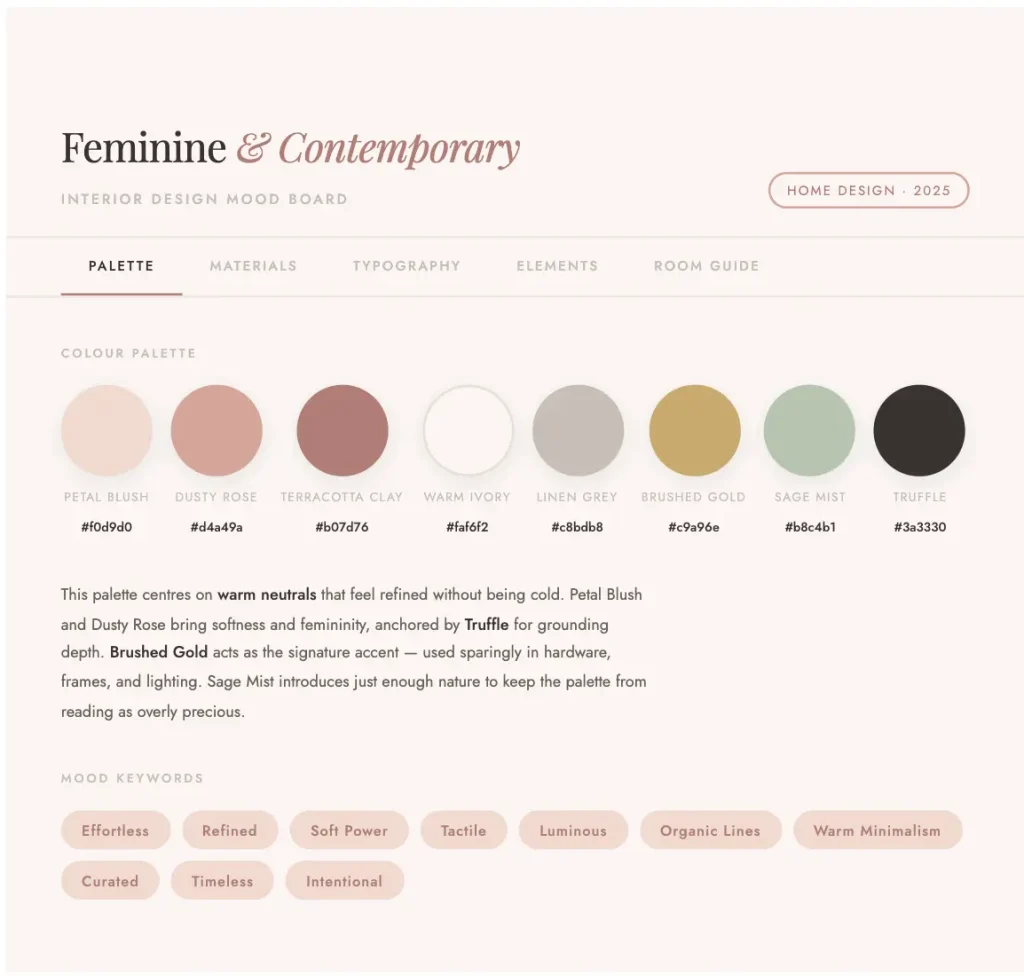
After that, Claude began generating what it calls an “interactive mood board.”
The results
This is what Claude delivered:
My 2 Cents
I have to admit, the interactive style of the mood board is very impressive. You can click through different tabs, and it suggests materials to consider, key design elements, and even provides a room guide—which is pretty cool. I’m not entirely sure why typography is included for an interior design project, but sure.
Although Claude’s output style is visually impressive, my critique is that the AI didn’t ask for much input. It simply took my two descriptive words and ran with them.
It didn’t present a selection of images for me to confirm what “feminine” and “contemporary” meant to me. Instead, it generated design elements based solely on its own interpretation, without incorporating my feedback or preferences.
So while the format is polished and engaging, I think the tool misses the mark when it comes to creating truly thoughtful, collaborative, interactive mood boards.
For more on interior design mood boards, see here.
Claude for Furniture Plans
The next thing I wanted to test was Claude’s ability to handle furniture and space planning, since it claims it can assist with layout development. If that were true, it could be a helpful tool in the design process. So, I provided it with a blank space to work from.
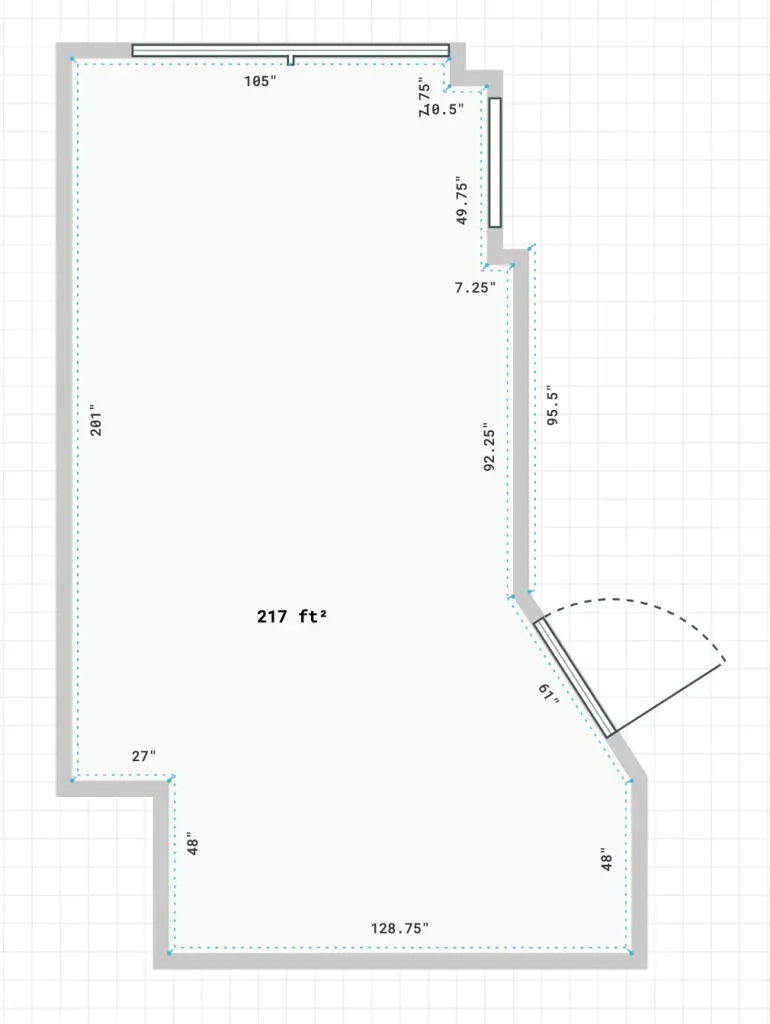
I uploaded the plan and prompted the AI to create a layout for a living area along with a small bistro space.
This time, Claude actually asked several follow-up questions—wanting to clarify the client’s lifestyle, style preferences, and a few other details before proceeding.
Here was the result:
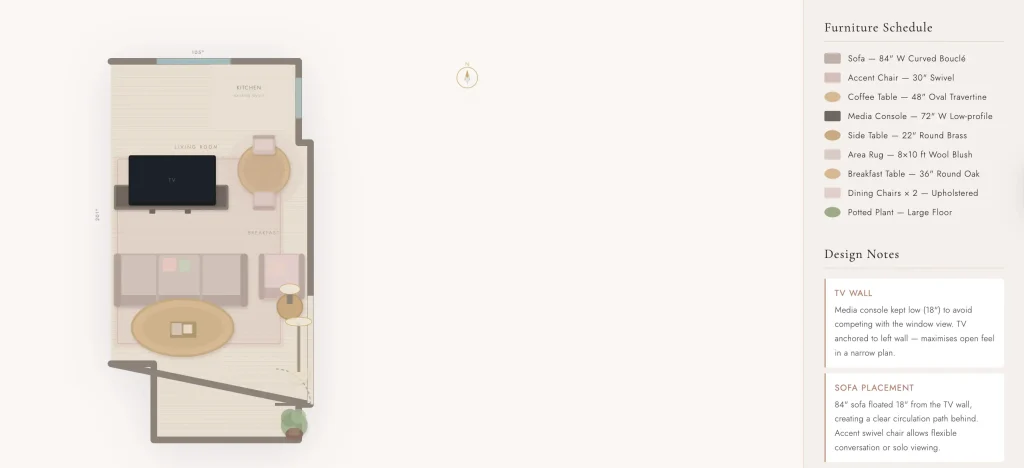
Honestly, it’s bad, terrible actually. It reminded me of the time I asked ChatGPT to create a space plan. The AI changed the rooms shape and made an impossible layout.
It seems that Claude simply isn’t advanced enough (at least at this stage) to effectively space plan a room in a practical, functional way.
FF&E Schedules With Claude
Claude also claims it can create FF&E schedules. And just so you know, it generates these in Excel, which feels gone with the times, (especially when you compare it to more advanced spec-writing software).
Anyway, the AI asked whether I wanted an FF&E schedule based on the floor plan it had just created. I said yes, and it quickly produced an Excel-style schedule that looked fairly standard at first glance.
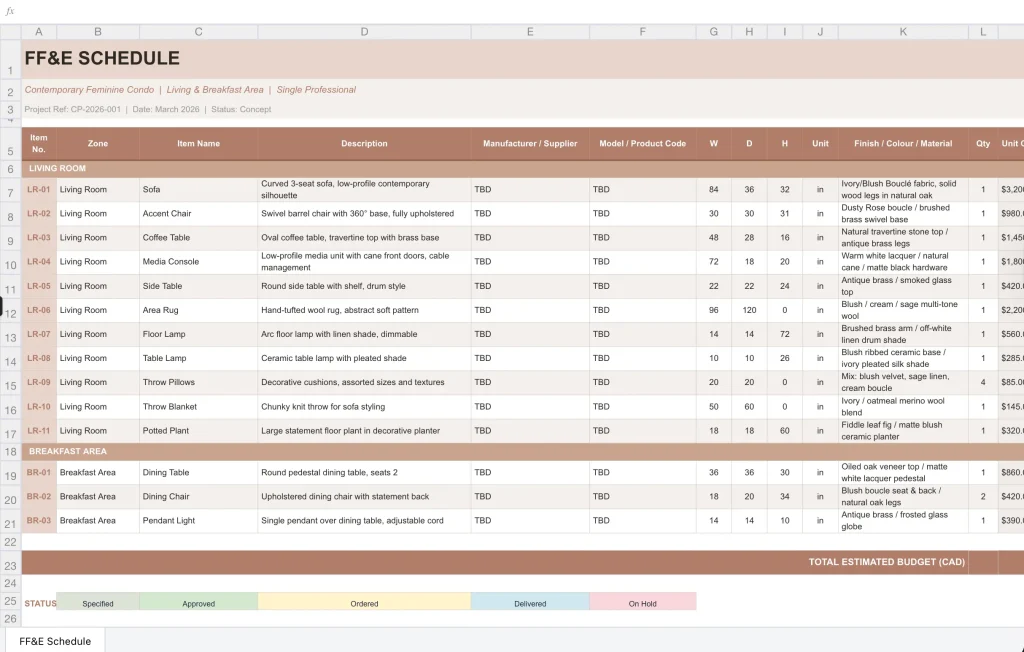
It included columns for zone, item name, description, manufacturer, model, dimensions, materials, and cost.
However, the manufacturer and model fields were left as “TBD,” and the AI went ahead and filled in dimensions, materials, and costs for completely arbitrary pieces that it hadn’t actually sourced.
So essentially, what it created was a placeholder FF&E schedule. It might offer a basic framework or reference point for building your own, but since the AI didn’t source real products, it doesn’t go much beyond that.
Read: The Best Interior Design Template Tools, Designer Reviews
Furniture Sourcing With Claude
I thought I would test Claude as a furniture sourcing assistant, since using AI to help with sourcing is actually one of the main ways I integrate AI into my business. As a designer, I prefer to handle the creative direction myself—but when it comes to sourcing, I don’t mind having support, especially when I’m searching for very specific pieces (which I often am).
So, I asked the AI to help me find the following—items I’m genuinely sourcing right now:
- A rolling storage piece suitable for organizing makeup
- 96″ multicoloured silk curtains with some sort of gradient effect
- A black-and-white picture frame gallery wall that would span approximately 60″ x 60″
For the rolling storage piece, Claude gave me five options—one from IKEA, a few from Amazon, and one from an unfamiliar brand. Honestly, I wasn’t impressed with any of them, so I prompted it again to find additional options.
The second round produced even more IKEA suggestions, but it did surface one strong option from Pottery Barn: the Customizable Pottery Barn Teen Rolling Beauty Cart. That recommendation felt more thoughtful. Anyone can search IKEA or Amazon—it’s digging through a wide range of vendors to uncover less obvious options that really save time.
AI glitches
Next, when I asked it to source the drapery, it accidentally gave me more makeup cart options. As I always do, I called the AI out.

After correcting itself, it provided a few Amazon options and suggested I search Pottery Barn and Anthropologie for what I was looking for. Not exactly groundbreaking results.
Finally, I asked it to find the black-and-white picture frame gallery. It suggested an option from Crate & Barrel and two other brands I wasn’t familiar with. The results were decent, but the unfamiliar brands felt slightly questionable.
Is Claude An AI Worth Using?
Overall, I wasn’t overly impressed with Claude as an interior design sourcing tool. That said, I’m speaking as a designer who has tested all the tools—I’m constantly comparing platforms and looking for the next one to truly outperform the others. In my opinion, there are currently more robust and helpful tools available, and the results here reflect that.
What I will say is that Claude seems to be on the right track. The interactive mood boards, the ability to generate FF&E schedules, and presentation-style outputs show potential—but there are definitely refinements needed before it becomes a truly valuable tool for interior designers.
Read: This AI Beta Really Excited Me As An Interior Designer
Click Here To Shop My Favourite Home Goods
Let’s design your space together, virtually.