If you are a regular on my blog, you might have realized that I have shown favour to both floor planning tools Coohom and Planner 5D. This is valid, as both of these floor planners are amazing tools for the average DIYer and the design professional alike. However, it leads me to the question: Which floor planner is better, and for what reasons? Although I love both of these 3D tools, I think it’s time for a battle of the software. Let’s break down Coohom and Planner 5D—what is similar between them, what sets them apart, my user experience with both, and ultimately: which one should you choose?

AVOID COSTLY (AND UGLY) DESIGN MISTAKES

The Similar Features Between Coohom and Planner 5D

First, let’s look at the features that Coohom and Planner 5D share.
Core Design Functionality
- Dual-View Switching: Both platforms allow you to draw precise floor plans in a 2D drafting view and instantly toggle to a 3D view to explore the space visually.
- Drag-and-Drop Interface: They both rely on an intuitive, user-friendly drag-and-drop system. You don’t need CAD skills to pull a sofa from the library and place it in the living room.
- Parametric Scaling: In both tools, you can resize furniture and architectural elements (like windows and doors) to fit specific dimensions.
Visualization & Rendering
- Photorealistic Rendering: Both offer built-in rendering engines that process your design into a high-quality, photo-like image (snapshots). They both handle lighting, shadows, and textures to make the design look “real.”
- Walkthroughs: Both allow you to virtually “walk” through your designed space to get a feel for the flow and layout from a first-person perspective.
- Lighting Controls: Both allow you to adjust natural light (sunlight direction) and artificial light sources (lamps, ceiling lights) to set the mood of the render.
Libraries & Assets
- Extensive Asset Libraries: Both come with massive, built-in catalogs of 3D models (furniture, decor, appliances) and materials (flooring, wall colors, textures).
- Brand Name Items: Both have partnered with real-world brands, allowing users to place actual purchasable items in their designs (though the specific brands they partner with differ).
Accessibility & Platform
- Cross-Platform Availability: Both are available as web-based tools (in the browser) and as dedicated mobile apps (iOS and Android), allowing you to design on a tablet or phone.
- Freemium Models: Both offer a “Free” tier that lets you test the tool and do basic designs, with “Pro” or “Premium” subscriptions required for HD rendering, full catalog access, and advanced features.
AI Integration
- AI Assistance: Both have integrated AI features to speed up the workflow. Planner 5D has the “Smart Wizard” (auto-furnishing rooms), and Coohom has AI-powered templates and lighting solutions.
Unique Features of Coohom
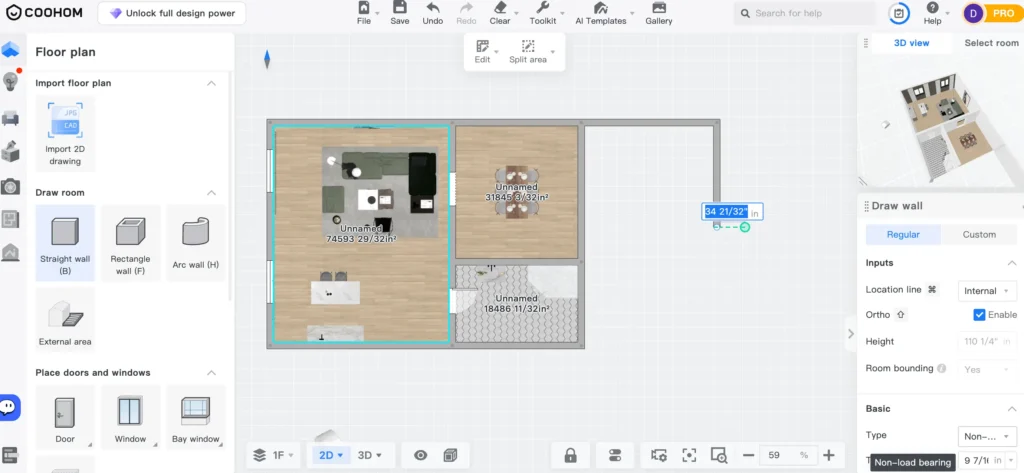
Professional Kitchen & Bath (K&B) Module
This is arguably Coohom‘s biggest differentiator. While Planner 5D lets you place cabinets, Coohom has a dedicated parametric K&B engine.
- What it does: You can customize cabinets down to the millimeter. It features “smart generation” of countertops, toe kicks, and cornices.
- Why it matters: If you are designing a kitchen renovation, Coohom acts more like professional cabinet software. You can open doors/drawers to check clearance, which is rare in standard floor planners.
Lightning-Fast Rendering (Cloud-Based)
Coohom is famous in the industry for its rendering speed.
- The Difference: While many tools take minutes (or hours) to render a 4K image, Coohom can often churn out a photo-realistic 4K render in under 10 seconds.
- Video Rendering: It also specializes in generating walk-through videos much faster than most competitors because it utilizes a massive cloud computing network rather than your computer’s power.
Massive Asset Library (1 Million+ Models)
- Coohom claims a library of over 1,000,000+ 3D models, significantly larger than Planner 5D’s catalogue.
- Realism: Because Coohom is often used by furniture manufacturers to showcase products, the furniture models tend to be highly detailed and textured (e.g., you can see the fabric weave on a sofa).
720° Virtual Tours
- Most floor planners offer 360° views (looking around from one spot). Coohom offers 720° tours, which essentially link multiple 360° panoramas together.
- This allows you (or your client) to virtually “walk” from the kitchen to the living room in a seamless web experience, rather than just viewing static snapshots.
Custom Furniture Modeling
- Coohom includes a semi-hidden feature called the Construction Tool or Custom Furniture module.
- Unique Feature: You aren’t limited to the library. You can actually “build” custom furniture pieces using geometric shapes, extrusions, and boolean operations (similar to SketchUp) directly inside the browser.
Merchant & Manufacturing Features (B2B)
- If your audience includes interior designers or carpenters, Coohom integrates with CAM (Computer-Aided Manufacturing) tools. A design made in Coohom can theoretically be sent to a factory machine to cut the wood for the cabinets. This puts it in a different league than Planner 5D, which is purely for visualization.
Unique Features of Planner 5D
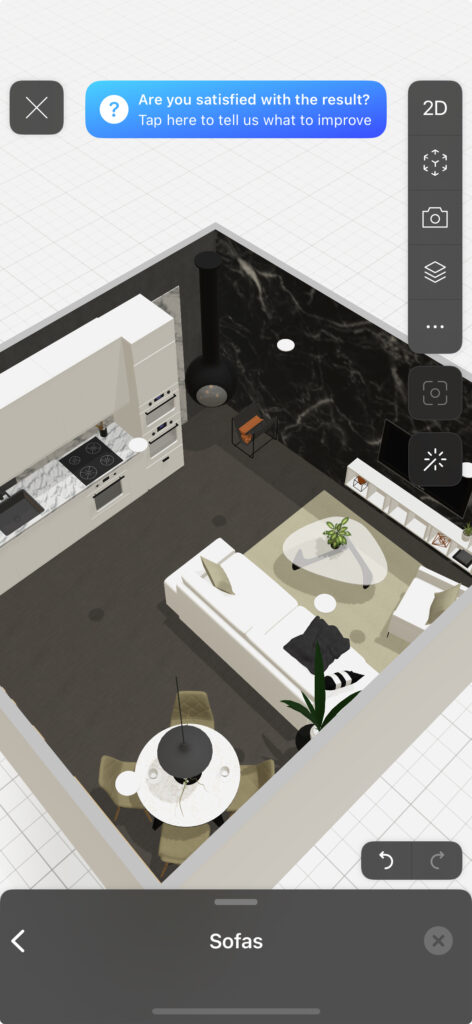
AI “Smart Wizard” & Design Generator
This is Planner 5D‘s killer feature for beginners who don’t know where to start.
- Smart Wizard: You don’t have to place furniture manually. You simply select a room shape, input dimensions, choose a style (e.g., “Industrial” or “Boho”), and the AI automatically arranges the furniture for you.
- Why it matters: In Coohom, you have to drag and drop every single chair and table yourself. Planner 5D does the heavy lifting if you just want a quick visualization.
- Bernard (AI Chatbot) Planner 5D includes an AI assistant named “Bernard.” You can chat with him to ask design advice (e.g., “What color sofa goes with grey walls?”) or technical questions. It adds a layer of personality and support that the more corporate Coohom lacks.
Augmented Reality (AR) & VR Focus
Planner 5D has invested heavily in mobile-first technologies that merge your design with the real world.
- AR Tool: You can use your phone’s camera to project your 3D floor plan onto your real-life floor, or “place” a virtual sofa in your actual living room to see if it fits.
- VR Mode: It supports Google Cardboard and other VR glasses directly from the app, allowing for an immersive “step inside” experience that is more accessible to the average consumer than Coohom’s professional VR solutions.
“Capture Your Room” (Scan-to-Plan)
Planner 5D creates a seamless bridge between your physical home and the digital tool.
- Plan Recognition: You can upload a photo of a blue-print (or a hand-drawn sketch), and the AI will convert it into an editable 2D digital floor plan.
- Room Scan: On iOS devices with LiDAR (newer iPhones/iPads), you can scan your room with the camera, and it will build the 3D model instantly. Coohom has similar tech, but Planner 5D’s integration into the consumer app is generally considered more user-friendly for DIYers.
Exterior & Landscape Design
While Coohom can do exteriors, Planner 5D places a much higher emphasis on it for the average homeowner.
- It has a robust library dedicated specifically to landscaping (pools, fences, garden paths, trees, BBQs). It is widely considered the better option if you are planning a backyard renovation rather than just an interior one.
A Designer’s User Experience With Coohom and Planner 5D

So, I have broken it down for you. If you are comparing the floor planner tools Coohom and Planner 5D, you now know what makes them similar and what sets them apart, helping you determine which floor planner is right for you.
As a designer who has used both floor planners extensively—and written about them just as much—I have my own two cents to share regarding my user experience. I definitely have preferences on which one to use in different scenarios.
Which Interior Floor Planner is best?
The Best Floor Planner: In terms of floor planning, I think Coohom is easier to get the hang of compared to Planner 5D. However, the interface is a little more cluttered, so you have to figure out where all the tools are. Conversely, Planner 5D has a cleaner interface, but I sometimes find that placing items precisely can be a little trickier. That said, both are very intuitive when it comes to creating 2D (and concurrently 3D) floor plans.
On Customization: When it comes to customization—considering custom cabinets and objects—Coohom wins here. It has more capabilities for detailed work, and as I noted, the features are heavily geared towards custom kitchen design.
On AI Features: I have to give this round to Planner 5D. Its AI features are some of the best in the industry (and I’ve tried basically all of them). The AI outputs for changing the style of a room or auto-furnishing a space are much more impressive than the results I get with Coohom.
On Rendering: I am at a crossroads here; I think both of these platforms produce amazing renders. It’s a tie.
Overall, Planner 5D has standout AI features, and I love the ease of their mobile app. So, I have broken it down for you. If you are comparing the floor planner tools Coohom boasts impressive customization abilities and creates high-speed professional visuals. Both options are amazing floor planners that bridge the gap between worlds, serving both DIYers and professionals in the interior design space.
Read: The Best 3D Floor Planner Software For Pros
Click Here To Shop My Favourite Home Goods
Let’s design your space together, virtually.




Leave a Reply