A Designer’s Review of DesignFiles: The Best Interior Design Software?
Last Updated: Dec 4th 2025
If you’re an interior designer considering investing in the interior design software DesignFiles, keep reading. And if you’ve never heard of DesignFiles, but you’re an interior design professional, you should also keep reading. I’ve been using DesignFiles for years, and I’m here to share an honest (not sponsored) and thorough review of why it’s worth considering for your design business.
What is DesignFiles?
At its core, DesignFiles is an all-in-one portal that lets you manage client invoicing and payments (with a QuickBooks integration), product sourcing, project management, client communication, and even floor planning and 3D modelling. DF has even introduced a new AI enhancement tool to be able to create photorealistic visuals.
DF consolidates all the tools I need into one hub.
Before I discovered DesignFiles, I managed my projects like many designers do:
- Communications via email (hard to keep track of a million email chains)
- Invoicing and payments on separate platforms (not streamlined)
- Sourcing in Excel (who the heck likes Excel?)
- 3D modelling and rendering using multiple programs (Don’t even get me started, but for more Read Interior Design Technologies: Irreversible Change to the Way We Design)

Sound familiar? It was a logistical nightmare. But DesignFiles simplifies everything. It’s a one-stop hub where you can manage every aspect of your project in a single place.
Let me walk you through the highlights of how it works and why it’s a game-changer.
The DesignFiles Interface
When you log into DesignFiles, you will see something like this:
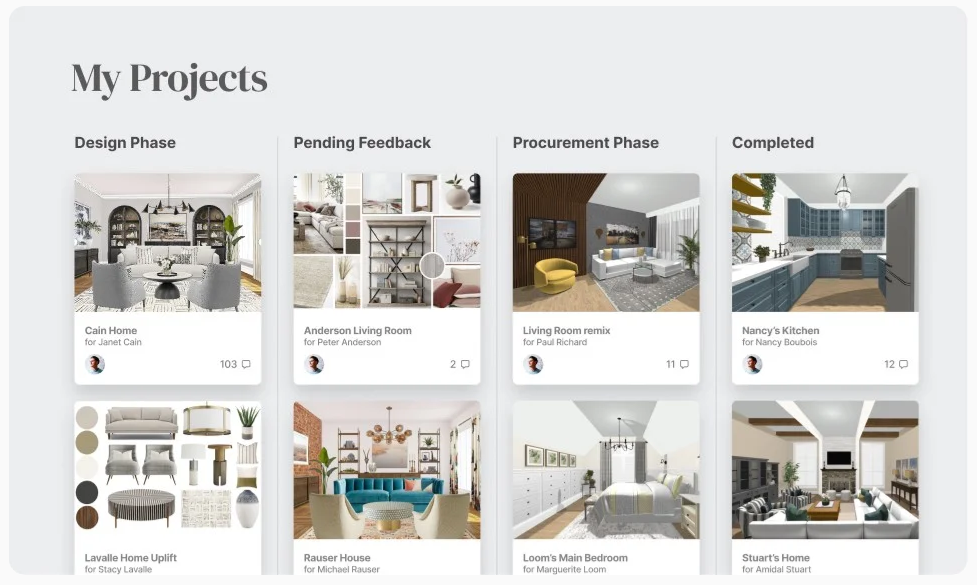
You’re greeted with a clean, intuitive interface displaying all your projects. You can organize these projects by stage, keeping your workflow streamlined.
Clicking on a project takes you to a dashboard where you can see all the designs and mood boards you’ve created for that client. And let me tell you, the mood board feature alone has transformed the way I work.
Creating Mood Boards

The mood board tool in DesignFiles is amazing! It’s super user-friendly, (like all the features in DF). You can easily drag and drop backgrounds, items, and anything else you want. Plus, you can manipulate the colours, angles, and more, giving you full control to create realistic and customized outputs. But best of all, the mood boards are interactive. Both you/your team and your client can click on individual products to view details and either accept or decline them. This makes it easy to visualize the space and track the client’s decisions in real time.
Here’s what makes it stand out:
- Status Tracking: Items can be marked as invoiced, shipped, returned, etc.
- Collaborative Notes: Clients and team members can add comments to individual items.
- Streamlined Approvals: You can track approvals directly on the board, avoiding endless email chains.
The result? A professional, efficient process that elevates the client experience. Here’s what it looks and feels like:
Pretty awesome and professional looking, if I say so! Seriously, this is much better than spending hours on Canva.
Sourcing Made Easy
One of my favourite DesignFiles features is the sourcing library. It includes hundreds of products from top vendors like CB2, West Elm, and Surya. Which makes sourcing faster, you can search for things like “Blue sofa” and the DF library will pull up real products.
But the real magic lies in the browser plugin.
With this plugin, you can clip product details from anywhere on the web and add them directly to your client’s library. This eliminates the need for endless copying and pasting and makes adding products to mood boards effortless.
I LOVEEEE this feature. And I hate copying and pasting. Here’s what it looks like:

Time saved? Hours. Stress avoided? Tons. This feature alone makes DesignFiles worth it for me.
Seriously, I can’t stress how much I hated creating Excel sourcing sheets. If you’re still in that boat – there is a better way.
Floor Plans and 3D Renders

DesignFiles also lets you create to-scale floor plans that automatically generate 3D renders. If you’ve ever used separate tools for CAD and 3D rendering, you’ll know how much of a headache it can be.
While I now primarily use generative AI tools for rendering (check out my review of AI room visualizers here), I appreciate that DesignFiles offers an integrated option for both. Depending on the client’s needs, it’s incredibly useful to have everything in one place.
The New Enhance with AI Feature

In late 2025, DF launched their new feature, the Enhance with AI feature, which is a built-in AI tool that will make your 3D visuals look photo-realistic. It can even improve the look of your mood boards. So, no need to hop to another AI tool. Now, this is a game-changer.
Contracts
Another standout feature is DF’s ability to create e-signable contracts. It’s foolproof, fast, and keeps the process professional.
And if you’re a working designer who is not using a contract. Oh, baby. You need to be reading another article; Read 6 Lessons in 6 Years in the Interior Design Business.
Invoicing, Purchase Orders, Time Tracking, and More
DesignFiles also includes tools for:
- Invoicing: Create and send invoices in a few clicks. DF makes it easy to create an invoice with only the approved items. You can also easily keep track of markups as well.
- Purchase Orders: Easily generate POs for vendors. This shaves off unnecessary procurement time.
- Time Tracking: Monitor billable hours effortlessly. You can even screen record your sessions.
- Calendar Integration: Stay organized by syncing deadlines and meetings.
- Payments: Your clients can easily make payments through Stripe.
And honestly, this isn’t even ALL the features DesignFiles offers. This is a review of the features I use most.
eDesign/Virtual Interior Design
If you’re exploring offering eDesign or virtual interior design services, DesignFiles makes it seamless. From client onboarding to delivering designs remotely, it’s built to support a virtual workflow. (Learn more about eDesign here.)
DF offers a Packages feature that allows you to build out eDesign packages and offer these services to your clientele. Pretty cool and useful, especially if you don’t have a website!
Is DesignFiles Worth It?
DesignFiles has been a game-changer for my business, simplifying my workflow and improving client communication. So for me, yes, it’s worth it. My clients often tell me how cool they think my design portal is. Aside from DF making my clients think highly of me, it makes running a design business much more efficient.
I can’t really imagine going back to the days before DesignFiles. Seriously, don’t show me an Excel sheet, I’ll go running.
DF offers different packages to suite different needs. Maybe you’re a freelance 1-woman show. Maybe you’re a part of a huge design firm. DesignFiles has different tiers for this reason. Click to learn more and sign up.
Click Here To Shop My Favourite Home Goods
Let’s design your space together, virtually.