Claude Prompts for Interior Designers: 3 Best Prompts to Save Hours on Admin

AI has changed my business and my life—for the better. That might sound controversial, but as a solo interior designer and small business owner, it’s my truth.
AI is changing the way interior designers work—and the right Claude prompts for interior designers can take hours of admin off your plate.
And this isn’t the first time our industry has experienced a major technological shift. If you’re a little older than I am, you may remember the transition from hand drafting to AutoCAD, hand sketching to 3D rendering, and paper specification books to digital FF&E schedules. These innovations permanently changed how designers worked, and today, we’re experiencing another significant shift.
With Claude and other AI tools, our workflows are changing yet again—and in ways that genuinely excite me. For the first time, I feel that technology isn’t just helping us design more efficiently; it’s giving us something equally valuable back: our time. It’s helping reduce the administrative workload that comes with running an interior design business, allowing us to focus more on the creative work we actually enjoy.
For solo designers like myself and those running small design teams, this is especially meaningful.
For me, it meant creating client proposals faster, generating FF&E schedules in minutes, drafting and refining client emails, and even handing over parts of my bookkeeping workflow to Claude. Tasks that once consumed hours of my time suddenly became much more manageable.
As a small business owner, adopting an AI-powered workflow felt almost like hiring an entire team. I could delegate more of the repetitive work, oversee the results, make the important decisions, and step into more of a creative director role. Instead of spending so much time managing people, paperwork, and administrative tasks, I could immerse myself in the parts of interior design I genuinely enjoy.
And perhaps most importantly, I no longer felt like I needed to be glued to my laptop for hours beyond what was necessary.
Don’t get me wrong: I’m not against working long hours or putting in the effort to build a business. I understand that hard work comes with the territory of being an entrepreneur. But I didn’t enter the interior design industry because I was passionate about administrative work. I wanted to create beautiful, thoughtful spaces. Yet, somewhere along the way, the creative work often became the smaller part of my day, overshadowed by managing people, coordinating projects, and keeping track of endless paper trails. By the end of the day, I felt depleted.
AI has helped bridge that gap for me.
It hasn’t eliminated the need for my expertise, judgment, or creativity. Instead, it’s helped me spend less time on the tasks that drain my energy and more time on the work that makes this profession rewarding.
So, how did I get started? And how can you begin using Claude to your advantage, even if you’re not particularly tech-savvy?
Here’s how I started building a smarter workflow with Claude—and the three Claude prompts I use most, so you can begin doing the same.
The Best Claude Prompts for Interior Designers
These are the three Claude prompts for interior designers that save me the most time. Copy them, fill in the brackets with your own project details, and adjust them to fit the way you work.

1. Client + Project Research Prompt to Nail Your Discovery Calls
The discovery call is your opportunity to get acquainted with a potential client, understand their needs, and show them why you’re the right designer for the job. It can often make or break your chances of landing a project.
If you show up unprepared, uninformed, or without the right energy, you’re unlikely to leave a lasting impression—and the client may ultimately choose to work with someone else.
That’s why I love using Claude to conduct preliminary client and project research before a discovery call. It allows me to learn more about the client and their property before we even speak, so I can come to the conversation feeling informed, prepared, and genuinely interested in their project.
This preparation also helps you identify potential connection points with your clients. Perhaps you discover something about their background, their neighbourhood, or the history of their property that opens the door to a more personal conversation. These little details can help build rapport and make the client feel that you’re genuinely invested in them and their project, rather than simply trying to win their business.
The goal isn’t to over-research someone or make the conversation feel rehearsed. It’s to arrive prepared, ask more thoughtful questions, and create the foundation for a strong working relationship from the very first interaction.
Here is the Claude prompt:
Before I start with a new client, research the project and client background. Client: [NAME], [COMPANY / PROFESSION / LINKEDIN URL]. Property: [ADDRESS]. Scope: [e.g. kitchen renovation, primary bath, furnishing a condo].
Find: 1) Property details: type, year built, approximate size, listing or sale history and photos, neighbourhood character, and anything that affects the scope (condo rules, heritage status, permit requirements in [CITY]); 2) the client’s professional background from public sources, to help me understand how they communicate and what they value; 3) local considerations: typical costs and timelines for this scope in the area.
Cite every source with a link, separate facts from assumptions, use public professional information only, and finish with 5 smart questions to ask on our first call.
2. Client Email Drafter Prompt
Getting through my emails can feel like a genuinely daunting daily task. Most professionals know that emails take time, and the more you send, the more you seem to get back. At times, I found myself spending far too long crafting the perfect client email—making sure it struck the right tone, included all the necessary details, and sounded professional, all while trying to respond in a timely manner.
Honestly, there were days when I felt more like a professional email writer than an interior designer.
With Claude, I can now draft concise, professional emails in a matter of minutes, without overthinking every word. What once took me a considerable amount of time to get just right—finding the right tone, organizing the details, and communicating updates clearly—can now be streamlined with AI.
Rather than starting from scratch every time, I can give Claude the context, explain what I need to communicate, and let it prepare a first draft. I review it, make any necessary adjustments, and send it off.
The result? Less time in my inbox, fewer hours spent agonizing over wording, and more time to focus on the work I actually enjoy.
Here is the Claude prompt:
Help me write a client email. Situation: [e.g. presenting the design concept, requesting a deposit, explaining a delay, asking for approvals, a scope boundary]. My notes or rough draft: [PASTE]. Client: [NAME], [new / long-term] client, prefers [short and direct / more detail].
Make it clear, warm and professional, with one clear ask and a deadline if needed. Keep it under [150] words, use short paragraphs and don’t over-apologize. Give me two versions: one concise and one slightly warmer. Match my voice ([3 WORDS]) and sign off as [YOUR SIGN-OFF].
3. Scope of Work Writer Prompt
Putting together a detailed scope of work to present to a client can feel daunting, not to mention time-consuming. From gathering information and assessing feasibility to understanding the project requirements and determining exactly what the work will entail, there are a lot of moving parts—and it’s easy for important details to slip through the cracks.
That’s where I use Claude to help streamline the process. With the right context, instructions, and training, Claude can help organize your project information into a clear, professionally formatted scope of work, making it easier to identify the tasks, deliverables, and requirements that need to be addressed.
Rather than starting from scratch or relying solely on your own notes, you can use Claude to structure the information, flag potential gaps, and create a more comprehensive document to review before presenting it to your client.
Of course, you’ll still need to verify the details, assess feasibility, and apply your professional judgment. But having AI help organize the information can save considerable time and give you greater confidence that you’ve covered the important details.
Here is the Claude prompt:
Write a detailed scope of work for [PROJECT NAME] at [PROJECT ADDRESS] to send to contractors for bidding. Rooms: [LIST]. My notes, drawings and selections are attached.
For each room cover: demolition; rough-ins (plumbing, electrical, HVAC); construction and framing; finishes (flooring, tile, paint, millwork); fixture and hardware installation; and what’s supplied by the client or designer vs the contractor.
Add general requirements: site protection, debris removal, permits, working hours [HOURS], building or condo rules, cleanup and timeline expectations. Write it as numbered items contractors can price line by line, and flag anything ambiguous I should clarify before it goes out.
How to Train Claude and Create Prompts That Work for Your Design Firm

Many designers get stuck when it comes to implementing AI into their workflows. For some, getting started feels like yet another task they simply don’t have time for. Even if their current systems aren’t exactly working, the thought of changing their workflows can feel overwhelming—almost reminiscent of previous technological shifts when they had to learn entirely new computer skills just to keep up with the industry.
Others have already experimented with AI, but the outputs don’t quite meet their expectations. The results feel generic, miss important details, or simply don’t reflect the way they like to work. So, they give up and assume AI isn’t for them.
Here’s the thing: you need to train Claude the same way you would train a new assistant.
You wouldn’t expect a new design assistant to automatically know your preferences, understand your business, or deliver a perfectly formatted document without guidance. You’d need to show them how you work, explain your expectations, and provide feedback along the way. AI is no different.
You can’t expect Claude to understand you or your business perfectly from the very first prompt. The real value comes from giving it the right context, learning how to prompt it effectively, and creating reusable skills that help it perform tasks consistently.
This is where the magic happens. Once you start building these systems, you can turn repetitive tasks into streamlined, repeatable workflows that significantly reduce your administrative workload. Depending on your starting point and the tasks you automate, you may be able to cut the time spent on certain admin tasks dramatically—even by 70% or more.
And honestly, having a workflow that works with you rather than against you can feel like a weight lifted off your shoulders.
The work doesn’t disappear. You still need your expertise, creativity, and professional judgment. But the work no longer needs to consume every spare hour of your day.
That’s the beauty of learning to use AI effectively: less time buried in admin, more time doing the work you love, and a little more breathing room to enjoy running your business.
Claude Bootcamp + More Prompts for Interior Designers
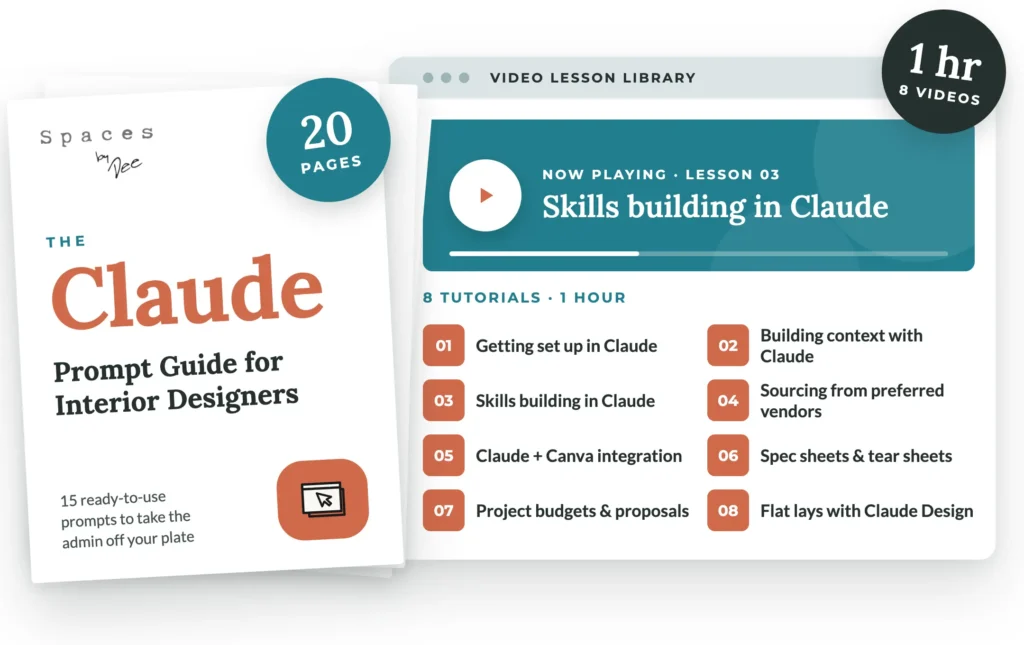
If you’re ready to spend less time on administrative tasks and start putting AI to work in your interior design business, I’ve got good news for you!
I created a practical crash course that teaches you the fundamentals of using Claude for interior design, even if you’re a complete beginner. It includes a prompt guide featuring 15 useful Claude prompts for interior designers and eight bite-sized video lessons you can watch over your lunch break.
You’ll learn how to start using Claude to streamline everyday tasks, build smarter systems, and create workflows that work for your business—not against it.
You don’t need to overhaul your entire business overnight. You just need to get started.