On my blog, I consistently publish articles on the best software for interior designers because, in today’s world, let’s face it—there’s analysis paralysis when it comes to choosing design software. 3D floor planning tools are no exception.
Foyr Neo is a cloud-based 3D floor planning software designed specifically for interior designers and industry professionals. This web-based software is a one-stop solution covering the entire process from floor plan creation to final rendering and walkthroughs. Widely loved within the design community, this software is often considered a must-have tool. With that in mind, I wanted to take a deep dive into Foyr Neo’s capabilities to see if the hype truly holds up.
What sets Foyr Neo apart from other software options? How easy is it to use in a real-world design workflow? In this post, I’ll explore these questions and more.
The Features of Foyr Neo

Design & Planning Tools
2D & 3D Floor Plans
Create precise, to-scale floor plans by drawing from scratch or uploading existing PDFs or scanned drawings to trace for accuracy. Seamlessly switch between 2D and 3D views, with changes reflected instantly across both modes, allowing for efficient spatial planning and design iteration.
For designers who want to save time or ensure accuracy, Foyr Neo also offers the option to have a designer trace your floor plan within 24 hours, starting as low as $5. Considering we are always looking for efficiency hacks, saving hours of drafting time for the price of a latte is a steal.
Export Plans and Elevations

Foyr Neo gives you the ability to export floor plans and elevations directly—a capability surprisingly absent in many other 3D tools. For professional designers, this is non-negotiable. Because Foyr Neo generates elevations instantly from your 3D model, you eliminate the need to recreate designs for different views. It streamlines the entire workflow, saving you from the hassle of double-building and ensuring your plans match your renders perfectly.
Drag-and-Drop Asset Library
Access an extensive built-in catalogue of 60,000+ 3D models, including furniture, fixtures, decor, lighting, and materials. The intuitive drag-and-drop interface makes it easy to quickly furnish and style spaces without disrupting your workflow.
My Favourite AI Features
AI-Powered Feature: Upload a photo of a furniture piece, and Foyr Neo’s AI will convert it into a usable custom 3D model, allowing you to design with real-world products and client-specific selections.
Now, this is a feature I know designers LOVE and need. Keep reading, I’ve tested this feature down below.
AI Rendering
Foyr Neo has launched an AI Restyle and AI Enhance tool that lets you transform renders into different artistic styles while enhancing their realism.
Rendering & Visualization
Photorealistic Renders
Generate stunning, high-resolution photorealistic renders up to 12K renders in minutes—not hours. Ideal for client presentations, approvals, and marketing materials, these renders deliver impressive realism with minimal setup.
360° Walkthroughs & Virtual Tours
Create immersive 360-degree walkthroughs and virtual tours that allow clients to explore spaces from every angle, helping them better understand scale, flow, and design intent before implementation.
Real-Time 3D Editing
Make real-time adjustments to lighting, materials, textures, and furniture placement while instantly seeing the results in 3D. This dynamic editing capability streamlines revisions and enhances collaboration with clients.
A Designer’s Test Of Foyr Neo
Now that I’ve highlighted all the standout features this software offers, you probably came here to hear my two cents on how it actually performs.
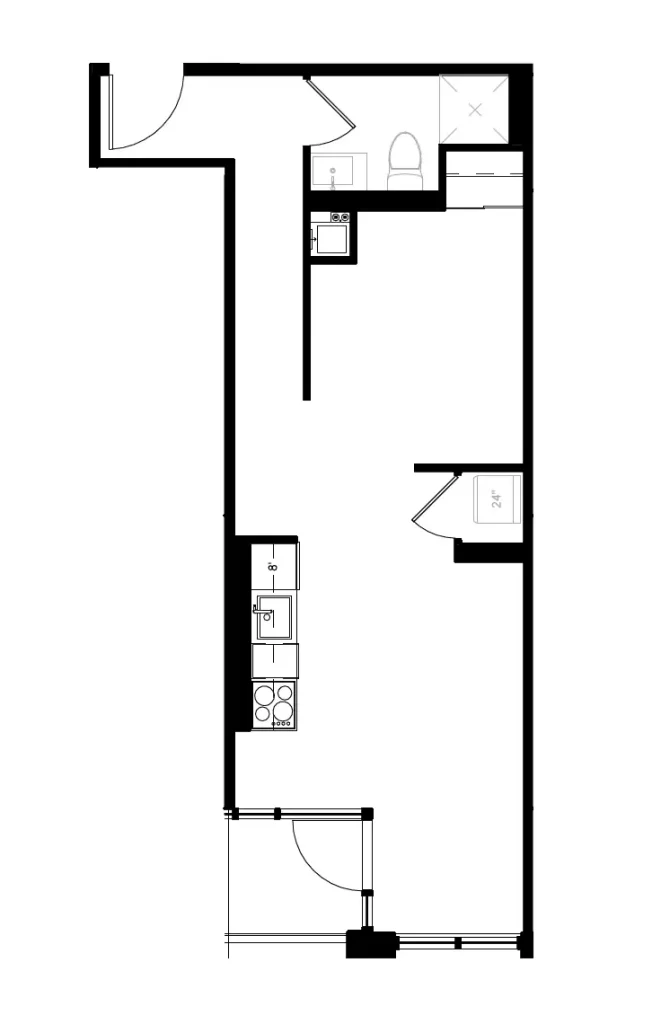
I decided to take Foyr Neo for a test spin by creating this condo layout. While I don’t yet have the as-built drawings, I worked from the floor plan I currently have, which includes only limited dimensions. Since Foyr Neo allows you to scale drawings, I was confident I could still create an accurate model.
The goal here is twofold:
First, to see how manageable it is to recreate a real-world layout in Foyr Neo with incomplete information—and second, to see whether the platform feels intuitive or frustrating as a first-time user.
Let’s see how it goes.
Drawing a Floor Plan In Foyr Neo
I uploaded the PDF of my floor plan, and I started drawing using the “Room” tool, which allowed me to quickly create the overall layout. Once a room is created, you can click on any wall and easily delete it by pressing Delete on your keyboard. Alternatively, you can use the Wall tool, which keeps walls straight and allows them to snap to other walls in your drawing. Overall, this process was quick, intuitive, and easy.
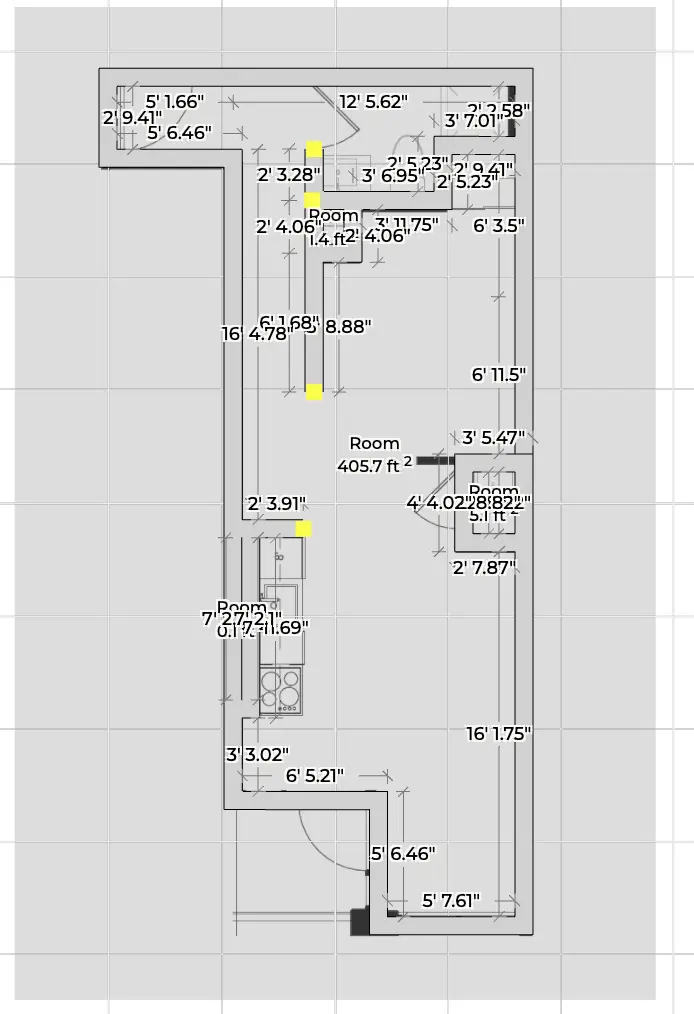
Once the main structure was in place, it was time to add windows and doors. These elements were easy to locate within the Foyr Neo library. When placing windows and doors, you can adjust dimensions, reposition them, and fine-tune the details, such as the finish, as needed. You can also seamlessly switch between 2D and 3D views, which I found especially helpful for visualizing changes in real time.
I wanted to change the window frames to black, and this was incredibly simple to do.
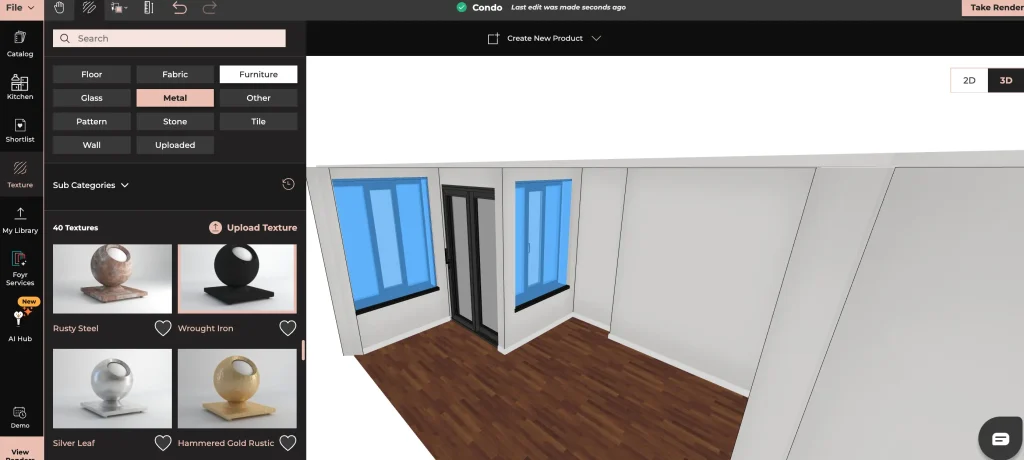
The Foyr Neo material library is honestly very impressive, it includes a wide range of wood textures, metals, fabrics, stones, and virtually every material you’d need to fully customize a design. You can even upload your own texture, which is another key feature that makes this software fit for pros.
I continued refining the model by adding doors, which proved to be just as easy and customizable as the windows.
Now, let’s move on to what I really want to dive into next: kitchen design and customization.
Kitchen Design In Foyr Neo
Now, many designers in the industry focus heavily on kitchen design, which often involves custom millwork and bespoke elements. I should know—this is where I started my career, in the kitchen and bath industry.
Because of this, professionals need software that allows for full customization of kitchen cabinetry and related elements in order to create an accurate 3D representation. As designers, we want our models to be as precise as possible so clients and trades people aren’t misled or left confused during execution.
Accuracy isn’t just a nice-to-have in kitchen design—it’s essential.
I was pleased to see that Foyr Neo includes a dedicated “Kitchen” tab, which houses a wide variety of kitchen cabinets, appliances, and all the other elements you’d need to design a complete kitchen—all in one place.
I went ahead and completed the kitchen design for this condo, and I can honestly say I was pleasantly surprised by how smooth the process was. Cabinets are easy to customize, and the drag-and-drop functionality makes placing cabinetry and appliances straightforward and efficient.
Naturally, the next step was to render the kitchen. Here is my 12K render:
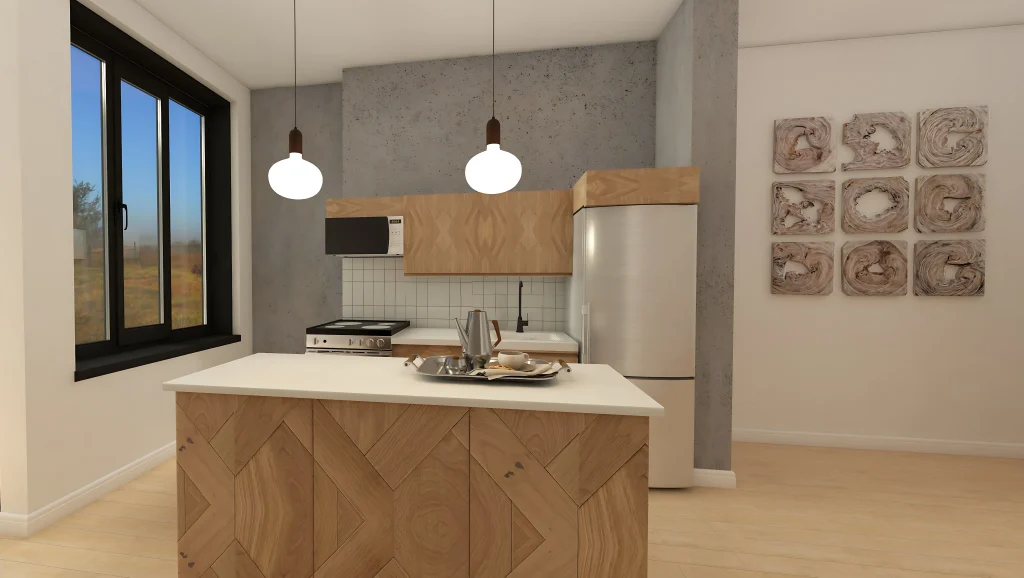
I think this industrial kitchen render turned out great, and it’s certainly client-ready.
Next, I wanted to try one of Foyr Neo’s most exciting tools:
Picture to 3D
As designers, we all face a common challenge with many 3D floor planning software: we need 3D models that match the exact products we’ve sourced to generate the most accurate visualizations. The problem? Most software libraries are limited, and few allow you to create 3D models directly from photos.
Luckily, Foyr Neo solves this with its AI-powered Picture to 3D tool, making it seamless to bring in products that look exactly like the items you’ve sourced for your clients.
No more explaining to clients: “Well, the 3D isn’t an exact replica of what you’ll be getting…”
In 2025, that’s simply not good enough. Designers need to present clients with precise, realistic 3D models.
So, I decided to put this AI tool to the test.
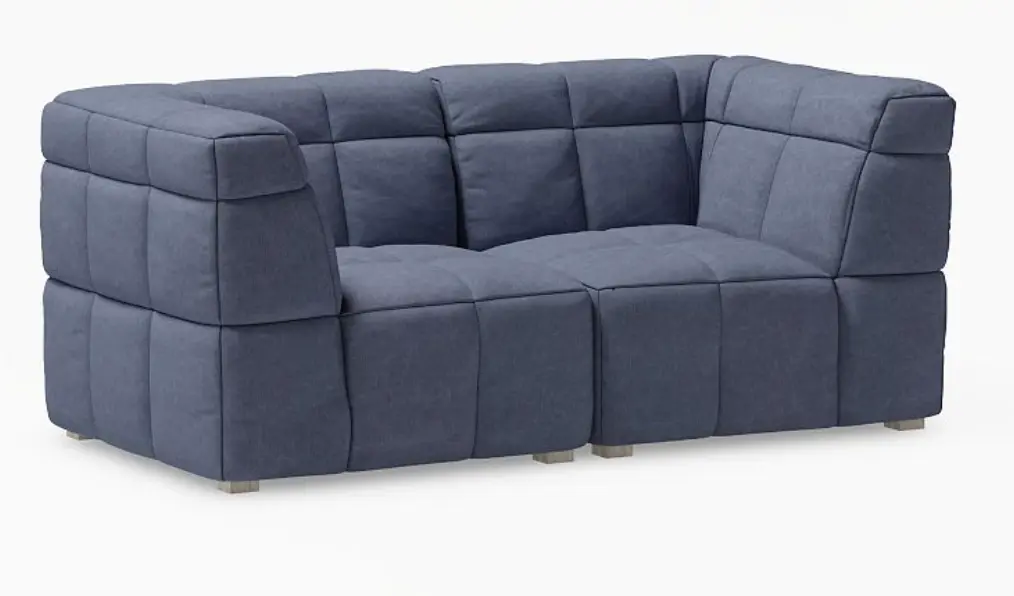
I uploaded a photo of this sofa:
Here is the 3D model I got in just a minute:
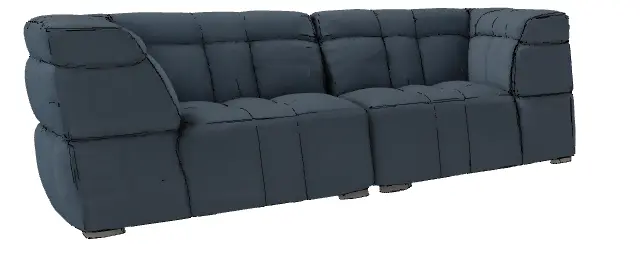
This tool is INCREDIBLE! Seriously, this is what designers WANT and NEED out of an AI tool. This is what separates Foyr Neo from many other floor planning tools.
A Designer’s Review of Foyr Neo
So, what do I think of Foyr Neo in terms of ease of use, flexibility, and how it compares to other floor planning tools designers love?
Customization in foyr neo
It’s clear why Foyr Neo has established a strong reputation in the 3D floor planning software world. The floor planner is extremely intuitive—I only had to pause once to look up instructions. For a first-time user, that’s impressive. I was able to create a full floor plan quickly, while the software simultaneously built out the 3D model.
Changing textures, resizing elements, and customizing components was as simple as a few clicks, and the Picture to 3D tool truly blew me away. Honestly, I know many designers will use Foyr Neo just for that feature alone.
Other 3D floor planning tools often struggle to meet designers’ needs for customization, but Foyr Neo excels. The ability to customize everything and generate accurate 3D models is unmatched.
The platform itself is incredibly easy to use. The interface is clean and intuitive, requiring minimal guesswork to get started.
the software perks
Being cloud-based is a huge advantage for two reasons. First, it saves your work continuously, sparing you the frustration of software crashing mid-project. Second, you don’t need a supercomputer to run it. I was able to render 12K images on my standard laptop without the fan sounding like a jet engine.
Finally, Foyr Neo is a true all-in-one ecosystem. Unlike other popular tools that require you to buy and install separate plugins for rendering or lighting, everything here is built-in. No plugins, no updates, no broken links.
In short, Foyr Neo is absolutely worth it.
Find Foyr on Instagram @_foyr or email connect@foyr.com for any queries.
Click Here To Shop My Favourite Home Goods
Let’s design your space together, virtually.

Disclaimer: This post is sponsored by Foyr Neo, but all thoughts and opinions remain my own.

Leave a Reply