Developed in Korea, the Ohouse home design app comes from the same team that built a wildly popular home-inspiration and shopping platform with over 30 million downloads. As a designer who is constantly testing out all the latest and greatest AIs and tools for interior design, naturally, this popular home design app caught my attention. I decided to put the Ohouse AI home design app to the test to see what all the hype was about. So, is this insanely popular home design AI app worth the hype? Should you give it a download? I’ll break down the features and show you my genuine results below.
Disclaimer: This post is sponsored by Ohouse AI; however, all opinions and results are authentic.
What Can Ohouse AI Do?
Ohouse AI boasts an impressive list of features, including:
- 3D Room Planner: Plan your layout in 3D with 12K+ models
- Restyle My Room: Pick a style and get an AI preview
- Customize with AI: Use a prompt or reference image for an AI preview
- Add to My Room: Choose or upload an item and see it in your room
- Furnish from Scratch: Start with an empty room and let AI furnish it
- Remove Items: Delete selected items or clear your room
- Change Flooring: Try new materials and colors with instant previews
- Garden Design: Reimagine your yard with plants, paths, and more
- Exterior Design: Restyle siding, paint, roof and more
- Paint Walls: Try colors or wallpaper with instant previews
- AI Style Finder: Discover your interior style with a quick quiz
- AI Room Analyzer: Upload a photo for AI tips and quick fixes

As someone who has tried many different home design apps, I always come from the angle of “What makes this AI different?” Ohouse offers some unique features that I immediately gravitated toward, specifically the Remove Items tool, AI Room Analyzer, 3D Room Planner, and the AI Style Finder Test.
.
A Designer’s Test Of Ohouse AI Home Design App
Restyle My Room
This wouldn’t be an AI interior design test without trying out the Restyle My Room feature, a staple of most AI interior design apps. This app offers plenty of design style options to choose from, including seasonal themes. Since it’s currently the Christmas season, I wanted to see how the app would redecorate a space with holiday decor in mind.
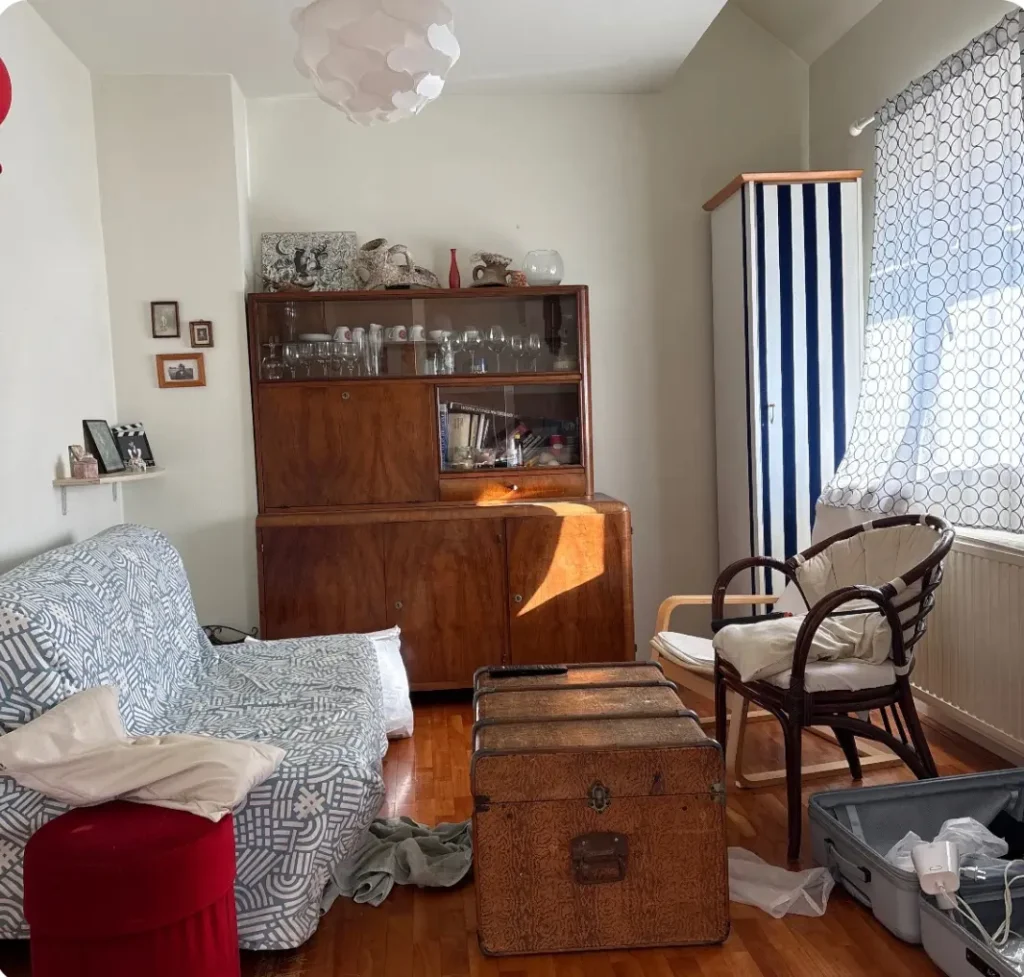
I uploaded a photo of the living room we’ll be using for testing and prompted the AI to decorate it with a Christmas theme. It’s also worth noting that the app includes a wide variety of styles, such as Scandinavian, Transitional, Farmhouse, Contemporary Rustic, and more!
Here is the result:

I love the fact that the AI retained the furniture in the space and added to it. Meaning, this can be an achievable result. This app could certainly help you in adding decor for the holidays, or envisioning your space in another style (which I will test out…keep reading).
AI Interior Design Style Test
I decided to try the AI Style Finder test. As an interior designer, I have a very unique style that I can barely put into words myself, so I was curious to see how the AI would categorize me. I know a lot of people struggle to figure out their aesthetic, so this test could be a great starting point for your own design discovery.
I took the test, which showed me different interiors that I had to rate “Yes” or “No.” My Result: Mid-Century.
Honestly? This is not far from how I describe my own style. For the record, I classify my look as “Maximal-Minimalist Retro mixed with Contemporary,” which really only makes sense to a designer! However, Mid-Century speaks to me as well. So, I think the app did a good job identifying what I like in an interior.
Remove Items Feature
Next, I wanted to try the Remove Items feature. This could be a game-changer for fellow interior designers or anyone who wants to start from scratch. Sometimes, when I work with clients, I have to work off of bad photos; often, the rooms are cluttered or messy, and I desperately need a clear view of the space. This feature allows you to reimagine the possibilities without breaking your back moving furniture.
At the moment, I am travelling, and let’s just say that living out of a suitcase has led me to be a little less tidy. So, I decided to test this feature at the Airbnb I am currently staying in.
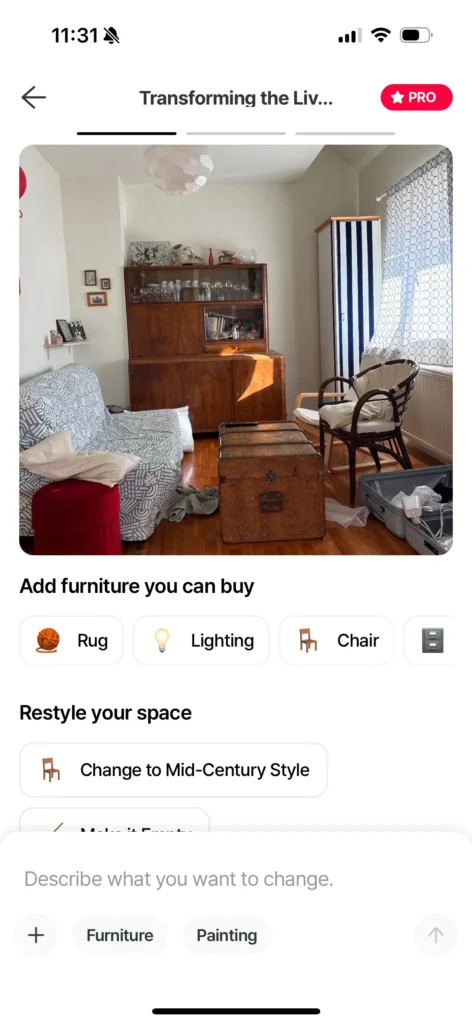
I first prompted the AI to completely clear the room. The result:
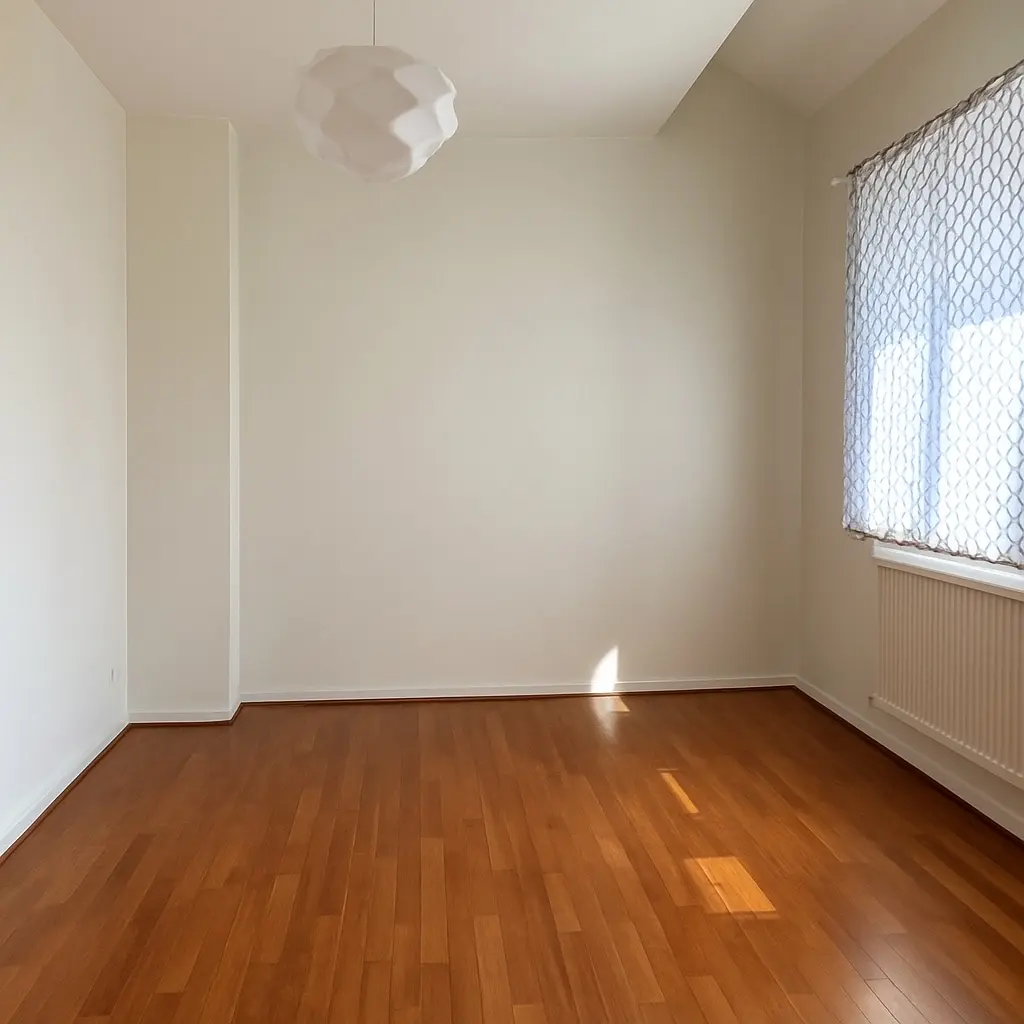
I am actually really impressed. The AI was able to retain the details of the ceiling, the walls, and the overall space. Better yet, it doesn’t look too AI-ish. Amazing.
Then, I tried the declutter feature (keeping the furniture but removing the mess).
The result:
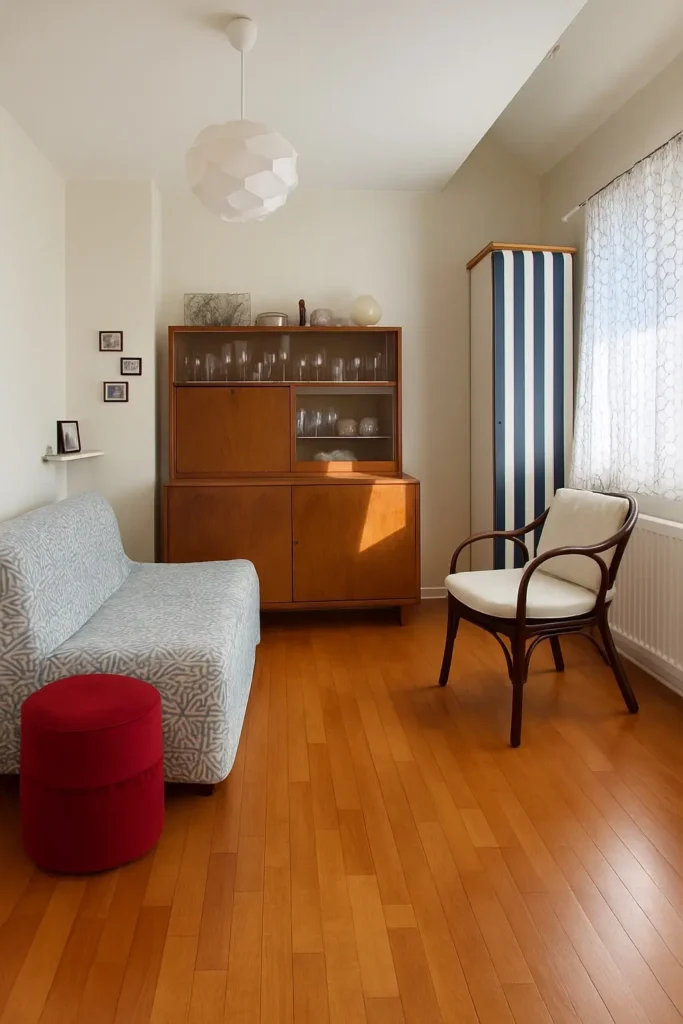
Wow! Again, the AI did an awesome job at removing the clutter. Now, if the AI could only grow legs and actually tidy up for me physically, that would be great.
The Full Room Makeover & Shopping Feature
I then decided to try the Full Room Makeover tool on the same living room. I chose a Mid-Century Modern (MCM) style since that is what the AI suggested for me.
Here is the result:

The AI retained the overall layout of the space but changed the style of the furniture. And yes, it is very much an MCM space! I noticed that the AI had a prompt under the design that said, “Add furniture you can buy.” I tapped “Rug,” and the AI modified the design and recommended rugs from Amazon.
What do I think of the shopping feature? I was impressed with most of the findings, and I think this feature is great for generating ideas and getting products to consider. Also, I appreciate that the products are from trusted retailers such as Amazon and Ikea. It means plenty of people will feel comfortable ordering from a trusted vendor rather than a random website they’ve never heard of (which I find happens with some other AIs).
Miniature Style
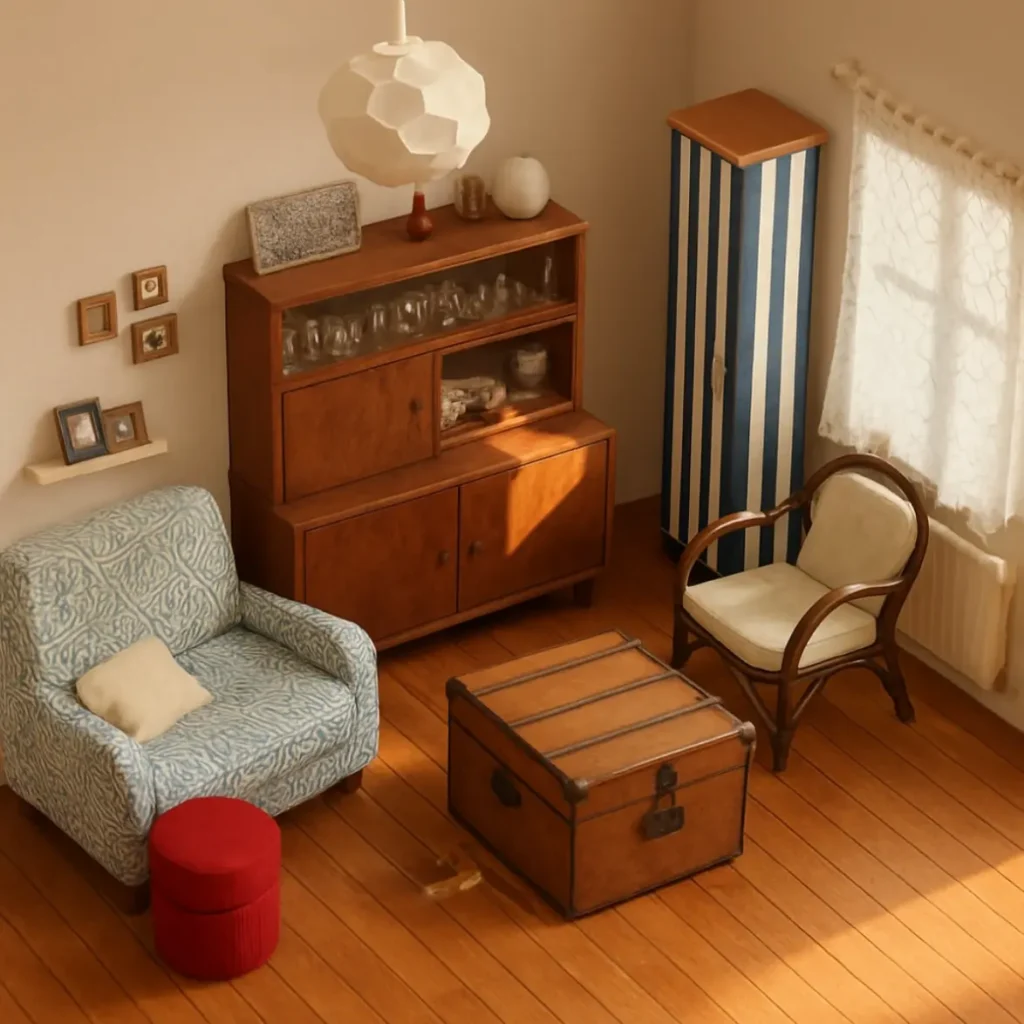
I also tried the Miniature-style prompt, since this style has become increasingly popular and trendy. This popular home design app includes all the fun, on-trend design outputs—such as Miniature, Anime, and more—which are so enjoyable to experiment with. I love seeing spaces transformed into these whimsical styles.
The 3D Floor Planner
Finally, I wanted to give the 3D Floor Planner a go.
I was skeptical because, although I am experienced with 3D floor planners, using programs like these on a phone usually leads to frustration. Let’s face it: an 11-inch screen can be tricky to work on. However, I was pleasantly surprised.
The Ohouse AI 3D planner was very intuitive. It was easy to figure out how to change the room dimensions, add furniture, and change materials. Even placing items into the room felt seamless.

What you can do in the planner:
- Create a 3D room, adding windows and doors (you have control over dimensions).
- Add and customize furniture (change colors, sizing).
- Add small decorative pieces to the space.
Here is the room I built:

In terms of the furniture style and decor, it was pretty minimalist. It had an IKEA catalog vibe and featured a lot of trendy pieces that I think Gen Z would really gravitate toward.
The majority of the furniture and decor items available on the app are modelled after real products available on the Korean market. This means the styles, shapes, and dimensions are accurate to actual items. This is especially important if you’re planning your space and want to use furniture that’s easily accessible while getting results that closely match your 3D model, rather than relying on random 3D assets that aren’t based on real products.
I didn’t get frustrated once using the 3D planner, which is rare. Hats off to Ohouse for creating a mobile planner that is actually easy to use. Once I created my space, I decided to make a 4K render (you can also create video renders and 2K renders).
Here is my 4K render result:
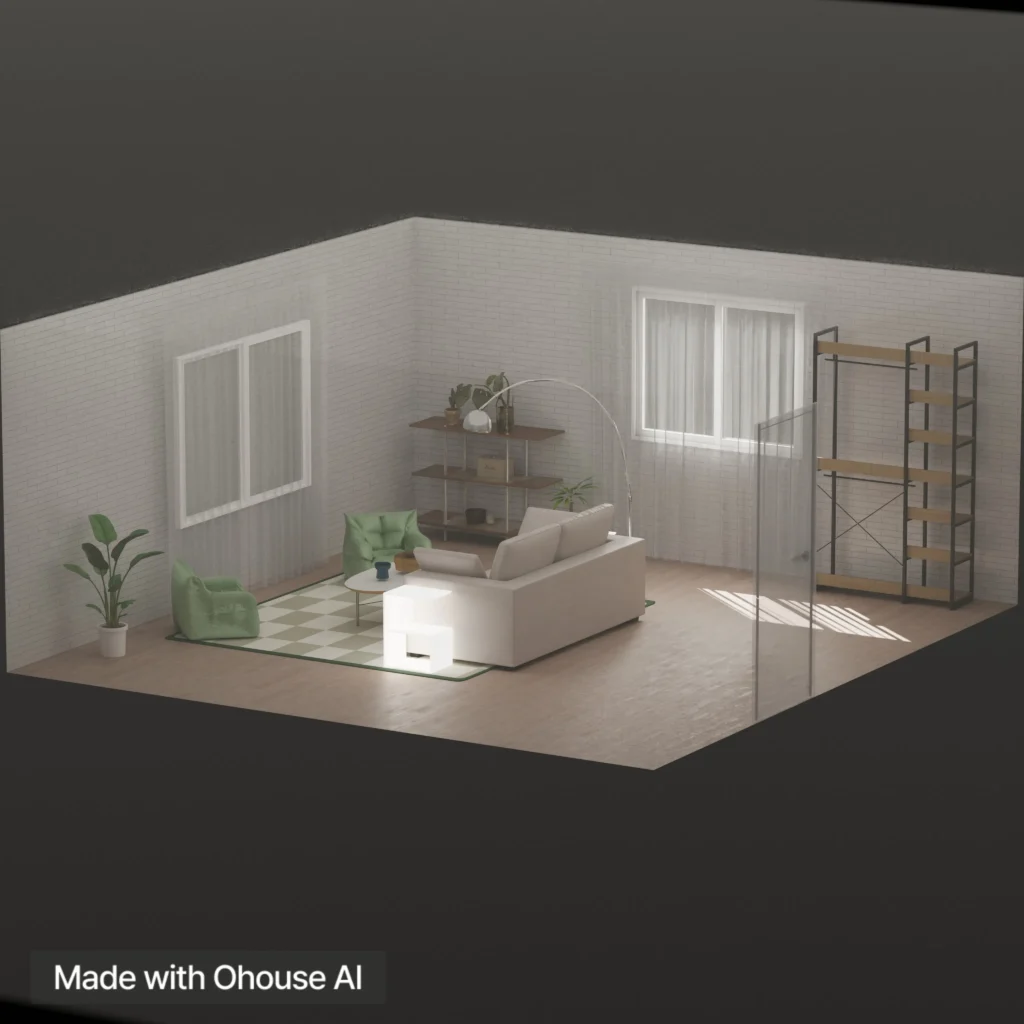
Honestly, it’s pretty impressive. The fact that I was able to create a room within 20 minutes and render it in just a couple more is fantastic.
Is Ohouse AI The Best Home Design App On The Market?
When reviewing AI tools, I let the results speak for themselves. This time is no different.
I think Ohouse AI is a very impressive home design app, and I can see why it has gained so much popularity in Korea. It is easy to use, does exactly what you ask it to do, and has plenty of tools that allow for 3D design, clutter cleanup, and product sourcing. It caters to the needs of home stagers, designers, and the average homeowner who wants to take on their own projects.
Also, I think it could even be utilized by those of you who like interior design games. After all, I used to play games like Rollercoaster Tycoon and The Sims mostly because I got to design. That was how I expressed my passion for design growing up. Nowadays, I think apps like this can do the same for design enthusiasts and design students. Whether you want to relax, decorate some spaces, or explore your interior decorating abilities, I definitely recommend Ohouse AI as a great, all-in-one home design app.
Click Here To Shop My Favourite Home Goods
Let’s design your space together, virtually.


Leave a Reply